Introduction
A customer walks into your garden center ready to buy five bags of mulch—ring it up, take payment, hand over the bags. Simple. But then the phone rings: a landscaper needs 200 spring perennials reserved for pickup in two weeks, and they'll pay a deposit today with the balance due on delivery. Suddenly, the decision of whether to process a ticket or create an order isn't just a technical detail—it's a workflow choice that affects inventory accuracy, cash flow timing, and customer satisfaction.
Misclassifying a future commitment as a completed sale can prematurely recognize revenue, distort inventory counts, and create reconciliation headaches. Global retail inventory distortion already costs an estimated $1.73 trillion annually—specialty retailers can't afford to treat these transaction types interchangeably.
What follows covers what each transaction type is, how they differ within NCR Voyix Counterpoint, and when to use each—whether you're running a garden center, feed store, farm market, or pet supply shop.
Key Takeaways
- A POS Ticket is a completed transaction—payment collected and goods exchanged or shipped immediately
- A Sales Order stays open until fulfilled: used for custom orders, backorders, or B2B sales needing extra processing
- Key difference: tickets are closed; orders are open and require fulfillment steps
- In NCR Voyix Counterpoint, Sale lines and Order lines cannot be mixed on a single ticket
- Use POS Tickets for standard walk-in retail; use Sales Orders for deposits, backorders, or delayed fulfillment
POS Ticket vs. Sales Order: Quick Comparison
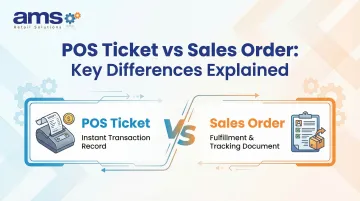
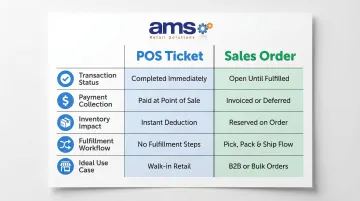
Here's a side-by-side breakdown of how POS tickets and sales orders differ across the transactions that matter most to specialty retailers.
| Factor | POS Ticket | Sales Order |
|---|---|---|
| Transaction Status | Completed and closed | Open and pending fulfillment |
| Payment Collection | Full payment at time of sale | May accept deposit; final payment due at fulfillment |
| Inventory Impact | Decremented immediately | Reserved/allocated but not removed |
| Fulfillment Workflow | Goods handed to customer or shipped at point of sale | Requires pick, pack, and release steps before completion |
| Ideal Use Case | B2C walk-in retail transactions | Custom orders, B2B sales, layaways, pre-orders |
What is a POS Ticket?
A POS Ticket is a finalized transaction record generated when a customer completes a purchase. Payment has been accepted, goods have been exchanged, and the transaction is closed in the system. In NCR Voyix Counterpoint, a Ticket represents the completed state of a sale—it's a historical record that updates sales history, decrements inventory, and finalizes the financial transaction.
Key data captured on a POS ticket includes:
- Customer information (if assigned)
- Itemized line items with pricing
- Discounts and promotions applied
- Payment method and transaction timestamp
- Staff member who processed the sale
In Counterpoint, the station's default line type determines whether a new ticket opens as a Sale or an Order. The ticket header is color-coded to indicate type, making it easy for staff to identify transaction status at a glance. This visual distinction helps prevent workflow errors during busy periods.
POS Tickets support return lines, making them the correct transaction type for exchanges and refunds. Sales Orders do not support return lines, so staff need to recognize which transaction type they're working in before processing a refund or exchange.
Offline Capability Advantage
AMS Retail's NCR Voyix Counterpoint supports offline POS capability, meaning tickets can still be processed even without a live network connection. For specialty retailers running outdoor sales events, pop-up markets, or locations with spotty connectivity, this keeps checkout moving without interruption. When the connection is restored, the system automatically synchronizes all offline transactions to the central database.
Use Cases of POS Tickets
Walk-in retail scenarios are the primary use case for POS Tickets:
- Purchasing feed, seed, or pet supplies at the counter
- Buying plants and soil amendments at a garden center
- A farm market customer paying for fresh produce on the spot
- Any in-person sale where goods change hands and full payment is collected immediately
POS Tickets also play a role in eCommerce integrations. For B2C websites, completed online orders — including invoicing, shipping, and refunds handled in the eCommerce platform — are typically pushed into Counterpoint as Tickets. This keeps the integration one-directional and simpler to manage: the eCommerce platform handles all order processing, and only the final completed transaction lands in Counterpoint.
What is a Sales Order in a POS System?
A Sales Order (called an "Order" in NCR Voyix Counterpoint) is an open transaction that has been initiated but not yet completed. No final payment has been collected and goods have not yet been fully fulfilled. This differs from the broader procurement definition of a sales order (which is a seller-to-buyer confirmation document)—in Counterpoint, an Order is specifically a pending POS transaction.
Key characteristics of Sales Orders in Counterpoint:
- Can accept an initial deposit, with remaining balance due at fulfillment
- Useful for high-value or custom-item purchases requiring advance commitment
- Supports multi-step fulfillment workflows (pick, pack, release)
- Remains editable until completed and converted to a posted ticket
When an Order is completed in Counterpoint, it is saved to the database and can be edited, printed, picked, and released from a workstation. This supports workflows that standard POS Tickets cannot accommodate.
System Constraints to Know
Critical limitation: Sale lines and Order lines cannot be combined on a single ticket in Counterpoint. Staff must understand this constraint to avoid workflow errors. Additionally, Orders cannot include Return lines—process returns on Sale tickets only.
Shipping address default: The shipping address on an order defaults to the customer's file address in Counterpoint and must be manually edited for alternate destinations. This is relevant for retailers handling delivery orders or serving customers with multiple locations.
Use Cases of Sales Orders
Sales Orders are the right tool when a transaction can't close in a single visit. Common scenarios in specialty retail include:
- Garden center taking an order for a specific plant variety not yet in stock
- Farm market reserving a bulk seed order for spring planting
- Pet supply store ordering a custom item for a customer
- Feed store accepting a deposit for a special feed blend
B2B buyers add another layer of complexity. When a wholesale account places an order that requires picking, approval, or delivery scheduling before payment is finalized, an Order in Counterpoint lets staff manage the entire fulfillment process internally. Landscaper accounts at garden centers and commercial farm accounts at feed stores are typical examples.
Real-world applications across specialty retail show how flexible this works in practice:
- Suncrest Nurseries (Garden Center): Customers pre-order specific plant varieties with a 50% deposit, supporting production planning months in advance
- Farm Runners (Farm Market): CSA members pay for a full season upfront; wholesale customers place weekly orders for aggregated fulfillment
- Feed & Seed Operations: Bulk orders (super sacks, scheduled deliveries) are reserved in advance, requiring a structured order and backorder workflow
POS Ticket vs. Sales Order: Which Should You Use?
The right transaction type depends on two things:
- When payment is collected relative to fulfillment
- Where order processing will happen (in the POS system vs. in an eCommerce or external platform)
Choose a POS Ticket When:
- The customer is present and payment is collected in full
- Goods are handed over immediately or shipped at point of sale
- Your eCommerce platform handles all order processing and only completed transactions need to be recorded in Counterpoint
- Processing a return or exchange (Orders cannot include Return lines)
Choose a Sales Order When:
- Fulfillment requires multiple steps (pick, pack, ship)
- The customer needs a deposit arrangement with final payment at delivery
- Inventory must be reserved but not yet decremented
- You are managing a B2B account that processes orders through Counterpoint before invoicing
- The item is not currently in stock and requires special ordering or backorder management
Mixed Workflow for Multi-Channel Retailers
Retailers with both B2C and B2B channels can — and often should — use a mix of both transaction types. A common configuration:
- B2C eCommerce orders flow to Counterpoint as Tickets (completed transactions)
- B2B account orders flow as Sales Orders (pending fulfillment)
- Walk-in retail defaults to Tickets
- Custom orders and deposits use Sales Orders
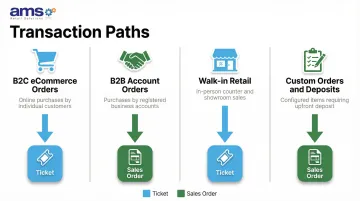
AMS Retail configures NCR Voyix Counterpoint to support exactly this kind of mixed workflow — so specialty retailers can serve B2C and B2B customers through separate transaction paths while keeping inventory and financials accurate across the board.
Conclusion
POS Tickets and Sales Orders are not interchangeable—they serve distinct stages of the retail transaction lifecycle. Choosing the right one ensures inventory accuracy, accurate cash flow recording, and a smoother customer experience.
For specialty retailers specifically, the split is straightforward in practice: use Sales Orders for custom and B2B transactions, default to Tickets for walk-in sales. That combination keeps counter staff moving quickly without losing back-office accuracy on complex orders. Get that division right, and both your team and your books stay organized.
Frequently Asked Questions
What is the difference between an order and a sale in CounterPoint POS?
In NCR Voyix Counterpoint, a Sale (POS Ticket) is a completed transaction where payment has been collected and goods exchanged. An Order is an open transaction that has been initiated but not yet fulfilled or fully paid—Orders can accept deposits and must be picked and released before converting to a completed Ticket.
What types of transactions can CounterPoint POS process?
NCR Voyix Counterpoint can process Sales (completed tickets), Orders (open/pending fulfillment), and Returns—each with its own workflow rules. Sale and Order lines cannot be combined on a single ticket, and Returns can only be added to Sale tickets.
Can you convert a POS Ticket to a Sales Order (or vice versa) in Counterpoint?
Yes, authorized users can change the ticket type between Sale and Order in Counterpoint (including in CPMobile), as long as no incompatible line types have been added. Staff can make this adjustment mid-transaction when a customer's needs change.
Can a Sales Order include a deposit payment in NCR Voyix Counterpoint?
Yes, Counterpoint supports an initial deposit at Order creation, with the final payment collected when the order is fulfilled—making Sales Orders a practical fit for custom purchases, pre-orders, and layaways.
What is a split purchase order?
A split order occurs when fulfillment is divided across multiple shipments because not all items are available at once. In Counterpoint, this is handled by partially picking or releasing a Sales Order, allowing available items to ship while the remainder stays open.
Can an invoice reference multiple purchase orders?
Within Counterpoint, each Sales Order generates its own ticket upon completion. If invoice consolidation across multiple orders is needed, that is typically handled at the accounting or ERP level, outside the POS system.