Introduction
Most specialty retailers already run two systems side by side: a POS at the register and an accounting platform in the back office. When these systems don't communicate, staff manually re-enter the same sales data twice—every day. Over time, that duplication adds up: wasted labor, compounding errors, and reports that never quite match.
Manual data transfer between POS and accounting software is a leading cause of bookkeeping errors, end-of-day reconciliation delays, and distorted financial reports. Manual entry carries an inherent error rate of 1–3%, and for small and mid-sized retail operations, those mistakes translate directly into flawed decisions, tax penalties, and wasted staff hours.
This guide explains exactly what integrated POS and accounting software is, how the data flows in practice, and what specialty retailers should look for when evaluating their options.
Key Takeaways
- Integrated POS and accounting software connects your point-of-sale system directly to your accounting platform—every transaction records automatically without manual re-entry
- Sales data, inventory costs, tax figures, and payment totals sync from the POS into the correct accounting categories in real time
- The result: fewer financial errors, faster reconciliation, cleaner tax reporting, and clearer cash flow visibility
- Specialty retailers gain the most because of seasonal inventory complexity and high transaction volume
- Look for a system that syncs automatically, maps to your chart of accounts, and scales as your business does
What Is Integrated POS & Accounting Software?
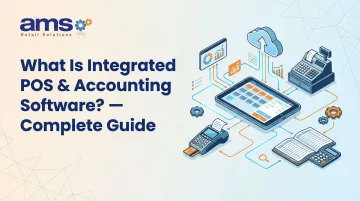
Integrated POS and accounting software is a system configuration where your point-of-sale platform and accounting software share a live data connection. Every sale, refund, void, and payment method posts automatically to the correct ledger account without manual input.
The Operational Gap It Solves
Historically, POS systems captured sales data and accounting software managed financials, but the two operated independently. Staff had to export reports from the POS and manually enter totals into the accounting system—creating a bottleneck and an error-prone handoff. According to QuickBooks research, small businesses spend an average of 25 hours per week on manual data entry and reconciliation, costing an estimated $28,500 per employee annually.
What Integration Is NOT
Not all data-sharing functions qualify as true integration. Here's the difference:
- Manual export/import workaround — exporting a CSV file from your POS and manually uploading it to accounting software
- Basic sales module — accounting software with a simple sales entry screen bolted on
- Genuine integration — data passes automatically and bidirectionally between systems
Many retailers assume an export function counts as integration. It does not. True integration is programmatic, using APIs or SDKs to transfer data without human intervention.
One Source of Truth Across Your Financials
Integrated POS and accounting creates a single source of truth across sales, inventory valuation, cost of goods sold (COGS), and tax liability. That accuracy matters at month-end, during audits, and when making purchasing decisions—especially for specialty retailers managing seasonal stock and variable pricing.
Two Main Integration Approaches
Understanding the architecture helps you evaluate your options before committing to a setup:
- Native/built-in integration — The POS and accounting tools are part of the same platform, sharing a common database with no translation layer between them.
- Third-party connector integration — Separate POS and accounting software linked via API or middleware. More flexible, but requires careful setup and ongoing monitoring to ensure data reliability.
How Does Integrated POS & Accounting Software Work?
The integration works as a continuous, automated data pipeline across four distinct stages, starting from the moment a sale is made through to its final appearance in the financial ledger.
Initiation: The Sale Event
The process begins when a cashier completes a transaction at the POS terminal. Whether scanning a barcode, entering a product code, or processing a return, the system captures:
- Item and quantity
- Price and applicable discounts
- Payment method (cash, card, store credit)
- Sales tax
This initiation can occur across multiple touchpoints simultaneously—in-store register, mobile POS on the floor, or online order. All data feeds into the same integration pipeline.
Purpose-built retail POS systems like NCR Voyix Counterpoint (used by AMS Retail Solutions) are designed to capture this data cleanly across all register configurations, including offline scenarios where connectivity drops. Transactions queue locally and sync automatically once the connection is restored.
Core Operation: Data Sync and Account Mapping
Once a transaction is recorded, the integration layer maps each data element to a pre-configured account in the accounting software:
- Revenue → Sales income account
- Sales tax → Tax liability account
- Cost of goods → COGS expense account
- Inventory reduction → Inventory asset account
- Payments → Undeposited funds or bank account
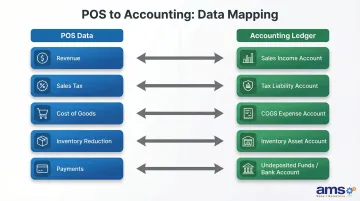
The POS sends a structured data push—either in real time or at scheduled intervals like end-of-day—to the accounting platform, which books the entries automatically.
Chart-of-accounts mapping is where setup errors do the most damage. If payment types map directly to a bank account instead of an "Undeposited Funds" clearing account, for example, reconciling your bank statement becomes nearly impossible — individual transactions won't match the lump-sum deposit from your payment processor.
Verification: Reconciliation and Error Handling
Modern integrations include reconciliation checks that compare POS daily totals against posted accounting entries to flag discrepancies, such as a voided sale that didn't sync or a payment type mismatch.
This stage matters especially for specialty retailers with:
- High SKU counts (garden centers with thousands of plant varieties)
- Seasonal stock changes (farm markets during harvest season)
- Mixed payment types (cash, card, gift cards, store credit, layaways)
Without strong reconciliation checks, these businesses are vulnerable to errors that compound over time.
Output: Financial Visibility
The integration ultimately produces:
- Up-to-date profit and loss statements
- Accurate inventory valuations
- Auto-calculated sales tax liabilities
- Real-time cash flow data
With all of this available in real time, owners skip the wait for manual end-of-day entry and act on current numbers instead of last week's.
That speed translates directly to better decisions: reordering before a stockout, adjusting pricing to protect margins, and scheduling labor based on actual sales data. According to McKinsey, real-time inventory visibility can reduce stockouts by up to 37% — revenue that would otherwise walk out the door.
Key Benefits of Integrated POS & Accounting Software
Elimination of Manual Data Entry Errors
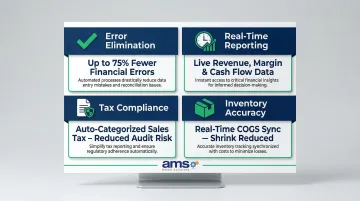
The single most immediate impact of integration is removing the human re-entry step entirely. Manual entry carries an inherent error rate of 1–3%, and 59% of professional accountants report making several errors per month. Automation can reduce financial errors by up to 75%.
Real-Time Financial Reporting and Cash Flow Visibility
Integration gives owners a live view of daily revenue, outstanding expenses, and gross margin without waiting for accounting close. For businesses like garden centers with sharp seasonal peaks, this matters enormously for cash flow planning during slow months.
Disconnected systems create data latency, contributing to inventory distortion (a $1.993 trillion problem in 2022). That gap has a direct customer impact: 21% of shoppers will leave a store and buy from a competitor when faced with an out-of-stock item. Real-time visibility closes that gap before it costs you a sale.
Simplified Tax Compliance
Integrated systems automatically categorize taxable vs. non-taxable sales and calculate sales tax per transaction. The time savings are real:
- One in three small-business owners spends more than 40 hours annually on federal tax compliance
- 14% of small and midsize businesses faced a sales tax audit within a five-year period
Automated tax tracking speeds up tax-season preparation and lowers audit exposure.
Inventory Cost Accuracy and Shrink Reduction
When inventory movements sync automatically to accounting, the cost of goods sold updates in real time. This gives retailers an accurate picture of shrink, waste, and carrying costs. Retail inventory shrink hit a 1.6% loss rate — $112.1 billion — in 2022. Real-time sync catches discrepancies early, cutting losses from theft, spoilage, and administrative errors before they compound.
Who Benefits Most from Integrated POS & Accounting Software?
Specialty retailers with large, seasonally rotating product catalogs gain the highest ROI from integrated systems. Garden centers in spring/summer, farm markets during harvest season, and pet supply stores managing dozens of product categories are strong candidates—their inventory and revenue patterns shift constantly, making manual reconciliation between disconnected systems error-prone and time-consuming.
Retailers with multiple revenue streams or payment types also see an outsized benefit. Every transaction type—layaways, gift cards, store credit, mixed tender—needs to map correctly to the right accounting entry. Without integration, that mapping falls on someone manually reconciling records at the end of every day.
Businesses where this matters most include:
- Retailers selling both in-store and online
- Stores running layaway programs or gift card transactions
- Operations accepting mixed tender types (cash, card, store credit)
High-transaction-volume operations round out the list. Busy checkout periods and multi-register setups generate hundreds of entries per day—a volume where manual bookkeeping breaks down fast. Automation isn't a convenience in these environments; it's the only practical option.
Conclusion
Integrated POS and accounting software eliminates the manual bridge between operations and finance—ensuring that every sale, return, and inventory movement is automatically reflected in your books without extra staff effort.
For specialty retailers evaluating their technology stack, understanding how the integration actually works—not just what it claims to do—is what separates a system that saves hours each week from one that creates new reconciliation problems. Ask your current or prospective POS vendor specifically how data moves between the point of sale and your accounting platform. If the answer involves manual exports, scheduled syncs, or middleware you have to manage, that's a gap worth closing before it shows up in your books.
Frequently Asked Questions
What is integrated POS and accounting software?
It's a connected system where your point-of-sale platform and accounting software share data automatically—so every transaction posts to both systems simultaneously, without manual re-entry. That means no duplicate data entry and financial records that reflect what's actually happening on the floor.
Can a POS system integrate with accounting software?
Yes, most modern POS systems offer accounting integrations either natively or via API connectors. Confirm compatibility with platforms like QuickBooks or Sage before purchase, and ask whether the integration is real-time bidirectional or a scheduled one-way data export—this affects how current your financial data will be.
What are the advantages of integrated POS and accounting software?
The top advantages include elimination of manual data entry errors, real-time financial visibility, simplified tax reporting, and accurate inventory cost tracking. These benefits translate directly into time savings, better decision-making, and reduced risk of costly mistakes.
What is a POS reconciliation?
POS reconciliation is the process of comparing daily transaction totals recorded in the POS against what was posted in the accounting system. This catches discrepancies such as unsynced voids, refunds, or payment method mismatches before they become larger problems.
What POS systems integrate with QuickBooks?
Many retail POS platforms integrate with QuickBooks, including cloud-based and on-premise options like NCR Voyix Counterpoint. When evaluating options, confirm what data syncs automatically—sales totals, payment types, refunds, and tax categories are the most critical fields to map correctly.
Do POS systems have a monthly fee?
Most modern POS systems charge a monthly software subscription fee, with costs varying based on features, number of registers, and whether payment processing is bundled. Hardware is typically priced separately.