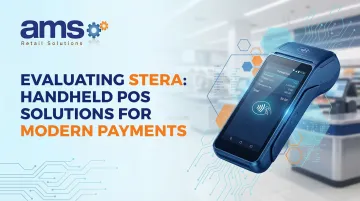
The Stera handheld POS terminal is an Android-based, all-in-one payment device designed to consolidate payment acceptance, inventory, and checkout into one portable unit. But is it flexible enough to work in demanding specialty retail environments? This post evaluates what Stera can actually do, how it handles modern payment types, and whether it fits the operational realities of seasonal, outdoor, or multi-location retail businesses.
Key questions answered:
- What payment methods does Stera support, and how secure is it?
- Can it handle outdoor environments and spotty connectivity?
- How does it integrate with existing POS software like NCR Voyix Counterpoint?
Key Takeaways
- Stera is a compact, Android-based handheld terminal supporting NFC contactless, chip & PIN, and 30+ payment methods
- Designed for mobility — ideal for seasonal, outdoor, or multi-location retail environments
- Locked to SMBC GMO PAYMENT — not processor-agnostic
- No offline mode — requires an active internet connection at all times
- Verify compatibility with your existing POS software before committing
What Is a Handheld POS System and Where Does Stera Fit?
A handheld POS system is a portable, all-in-one device combining payment processing, sales management, and sometimes inventory tracking. Unlike traditional fixed terminals that require counter space and wired connections, handheld systems enable transactions anywhere on the floor, in outdoor yards, or at temporary selling locations.
The Evolution Toward Mobile Payment Devices
POS technology has evolved from magnetic stripe readers and fixed terminals toward mobile, contactless-first devices. The global mobile POS terminals market reached $40.81 billion in 2023 and is projected to grow at 11.1% annually through 2030, driven by demand for flexible checkout and contactless payment acceptance.
Stera's Position in the Market
Stera sits squarely in that mobile-first space. Developed by Sumitomo Mitsui Card Company (SMBC) alongside GMO Financial Gate, it is an all-in-one payment ecosystem built primarily for the Japanese market — though its design philosophy translates to any merchant needing off-counter processing.
Key attributes of the Stera platform:
- Runs on durable Android-based hardware from manufacturers like Panasonic
- Supports contactless, card, and QR code payment methods in a single device
- Targets merchants who process transactions on the floor, in the field, or at pop-up events
- Designed for specialty retailers, hospitality venues, and service businesses requiring genuine mobility
Stera Handheld POS: Hardware and Software Features
Physical Hardware Specifications
The primary handheld model, the Panasonic JT-VM1S (branded as "stera terminal mobile"), features:
- Screen: 5.5-inch TFT color LCD with 1440 x 720 resolution and capacitive touch
- Weight: 300 grams (10.6 ounces) — lightweight for all-day use
- Battery: Exchangeable 3,000 mAh battery pack with approximately 3-hour charge time
- Connectivity: Wi-Fi (802.11 a/b/g/n/ac), Bluetooth 5.1, and optional 4G data communication
- Durability: PCI PTS 6.2 certified, designed for commercial use
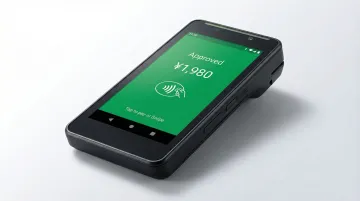
This is a printerless model, meaning it relies on electronic receipts or must be paired with an external mobile printer for physical receipts.
Android-Based Software Environment
Stera runs on Android 10 (API level 29), which enables app-based flexibility and cloud connectivity. Unlike proprietary closed systems, the Android platform allows for:
- Custom app installation via the "stera market" app store
- Cloud-based data synchronization
- Integration with third-party business software
Retailers who need to connect handheld devices to existing POS platforms, accounting systems, or inventory management tools will find the open architecture genuinely useful — though integration depth depends on the specific software involved.
Built-In Peripherals
The JT-VM1S includes:
- Magnetic card reader (JIS I/II)
- Contact IC card reader (ISO/IEC 7816)
- Non-contact IC card reader/writer (ISO/IEC 14443 Type A/B, FeliCa)
- Front and rear 8MP autofocus cameras for barcode scanning and QR code reading
Having these peripherals built in eliminates the need for separate scanners or readers, keeping checkout compact and reducing equipment costs.
Reporting and Back-Office Capabilities
Stera's cloud-based dashboard gives managers access to core business data without being tied to a register. Reports available include:
- Transaction history and payment method breakdowns
- Employee activity tracking
- Basic sales analytics
All of this is accessible from any web browser, which works well for owners managing multiple locations or checking in remotely.
Offline Functionality: A Critical Gap
Stera does not support offline or store-and-forward transaction processing. Stera requires a stable internet connection for every transaction authorization. The JT-VM1S instruction manual advises users to "move to a location with good radio wave strength" if transactions fail, stating that "if the wireless LAN/wireless WAN radio wave condition is not good, transactions may not be possible."
For specialty retailers operating at farmers markets, outdoor garden centers, or remote selling locations with spotty connectivity, this is a significant limitation.
How Stera Handles Modern Payment Methods
Comprehensive Payment Type Support
Stera supports over 30 payment methods on a single device, including:
- NFC/contactless payments: Apple Pay, Google Pay, contactless credit/debit cards (Visa, Mastercard)
- EMV chip & PIN: Full support for chip-based card transactions
- Magnetic stripe: Legacy card support
- QR code payments: PayPay, Rakuten Pay, Alipay, WeChat Pay, and other regional wallets
- Domestic e-money: Japanese transit and prepaid cards (Suica, PASMO, ICOCA)
That range of acceptance matters most in high-traffic retail settings where payment delays cost sales.
How NFC/Contactless Payment Works
NFC (Near Field Communication) uses short-range radio to pass encrypted payment credentials from a card or smartphone to the terminal, which forwards them for authorization. The entire exchange takes under a second.
Adoption reflects how dominant the format has become: over 80% of face-to-face Visa transactions globally (excluding the U.S.) were contactless in 2024, driven by speed and hygiene preferences.
Transaction Security Features
| Security Feature | Vendor Claim | Independently Verified |
|---|---|---|
| PCI PTS 6.2 (hardware) | Yes | Not confirmed on PCI SSC validated list |
| PCI DSS compliance | Yes (GMO Financial Gate, GMO Payment Gateway) | Not confirmed on PCI SSC validated list |
| SRED encryption | Yes — card data encrypted at point of capture | Supported by hardware spec |
| E2EE / P2PE | Not publicly claimed | No validated solution documented |
| Tokenization | Not publicly documented | Unconfirmed |
The gap between vendor claims and official PCI Security Standards Council validation is worth flagging. Merchants in regulated industries should request formal compliance documentation before committing.
Payment Processing Flow
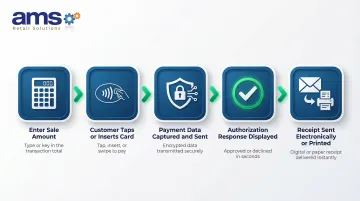
From a merchant's perspective, the transaction flow is simple:
- Merchant enters sale amount on the Stera touchscreen
- Customer taps card/phone or inserts chip card
- Stera captures payment data and sends it for authorization
- Authorization response is displayed on screen
- Receipt is sent electronically or printed via external printer
That simplicity at the counter is only part of the picture — the commercial terms behind each transaction carry more weight for long-term cost planning.
Payment Processing Fees and Lock-In
Stera is not processor-agnostic. Merchants must contract with SMBC GMO PAYMENT, Inc. (SGP) to use Stera services.
Pricing (for Japanese market):
- Monthly fee: ¥0 for the first year, then ¥3,300/month (waived if annual cashless sales exceed ¥30 million)
- Processing rates (Small Business Plan): Visa/Mastercard at 1.98%, JCB/Amex/Diners/Discover at 2.48%, others at 3.24%
Hardware purchase prices and software subscription costs are not publicly published and require a direct quote.
This processor lock-in is a deal-breaker consideration. Retailers must evaluate whether SGP's rates and terms align with their business needs and compare them against processor-agnostic alternatives.
Evaluating Stera for Specialty Retail Environments
Unique Checkout Demands of Specialty Retailers
Garden centers, farm markets, outdoor sporting goods stores, and feed & seed businesses face distinct challenges:
- Seasonal product mixes with high SKU counts
- Outdoor selling areas where fixed terminals are impractical
- Large floor areas requiring mobile checkout
- Customers who expect fast, frictionless transactions without waiting in line
These retailers need payment solutions that work where the customer stands, not just at a fixed counter.
How Stera's Mobility Fits
Stera's cordless design and lightweight form factor (300g) enable transactions across:
- Large floor areas and greenhouse sections
- Outdoor lots and garden yards
- Temporary market stalls and pop-up locations
- Off-site events and seasonal selling venues
Completing sales on the floor eliminates the trip to a fixed counter, cutting wait times and improving the overall experience.
Inventory Management Integration
Real-time inventory sync is critical for seasonal retailers managing hundreds of SKUs across plants, feed, or sporting goods. Stera's Android-based platform supports integration with external inventory systems, but integration depends on the specific POS software in use.
NCR Voyix Counterpoint Integration Considerations
For specialty retailers using NCR Voyix Counterpoint, that inventory sync question becomes more specific. Before deploying Stera, confirming how well it communicates with your back-office software determines whether you see real efficiency gains or end up managing two disconnected systems.
Stera's Android platform supports API-based integrations, but no public documentation confirms native compatibility with NCR Voyix Counterpoint.
Retailers should verify:
- API availability and documentation
- Data flows supported (inventory sync, sales transactions, customer records)
- Whether middleware or custom development is required
AMS Retail Solutions can evaluate this fit as part of a broader system consultation, helping specialty retailers avoid costly integration gaps. Contact them at 757.495.4995 to discuss compatibility before committing to Stera.
What to Consider Before Choosing a Handheld POS Solution
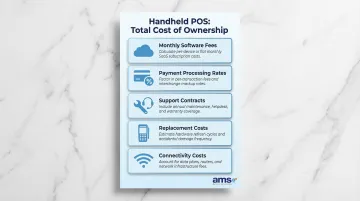
Total Cost of Ownership
Beyond the hardware purchase price, calculate:
- Monthly software/SaaS fees for cloud access and updates
- Payment processing rates per transaction
- Support contracts for repairs and technical assistance
- Replacement costs for lost or damaged units
- Connectivity costs for mobile data plans
Project your transaction volume against per-transaction costs to understand your true ROI. Once you've mapped those numbers, the next question is whether the device fits into your existing tech stack.
Integration Compatibility
Verify whether the handheld POS can talk to:
- Existing POS software (e.g., NCR Voyix Counterpoint)
- Accounting platforms (e.g., QuickBooks)
- E-commerce systems for unified inventory and customer data
A single-source POS provider like AMS Retail Solutions can evaluate this fit as part of a broader system consultation, helping specialty retailers avoid siloed data and double-entry workflows. From there, think about where your business is headed — not just where it is today.
Scalability
Consider whether the solution can grow with your business:
- Supports central device management across multiple store locations
- Allows you to add units without re-platforming or renegotiating contracts
- Receives ongoing software updates as payment standards and security requirements change
A solution that checks all three boxes protects your investment well beyond the initial purchase.
Frequently Asked Questions
What is a handheld POS system?
A handheld POS system is a portable device combining payment processing, sales recording, and often inventory management into a single mobile unit. It allows retailers to complete transactions anywhere on the floor or outdoors without a fixed terminal.
What does Stera cost, and are there monthly fees?
Stera's pricing structure typically includes hardware costs plus per-transaction or monthly service fees through your payment processor. Exact pricing varies by contract, so request a full fee schedule — including any minimums or cancellation terms — before committing.
What payment types does Stera accept?
Stera accepts NFC/contactless payments (Apple Pay, Google Pay, contactless cards), EMV chip & PIN, magnetic stripe cards, and major digital wallets. It supports over 30 payment methods in total.
Can Stera work in outdoor or low-connectivity environments?
Stera does not support offline or store-and-forward transaction processing. It requires a stable internet connection for real-time authorization. This limitation is critical for farm markets, garden centers, and outdoor pop-up retail scenarios with spotty connectivity.
How does Stera integrate with existing POS software?
Integration depends on the POS software in use. Confirm API or native compatibility with your back-office platform — such as NCR Voyix Counterpoint — before purchasing to ensure clean data flow and avoid manual double-entry.
What security certifications should a handheld POS have?
PCI DSS compliance is the baseline standard retailers should look for, along with end-to-end encryption and tokenization. These features ensure payment data is protected throughout each transaction. Verify that both the hardware and service provider hold current PCI certifications.
Evaluating a handheld POS solution requires balancing mobility, payment flexibility, integration compatibility, and total cost of ownership. For specialty retailers considering Stera alongside NCR Voyix Counterpoint, confirming compatibility before purchase prevents costly data gaps and workflow disruptions down the line. Contact AMS Retail Solutions at 757.495.4995 to schedule a consultation and ensure your handheld POS investment delivers seamless data flow and real operational value.