Introduction
Between 30% and 60% of small-to-mid-size retailers still manage inventory through spreadsheets and manual methods—a habit that contributes to an estimated $1.73 trillion in annual global losses from inventory distortion. For specialty retailers, the margin for error is even thinner.
A garden center that misses its spring ordering window or a feed store that runs dry during peak season doesn't just lose a sale—it loses the customer. Vendor order management in a retail POS system addresses this directly: it's the end-to-end process of creating purchase orders, sending them to suppliers, receiving shipments, and reconciling inventory, all within a single platform.
This guide is for specialty retailers who need to eliminate stockouts, protect margins, and improve cash flow by bringing vendor orders inside the POS—instead of chasing them across disconnected spreadsheets and emails.
Key Takeaways
- Vendor order management connects purchase orders, receiving, and inventory in one workflow, closing the gaps spreadsheets leave open
- Receiving is where most errors occur; scanning against a PO prevents inventory inaccuracies from compounding
- Reorder points driven by real sales data reduce both stockouts and overstock
- Tracking vendor KPIs like fill rate and on-time delivery tightens margins and keeps suppliers accountable
What Is Vendor Order Management in a Retail POS System?
Vendor order management is the structured process by which a retailer creates, sends, tracks, and reconciles orders placed with suppliers—all housed within the POS rather than across disconnected tools. Shelves stay stocked at the right levels, vendor costs are accurately reflected in inventory value, and the back office closes faster with fewer manual corrections.
This differs from general inventory management. Vendor orders govern what comes in (purchasing side), while inventory management governs what's on hand (stock side). The two must be connected in the same system to stay accurate. When they're not, retailers face compounding problems:
- Phantom inventory — stock counts that don't reflect reality
- Delayed cost updates — vendor price changes that lag behind actual purchases
- Margin distortion — profit figures that are off until someone manually corrects them
Why Vendor Orders Belong in Your Retail POS System (Not Spreadsheets)
When purchase orders, receiving records, and inventory counts live in the same platform as sales data, the system reflects real on-hand quantities instantly. This prevents overselling, missed reorders, and inaccurate cost-of-goods figures.
What typically goes wrong when vendor orders are managed outside the POS:
- Duplicate data entry between spreadsheets, email, and the POS
- Inventory counts that don't match actual stock
- Delayed cost updates that distort margins
- No audit trail when discrepancies arise with vendors
- Manual reconciliation that takes hours or days instead of minutes
These problems compound quickly for specialty retailers with tight seasonal windows.
Garden centers that order the bulk of their perennials in April through June, or outdoor sporting goods stores stocking for hunting season, can't afford purchasing decisions based on guesswork or prior-year estimates. Having purchasing and sales data in one platform makes demand-driven ordering significantly more accurate.
Miss a forecast in those compressed windows and there's no easy correction. Stockouts cost you sales you can't recover; overstocks force markdowns that cut directly into margin.
How the Vendor Order Process Works in a Retail POS System
The vendor order cycle runs from identifying a replenishment need, through PO creation and vendor confirmation, to physical receiving and inventory posting. Each stage feeds the next inside the same system.
Identifying Replenishment Needs
A retail POS system uses sales velocity data, reorder points, and safety stock thresholds set per SKU to flag or auto-suggest when a new order is needed. Using real sales history rather than estimates produces more reliable suggestions, especially for seasonal product categories.
The system monitors on-hand quantities against pre-set reorder points and either alerts the buyer or auto-generates a suggested PO when stock drops to that threshold. Accuracy depends on how consistently sales and receiving data have been maintained.
Creating and Sending the Purchase Order
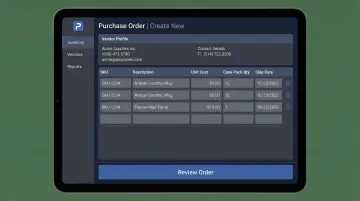
Every PO should include at minimum:
- Vendor ID and contact information
- Item identifiers (SKU or UPC)
- Unit cost
- Case pack quantity
- Expected ship and cancel dates
- Ship method
- Payment terms
A POS system that stores vendor profiles and product cost history allows staff to generate a complete, accurate PO without retyping data across systems. A purpose-built specialty retail POS—like NCR Voyix Counterpoint used by AMS Retail Solutions—enables retailers to clone prior POs, attach notes, and request acknowledgment from the vendor before goods ship. This cuts re-entry into accounting systems and reduces ordering errors.
Receiving the Shipment
The receiving step is the most operationally critical point in the vendor order process. Staff scan incoming cartons against the open PO, and the system flags any quantity discrepancies, missing items, or cost variances on the spot. This is where most errors occur—supplier and receiving errors account for approximately 24% of all inventory distortion costs globally.
Three-Way Match
A three-way match compares what was ordered (the PO), what the vendor invoiced, and what physically arrived. Resolving discrepancies at the dock rather than days later prevents inventory inflation and vendor disputes. Clearing all three before posting the receipt ensures vendors are paid only for what actually arrived.
Scan-Based Receiving
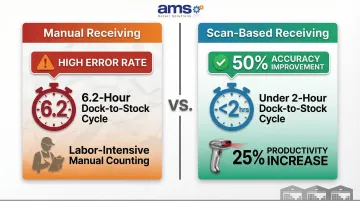
Transitioning from manual, paper-based receiving to systems using mobile computers with barcode scanners results in a 25% increase in productivity and a 50% improvement in accuracy. Best-in-class operations achieve dock-to-stock cycle times of less than 2 hours, compared to a median of 6.2 hours.
Posting the Receipt and Updating Inventory
Once the receipt is confirmed, the POS posts quantities to on-hand stock, updates cost layers, and creates the accounting accrual. The warehouse, sales floor, and finance team are all working from the same numbers simultaneously.
If a shipment is short, damaged, or includes substitutions, the system should allow staff to open a return authorization or adjustment from the same receiving screen—no separate module required.
Managing Returns, Credits, and Chargebacks
Vendor returns should be handled within the POS, not through a separate workflow. A well-integrated system lets staff:
- Link the return authorization directly to the original PO and receipt
- Attach photos or notes documenting damaged goods
- Generate the chargeback or credit request with a complete paper trail
That audit trail protects both the vendor relationship and the retailer's cash flow when disputes arise.
Key Factors That Affect Vendor Order Management in Specialty Retail
Sales Data Quality and Reorder Point Accuracy
The reliability of auto-suggested orders depends entirely on the quality of historical sales data in the system. Retailers who have inconsistently posted receipts or made manual inventory adjustments outside the POS will see inaccurate reorder recommendations. Approximately 60-65% of retail SKUs are affected by Inventory Record Inaccuracy (IRI), meaning the system on-hand quantity doesn't match the physical on-hand quantity. Establishing clean data habits from the start is foundational.
Lead Time Variability by Vendor
Actual lead times often differ from a vendor's stated lead times. A POS that tracks historical receipt dates against promised ship dates builds a more accurate lead time profile over time, reducing the risk of ordering too late during peak seasons. Supply chain disruption and lead-time variability are responsible for $301 billion in annual inventory distortion losses, with approximately 7% of stockout events directly attributed to supplier reliability issues.
Case Pack and Minimum Order Constraints
Many specialty retail vendors—nursery suppliers, feed distributors, pet product wholesalers—sell in case packs or require minimum order quantities. When a POS doesn't account for these constraints, buyers end up over-ordering to hit minimums without a plan for the excess. The downstream effects compound quickly:
- Overstock ties up cash that could fund faster-moving SKUs
- Excess inventory risks spoilage or markdown losses
- Overstock accounts for approximately 33% of total inventory distortion costs
Vendor Data Standardization (Barcodes and EDI)
When vendors provide GS1-compliant barcodes on cartons and send Advance Ship Notices (ASNs) ahead of delivery, receiving teams can scan against the PO at the dock in minutes rather than hours. There's no manual entry step, which removes a key source of receiving errors.
Adopting EDI can lead to a 30-40% reduction in error-containing transactions and speed up business cycles by as much as 61%. For specialty retailers processing high volumes of seasonal receipts, a POS that supports EDI intake and ASN matching natively turns dock receiving from a bottleneck into a routine task.
Integration with Accounting
Vendor order workflows must connect to the accounting layer. When receipts post, landed costs and accruals should update automatically so accounts payable always reflects what has been received and verified—not just what was ordered.
The financial impact is real: automating invoice processing via EDI cuts per-invoice costs by 70-80%, dropping them from $9–$16 down to $2–$4. That cost-of-goods accuracy feeds directly into gross margin visibility, and retailers who correct inventory inaccuracies see overall store sales increase by 4-11%.
Common Vendor Order Mistakes Retailers Make (and How to Avoid Them)
Letting Some Orders Live in Spreadsheets While Others Go Through the POS
A split system creates a divided source of truth. The POS cannot accurately reflect on-hand inventory, forecast reorders, or report true COGS if some purchasing activity happens outside it. The fix is a single system rule: every vendor order, without exception, goes through the POS.
The operational cost of fixing errors from split systems far exceeds any convenience the spreadsheet provides.
Skipping or Rushing the Receiving Step
Accepting shipments without scanning against the PO—or assuming the count matches the packing slip—leads to phantom inventory that looks correct on paper but doesn't exist on the shelf. Receiving deserves the same discipline as the checkout counter, including visual aids and clear staff accountability.
In fact, 24% of all inventory distortion costs stem from supplier and receiving errors.
Ignoring Vendor Performance Data
Retailers who skip tracking fill rate, on-time delivery, or defect rates lose their footing in vendor negotiations and reorder timing decisions. Even a simple monthly scorecard generated from POS receiving data shifts those conversations from gut feel to hard numbers.
Key vendor KPIs to track:
- On-Time In-Full (OTIF): aim for 85–90%; best-in-class suppliers hit 95%+
- Fill Rate: a healthy range is 85–95%, with top vendors consistently above 95%
- Defect/Return Rate: most categories should stay well under 2%
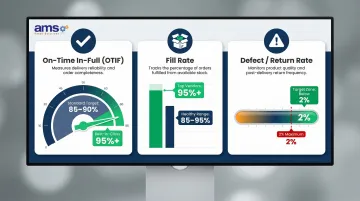
POS systems that surface this data automatically make it far easier to spot underperforming vendors before they affect your margins — and give you the numbers to back up any conversation about pricing, lead times, or returns.
Frequently Asked Questions
What information should every purchase order include in a retail POS system?
Every PO should include vendor details, item SKUs or UPCs, unit cost, case pack size, promised and cancel dates, ship method, and payment terms. Keeping all of this in your POS eliminates re-entry into accounting software or spreadsheets.
How does a retail POS system know when to trigger a vendor order?
The POS monitors on-hand quantities against pre-set reorder points and safety stock levels per SKU. It either alerts the buyer or auto-generates a suggested PO when stock drops to that threshold, with accuracy dependent on how well sales and receiving data have been maintained.
What is a three-way match and why does it matter in retail receiving?
A three-way match compares the original purchase order, the vendor's invoice, and the physical quantities received. All three must align before you post the receipt — this prevents inventory inflation and ensures vendors are paid only for what actually arrived.
What is an Advance Ship Notice (ASN) and how does it speed up receiving?
An ASN is a digital notification sent by the vendor before the shipment arrives, listing item quantities and carton-level details. This allows receiving staff to scan against the expected delivery rather than count blind, which cuts receiving time and reduces errors.
Should I manage vendor orders in my POS or a spreadsheet?
All vendor orders should be managed in the POS. Splitting them between tools creates inventory inaccuracies, delayed cost updates, and reporting gaps that are difficult to reconcile.
How do I hold vendors accountable using my retail POS system?
The POS can generate vendor performance data from receiving records—tracking fill rate, on-time delivery, and exception quantities. Sharing a simple monthly scorecard with vendors shifts conversations from anecdotal to data-driven, leading to fewer shorts and missed deliveries over time.