Introduction
Outdoor power equipment dealers aren't simply retail stores, and they aren't traditional repair shops either. The U.S. Census Bureau classifies them as businesses engaged in both retailing equipment and providing repair services with replacement parts — which means the same dealer ringing up spark plugs at the counter may also be managing a riding mower tear-down in the service bay.
IBISWorld reports 7,231 outdoor power equipment stores operating across the United States, generating $13.8 billion in combined revenue. Every one of those dealerships faces the same operational challenge: managing inventory and transactions across two fundamentally different business models, often using systems that weren't designed for either.
Most generic retail POS platforms handle basic checkout well enough. They fall short when dealers need to connect parts inventory, service work orders, labor time tracking, and customer equipment history in one place. The gaps are costly:
- Unbilled labor hours that disappear without a trace
- Repair jobs misquoted because parts costs weren't captured
- Inventory shrinkage with no clear source
- Service departments that can't demonstrate their own profitability
This guide covers what a POS system built for outdoor power equipment dealers actually needs to do — and how to set one up to handle parts sales and service orders without letting either side of the business fall through the cracks.
Key Takeaways
- A specialty dealer POS handles over-the-counter parts sales and repair work orders from one platform
- Proper parts inventory setup—including bin locations, supplier pricing, and barcoding—is foundational to everything else
- Service orders must capture labor time, parts consumed, and equipment details to price and close jobs accurately
- Automatically linking service-job parts back to inventory prevents shrinkage and protects margins
- The right configuration reduces double-entry and gives managers real-time visibility across departments
How to Set Up and Use a POS System for OPE Parts Sales and Service Orders
Step 1: Build and Organize Your Parts Inventory in the System
Your POS system is only as reliable as the inventory data behind it. Before going live, import or manually enter every stocked part with complete information: SKU, supplier cost, retail price, bin location, and reorder point. Incomplete data at launch creates cascading problems that compound daily—inaccurate reorder decisions, margin analysis you can't trust, and counter staff unable to quickly locate parts.
Why barcodes and OEM part numbers matter:
Use barcodes or OEM part numbers as the primary identifier for every part. This allows:
- Quick scanning at the counter during retail checkout
- Accurate inventory deduction when parts are used in service orders
- Faster technician workflows when pulling parts from the shelf
- Reduced manual entry errors that distort inventory counts
OEM price file integration:
Major OPE manufacturers—STIHL, Husqvarna, Briggs & Stratton, and others—provide electronic price files that update product numbers, prices, and descriptions automatically. ARI Network Services integrates with 120+ OEMs and provides access to more than 10 million SKUs across 195+ distributors and 1,400+ aftermarket manufacturers.
Ideal Computer Systems reports that automated price list updates complete "in just a few minutes" versus manual entry, eliminating pricing errors and keeping margins accurate. Generic retail platforms don't offer this—it's a meaningful operational dividing line for parts-heavy businesses.
Action steps:
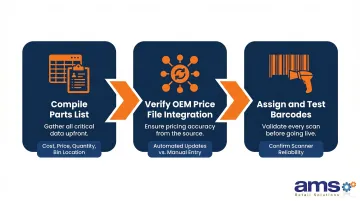
- Compile a complete parts list with supplier cost, retail price, on-hand quantity, and bin location before launch
- Verify whether your POS supports direct OEM price file integration to reduce ongoing manual updates
- Assign barcodes to all parts and confirm scanners can read them reliably
Step 2: Set Up Customer Records and Equipment Profiles
Create a customer record for every client in your system, and link the equipment they own—make, model, serial number—to their account. When a customer brings a unit back for service, your counter staff or service writer should be able to pull up the full service history instantly.
Why equipment profiles matter:
Tracking which parts were installed on which machine enables:
- Faster warranty lookups when parts fail under coverage
- Service interval tracking to proactively schedule maintenance
- Repeat repair identification—spotting patterns that indicate design flaws or incorrect prior repairs
- Improved customer experience through personalized service recommendations
What to capture:
For each piece of equipment, record:
- Make, model, and serial number
- Purchase date (if known)
- Service history with dates, work performed, and parts installed
- Warranty status and expiration dates
For a busy dealer running 50+ active service tickets at any time, this replaces paper files and technician memory with a single, searchable reference.
Step 3: Create and Manage Service Work Orders
A service order (or repair order) opens in the POS when a customer drops off equipment for repair. This record captures:
- Customer information and contact details
- Equipment details (make, model, serial number)
- Complaint or symptom described by the customer
- Estimated labor hours and quoted parts
- Assigned technician
Labor time tracking:
Technicians must clock time against the work order—either manually entering start and stop times or via time clock integration. This tracks actual labor cost and billable hours. The Bureau of Labor Statistics reports a median wage of $48,240 for small engine mechanics as of May 2024. Every unbilled labor hour represents direct margin leakage from your service department.
Posting parts to work orders—the critical step:
Parts pulled from the shelf for a service job must be posted directly to the work order, not processed as a retail sale. This step:
- Removes parts from inventory at the point of use
- Ties every part to a billable job
- Prevents shrinkage by creating a trackable record
- Ensures accurate job costing and profitability analysis
Dealers who ring parts up as retail sales instead lose job-level costing entirely—the invoice may still get paid, but you can't tell whether that job made money.
Step 4: Close Out Orders, Process Payment, and Update Inventory
When the repair is complete, the service writer reviews the work order to close it out:
Closing checklist:
- Confirm all labor hours are posted (estimated vs. actual)
- Verify all parts used are posted to the work order
- Apply any warranty credits or approved discounts
- Calculate final invoice total including parts, labor, and applicable taxes
Automatic inventory adjustment:
When the work order is closed and payment is collected, the POS should automatically decrement inventory for all parts used on that job. This eliminates manual reconciliation and prevents the inventory discrepancies that accumulate when parts and service are tracked separately.
The shrinkage math:
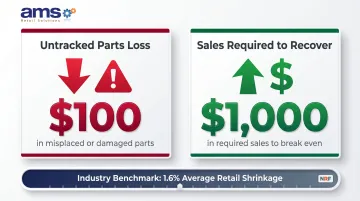
The National Retail Federation reports average retail shrinkage of 1.6% in FY 2022—$112.1 billion across all retail. For OPE dealers, untracked service department consumption is a primary driver of that gap.
Ideal Computer Systems estimates that $100 in misplaced or damaged parts requires upwards of $1,000 in sales to recover the margin. Without POS tracking linking every part to a work order, that exposure compounds across every repair job.
When Should an OPE Dealer Use a Dedicated POS for Parts and Service?
A basic cash register or generic retail POS isn't the wrong choice universally—it's just the wrong choice when dealers manage service orders alongside parts sales. The complexity of dual operations justifies specialty software when:
Volume crosses a critical threshold:
- Dealers processing more than a handful of repair orders weekly
- Operations stocking hundreds of OEM parts SKUs
- Shops with more than one service technician whose time needs separate tracking
Industry scale confirms the opportunity:
OPEI reports the U.S. OPE industry encompasses approximately 250 million legacy products currently in use, with nearly 40 million new products shipped annually. This installed base generates continuous demand for parts and service, creating the repair volume that justifies purpose-built systems.
A solo operator doing occasional repairs for known customers with minimal parts inventory may find a basic solution more practical. But as repair frequency increases and parts inventory expands, tracking everything manually becomes unsustainable—and the financial cost of that friction shows up fast in your margins.
Where the real money is:
The NAEDA 2024 Cost of Doing Business Study puts service department gross margins at 63.48% for equipment dealers, compared to 33.54% for parts. That gap makes labor tracking one of the highest-ROI investments an OPE dealer can make — every unbilled hour or missed time entry is margin you can't recover.
What You Need Before Setting Up Your OPE Dealer POS
Equipment and System Requirements
Retail-hardened hardware:
POS hardware for service counters takes more daily abuse than typical office environments. The system should support:
- Barcode scanning for fast parts lookup
- Receipt printing for customer invoices
- Credit and debit card processing at the point of sale
- Touchscreen displays built for heavy use
These hardware requirements set the foundation — but your team's ability to work from anywhere in the shop matters just as much.
Shop floor access for technicians:
Consider whether technicians need workstation, tablet, or mobile device access to open, update, and close work orders without walking to the front counter terminal. Mobile-enabled POS platforms let technicians update job status, post parts, and record labor time where they're actually working — and they need to keep doing that even when the network hiccups.
NCR Voyix Counterpoint, available through AMS Retail Solutions, includes offline capability so transactions continue if connectivity drops mid-sale, then syncs automatically when the connection restores.
Inputs and Data to Prepare
Clean parts list ready to import:
Before going live, prepare a complete parts list including:
- Supplier cost for accurate margin calculation
- Current retail price for consistent pricing
- On-hand quantity for initial inventory counts
- Bin location for fast retrieval
Dirty data at launch causes problems that multiply over time — inventory counts drift, reorder points become unreliable, and margin reports become meaningless.
OEM price file integration research:
Determine whether your POS vendor supports direct OEM parts catalog or price file integration. This is a key differentiator between systems built for OPE dealers versus generic retail platforms. Without it, every OEM price change becomes a manual data entry task — and those errors compound quickly into pricing gaps and margin leakage at the counter.
Key POS Features That Determine Results for OPE Dealers
Not all POS systems are built the same. For OPE dealers, the difference between a system that fits and one that doesn't shows up quickly in parts accuracy and service billing. The following features separate capable systems from generic ones:
Work Order Management with Labor Tracking
The system must allow service orders to be created, assigned to a technician, and tracked through completion—including clocked labor hours tied to the job, not just estimated hours. Dealers who estimate labor instead of recording actual hours don't know whether jobs are profitable until it's too late to adjust.
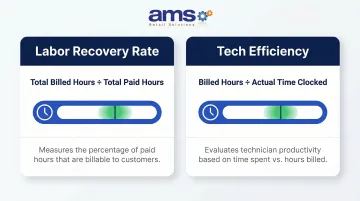
Industry consultants identify recovery rate (Total Billed Hours / Total Paid Hours) and tech efficiency (Billed Hours / Actual Time Clocked) as critical KPIs. Without a POS that tracks these metrics automatically, dealers operate blind.
Key question: Is work order management a built-in module, or does it require separate integration?
Parts Inventory Linking to Service Orders
Any part pulled for a repair job should be posted directly to the work order and automatically removed from inventory at the moment of use. Systems that require manual inventory adjustments after the fact are prone to shrinkage and billing errors.
This linking protects profitability by ensuring:
- Every part consumed is billed to a customer
- Inventory counts remain accurate in real time
- Job costing reflects actual parts used, not estimates
OEM Pricing and Supplier Integration
Receiving updated OEM price files, generating purchase orders in the system, and scanning parts into inventory via barcode all reduce manual data entry and keep margins accurate. For high-SKU parts operations, that efficiency adds up fast:
- Price updates complete in minutes instead of hours
- Fewer pricing errors that quietly erode margins
- Faster purchasing workflows when reordering parts
Customer and Equipment History
A built-in CRM or customer record capability that stores equipment make, model, serial number, and full service history gives counter staff and service writers the context they need to:
- Diagnose problems faster by reviewing past repairs
- Upsell appropriate parts based on equipment age and usage
- Avoid repeat mistakes by identifying patterns
Reporting Across Both Departments
Dealers need visibility into parts margins, labor profitability, slow-moving inventory, and technician efficiency. Look for reporting that ties both retail parts sales and service order activity into unified dashboards rather than requiring separate tracking.
Critical reports include:
- Parts fill rate (target: 85%-90%)
- Inventory turns (target: greater than 3.0 times annually)
- Labor recovery rate by technician
- Slow-moving inventory identification
- Service department profitability separate from parts sales
Common Mistakes OPE Dealers Make When Managing Parts and Service with a POS
Processing Service Parts as Retail Sales
When a technician grabs a part and it gets rung up as a regular sale rather than posted to a work order, the shop loses the connection between parts cost and job profitability—and the customer gets billed incorrectly. POS workflows should require technicians or service writers to pull parts against an open work order, not the front counter.
Skipping Inventory Setup or Using Incomplete Data at Launch
Going live with partial inventory data—missing costs, incorrect on-hand counts, or no bin locations—leaves dealers with a system they can't trust for reordering or margin analysis. Accurate setup at launch means counter staff can look up prices, check stock, and process transactions without second-guessing the data.
Example of the impact:
A dealer with 500 parts SKUs who enters only retail prices without supplier costs can't calculate actual margins. When it's time to analyze profitability or adjust pricing, the data isn't there.
Not Tracking Technician Time in the POS
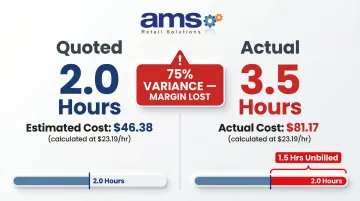
Estimating labor instead of recording actual hours means dealers don't know whether jobs are profitable until it's too late to adjust. With median small engine mechanic wages at $48,240 annually ($23.19/hour), every unbilled hour represents direct margin loss.
Time tracking consistently surfaces gaps like this: a job quoted at 2.0 hours takes 3.5 hours to complete. That 75% variance goes unbilled without an accurate record, eroding margin on every misquoted job.
Failing to Run End-of-Day Reconciliation
Skipping daily or weekly reconciliation of parts sold vs. work order parts posted lets inventory discrepancies accumulate. By the time a physical count is done, the gap between system and shelf is large enough to distort reorder decisions and disguise theft or waste.
Daily reconciliation should compare:
- Parts sold at retail (over the counter)
- Parts posted to service work orders
- Physical count spot-checks for high-value items
Investigate discrepancies immediately while transactions are still fresh in staff memory.
Frequently Asked Questions
What is the best software for parts inventory in an OPE dealership?
The best software depends on the dealer's size and whether they also manage service orders. For OPE dealers managing both, a specialty retail or dealer management POS that supports work orders, OEM price file integration, and barcode-based inventory tracking will outperform generic inventory tools.
How profitable is a small engine repair shop?
Profitability depends on labor recovery rate, parts margin, and job volume. Dealers with a POS tracking actual labor time and parts cost per job are better positioned to identify and close margin gaps than those estimating manually. Strong service departments typically achieve gross margins above 60%.
What are the parts of a POS system?
Core components include a terminal (touchscreen or PC), barcode scanner, receipt printer, card payment terminal, cash drawer, and the POS software that ties transactions, inventory, and customer records together into a unified platform.
Can a single POS system handle both retail parts sales and service work orders?
Yes, but only with a system designed for this use case. Purpose-built specialty retail POS platforms support both retail and service operations. General retail POS software typically lacks work order, labor tracking, and equipment history modules essential for service operations.
How do OPE dealers prevent parts from going missing in the service department?
The most effective control is requiring all parts used in service jobs to be posted directly to an open work order in the POS. This creates a trackable record, removes parts from inventory at point of use, and ties every part to a billable job.
About AMS Retail Solutions
AMS Retail Solutions provides NCR Voyix Counterpoint POS systems tailored for specialty retail operations including outdoor power equipment dealers, farm and ranch supply stores, garden centers, and other equipment-focused businesses. Their specialty retail POS platform manages retail checkout, parts inventory, and service operations from a single system. For more information about how NCR Voyix Counterpoint can manage both parts sales and service orders for your dealership, call 757.495.4995 or visit amsretail.com.