
Why Bulk and Loose Goods Are a Different Beast at the Register
Landscape supply businesses don't operate like typical retail. Products like mulch, topsoil, crushed stone, sand, and gravel don't come with barcodes, don't sit neatly on shelves, and aren't sold in fixed quantities. Every transaction varies: one customer needs 1.5 cubic yards of mulch, another orders 8 tons of crushed gravel, and a commercial contractor requires a mixed load delivered across town. A generic retail POS wasn't built for this reality.
The core challenge is straightforward: manually estimating yards, writing handwritten tickets, or forcing bulk goods into unit-based SKUs leads to pricing errors, inventory blind spots, and slower checkouts. During peak spring and summer seasons, these problems compound fast—undercharging a contractor by half a yard on a recurring order, losing track of what's left in the yard, or watching delivery tickets disappear between the counter and the loader.
The scale of the problem matters too. According to SiteOne Landscape Supply, the North American wholesale landscape supply market is worth approximately $25 billion, supporting over 692,000 businesses and 1.4 million employees. Yet many independent yards still run on paper-based processes that create traceability problems and data inaccuracies.
A properly configured POS eliminates these operational gaps by treating bulk goods the way they actually sell—not as fixed SKUs, but as variable-quantity products with flexible pricing, real-time inventory depletion, and integrated delivery management.
Key Takeaways
- Bulk goods sell by flexible units (cubic yards, tons, pounds) with variable-quantity entry at the register
- Inventory depletes in real time as sales process—no barcode required
- Delivery tickets generate directly from transactions, keeping yard staff and drivers in sync
- Contractor accounts get tiered pricing, credit terms, and invoicing in one workflow
What Makes Bulk and Loose Goods Unique at the Landscape Supply Counter
Bulk and loose goods differ fundamentally from packaged retail. A bagged product has a barcode and fixed weight; a cubic yard of mulch is measured at the time of sale, varies by how it's loaded, and has no scannable identifier. The POS must handle variable quantity and open-amount transactions instead of simple barcode scans.
Range of Units Landscape Supply Sells
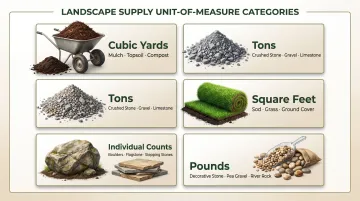
Landscape supply businesses sell in multiple units—often within a single customer transaction:
- Cubic yards – Mulch, topsoil, compost
- Tons – Crushed stone, gravel, sand
- Square feet – Sod
- Individual counts – Boulders, flagstone pieces
- Pounds – Decorative stone
According to Caterpillar's Material Density Reference Tables, crushed stone weighs approximately 2,700 lb/yd³ in loose state, while dry sand weighs around 2,400 lb/yd³—but these figures vary significantly with moisture content, grain size, and compaction. This variability is why flexible unit-of-measure (UOM) configuration is essential.
Customer Mix Complexity
The customer mix adds layers of complexity. SiteOne Landscape Supply's revenue data shows the typical customer is a landscape contractor—61% residential construction, 31% commercial/institutional, and 8% recreational. This means your POS must handle:
- A homeowner buying 1.5 yards of mulch for weekend landscaping
- A contractor ordering 12 tons of crushed gravel for a commercial site
- A developer requesting a mixed pallet load with scheduled delivery
Each requires different pricing structures, documentation, and workflows—all in the same day.
What Goes Wrong with Standard Retail POS
That customer variety puts immediate pressure on your checkout process. When businesses try to manage bulk goods with a standard retail POS or spreadsheets:
- Cashiers manually calculate prices, slowing checkout and introducing errors
- Quantities get recorded inconsistently across handwritten tickets
- Inventory never reflects what's actually in the yard
- Disputes arise with contractors over what was ordered versus delivered
- No audit trail exists when discrepancies surface weeks later
The Profitability Risk
Margin errors compound fast in bulk operations. Giving a customer 3.2 yards when the ticket says 3.0—or undercharging because a price-per-ton wasn't updated after a vendor increase—eats margin on every high-volume order.
Industry-wide, the NRF National Retail Security Survey found average retail shrink rates at 1.6% of sales, representing $112.1 billion in total losses. Garden centers face additional variance, with up to 78% of shrinkage tied to spoilage and throw-outs. Bulk materials add compression, moisture, and settling on top of that baseline—making accurate measurement and pricing systems non-negotiable.
How a POS Configures Units of Measure and Pricing for Bulk Materials
The foundation of bulk goods management is unit-of-measure configuration. Each bulk product is set up with a base unit (such as cubic yard), and the system allows cashiers to enter any decimal quantity at the time of sale. Selling 0.5, 1.5, or 7.25 yards is handled automatically, with correct pricing calculated instantly.
Alternate Units of Measure
Products can be configured with alternate units for the same material:
- Mulch sells by the cubic yard, half-yard, or full-truckload
- Each unit carries its own price or conversion factor
- No need for separate SKUs for every size variation
According to NCR Voyix Counterpoint's training documentation, each item supports up to 5 alternate selling units with configurable conversion factors, and cashiers can select different units during ticket entry at the POS.
Price-Per-Unit for Weight-Based Materials
Crushed stone, sand, and gravel are commonly priced per ton. The POS supports entering a weight — for example, 4.6 tons — and automatically computes the line total based on a stored price-per-ton rate rather than a fixed item price.
A few key configuration settings make this work:
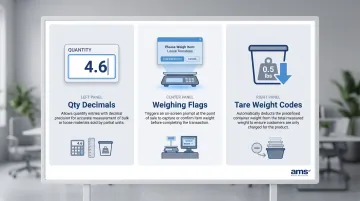
- Qty Decimals defines how many decimal places are allowed during quantity entry
- Weighing flags prompt the operator for weight when the item is rung up
- Tare weight codes automatically deduct container weight from the total
Tiered and Volume Pricing
Automatic price breaks trigger based on quantity entered — no manual overrides needed:
- $45/yard for 1–4 yards
- $38/yard for 5+ yards
This reduces the need for cashiers to manually override prices for contractor orders. NCR Voyix Counterpoint supports quantity-based pricing through Special Pricing rules, including discounts or markups based on quantity purchased, day of week, or other conditions.
Lookup-Based Selling
Bulk goods are called up by product code, name, or touchscreen quick-key button at the register—not by barcode scanning. An intuitive product menu organized by categories like "Stone," "Mulch," and "Topsoil" keeps checkout moving — including multi-pile transactions where a customer loads several materials in one trip.
Together, these configurations let landscape supply businesses ring up bulk goods accurately — from fractional yards of mulch to multi-ton stone orders — without building workarounds into their checkout process.
Inventory Tracking for Bulk Goods Without Barcodes
Bulk inventory tracking works by depletion. When a cashier enters a sale of 3 cubic yards of mulch, the system subtracts exactly 3 from the on-hand quantity for that product. Inventory stays current without anyone physically counting the pile after every sale.
Reorder Points for Bulk Materials
You can configure the POS to trigger low-stock alerts when a material drops below a defined threshold—for example, alerting when topsoil falls below 20 yards on hand. This helps purchasing managers schedule vendor deliveries before running out, reducing lost sales during peak season.
Receiving Process for Bulk Goods
When a supplier delivers a load of crushed stone, the quantity is entered as a receiving event in the POS, updating on-hand inventory and auto-matching against a purchase order. The system always reflects what's been received, not just what's been sold.
The Reconciliation Challenge
Bulk materials are subject to variance from settling, moisture weight changes, loader estimation, and measurement inconsistency. Caterpillar's engineering tables show that wet sand weighs approximately 29% more per cubic yard than dry sand (3,100 vs. 2,400 lb/yd³). Mulch typically settles by 20–25% within the first four months as the material compacts and decomposes.
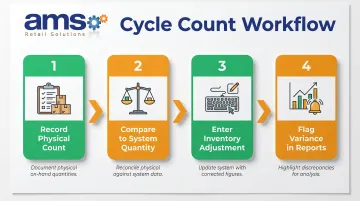
A POS handles this through manual inventory adjustment tools that let managers:
- Record a physical count for a specific stockpile
- Compare physical count to system quantity
- Update the system with the corrected amount
- Flag the variance in reporting for review
This keeps records accurate without requiring a full shutdown for inventory. NCR Voyix Counterpoint supports these physical count workflows and inventory adjustments, allowing direct corrections to both quantity on hand and average cost for an item.
Tying Delivery and Load Management to the POS Transaction
For landscape supply businesses that deliver bulk materials, the POS transaction should generate a load ticket or delivery order that travels with the product. This captures:
- Customer name
- Material and quantity
- Delivery address
- Requested date and time
Yard staff know exactly what to load and where it's going without relying on verbal instructions or separate paper systems. Manual, paper-based delivery processes are a persistent weak point in construction material operations — prone to traceability gaps, data inaccuracies, and decisions made too late to fix mistakes.
Delivery Scheduling Integration
At checkout, the cashier captures a requested delivery date and time, which feeds into a dispatch or scheduling view. This keeps the yard team and drivers coordinated and reduces missed or wrong deliveries.
Downstream Benefits
When delivery details live in the POS, managers can pull reports of all deliveries by:
- Date — see every delivery scheduled or completed in a given period
- Material — track which products are moving and at what volume
- Driver — measure load counts and flag delivery discrepancies by route
This makes it easier to route loads and reconcile completed deliveries against inventory deductions. Building products businesses commonly run into the same delivery friction points: lack of real-time visibility, last-minute order changes, jobsite timing conflicts, and documentation disputes after the fact. POS-integrated delivery ticket generation addresses all of these — eliminating re-keying errors and creating a clear, auditable trail from order to delivery.
Contractor Accounts and Volume Pricing for Bulk Orders
Contractor and commercial accounts are managed in a landscape supply POS as specific customer profiles with assigned pricing tiers, credit terms, and charge account limits. When a known contractor comes in or calls with a bulk order, their pricing tier applies automatically — no haggling at the counter.
Invoicing Workflow for Contractor Bulk Orders
Instead of requiring immediate payment, the POS posts the transaction to the contractor's account and generates a detailed invoice showing materials, quantities, unit prices, and totals. The system maintains a running balance, simplifying month-end billing and reducing accounts receivable disputes. Levelset reports that it takes an average of 83 days to get paid in construction — which means tight AR management directly affects whether your business has operating capital when you need it.
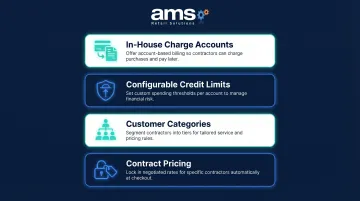
NCR Voyix Counterpoint supports contractor account management through:
- In-house charge accounts via A/R customer types, so contractors can pay on terms
- Configurable credit limits that cap exposure by account
- Customer categories for grouping accounts by pricing tier or reporting segment
- Contract pricing that locks a specific price for an item or group of items per customer
Purchase History as a Business Tool
With all contractor transactions stored in the system, managers can review what each contractor buys, how often they order, and at what volume. That data informs pricing adjustments, targeted outreach during slow periods, and stocking decisions tied to their actual project pipeline — so you're not guessing what to order next season.
Managing Bulk Inventory Shrink and Variance
Bulk materials are naturally prone to shrinkage and variance. Mulch compresses over time, sand loses volume to moisture, loaders may give slightly more or less than the ordered amount, and wind or rain can shift piles. Without active management, the system's on-hand quantity will gradually drift from physical reality.
How Regular Cycle Counts Work in Practice
Rather than counting every product at once, managers schedule periodic measurements of specific piles:
- Measure the topsoil stockpile by volume estimation
- Compare the physical count to the system quantity
- Enter an inventory adjustment to correct the difference
This keeps records accurate without a full shutdown. NCR Voyix Counterpoint's physical count workflow uses a multi-step process (Create, Worksheet, Enter, Post) where posting generates and automatically posts inventory adjustment transactions for items where the captured and entered counts differ.
What makes variance especially tricky is that the same pile can register differently on two consecutive counts. Caterpillar's Load Factor—the ratio converting bank (in-ground) volume to loose (excavated) volume—illustrates just how much weight shifts by material type:
| Material | Loose (lb/yd³) | Bank (lb/yd³) | Load Factor |
|---|---|---|---|
| Crushed Stone | 2,700 | 4,500 | 0.60 |
| Gravel, Dry | 2,550 | 2,850 | 0.89 |
| Sand, Dry Loose | 2,400 | 2,700 | 0.89 |
| Sand, Wet | 3,100 | 3,500 | 0.89 |
| Top Soil | 1,600 | 2,300 | 0.70 |
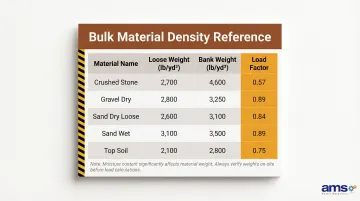
As Caterpillar notes, "Weight of material varies with moisture content, grain size, and degree of compaction." A topsoil pile after a rainstorm can register nearly 700 lb/yd³ heavier than during dry conditions — enough to throw off purchase order quantities if you're not tracking variance consistently. Regular cycle counts let you spot these seasonal patterns early and build them into your reorder planning before a shortfall hits a busy weekend.
Frequently Asked Questions
Is it cheaper to buy topsoil in bags or bulk?
Bulk topsoil is typically less expensive per cubic yard than bagged topsoil. SiteOne lists bulk at approximately $40–$90 per cubic yard depending on grade, while bagged topsoil can cost the equivalent of $50–$225 per cubic yard. Bags suit small projects, but bulk delivers significant savings for jobs requiring multiple yards.
How much should I charge for delivering 12 yards of mulch?
Delivery pricing varies by region, distance, and business cost structure. A POS system supports configurable delivery fees on bulk transactions—flat rates, per-yard charges, or distance-based surcharges (e.g., $105 for local delivery). Tiered pricing by volume and distance is also common.
How much does a yard of crushed stone weigh?
A cubic yard of crushed stone typically weighs around 2,400–2,700 pounds depending on the material type and moisture content. This matters when a POS sells by the ton versus by the yard, requiring accurate UOM setup to ensure pricing consistency across different customer preferences.
Can a POS system track bulk inventory that has no barcode?
Yes—bulk materials are tracked by product code and quantity entry rather than scanning, with inventory depleting in real time as sales are processed. The system updates on-hand quantities via receiving events when new stock arrives, and manual adjustments handle variance from settling, moisture, or measurement inconsistency.
How does a POS handle variable-weight bulk material sales?
The cashier enters the actual quantity sold (in tons, yards, or pounds) at the time of the transaction, and the system multiplies that quantity by the configured price-per-unit to calculate the total. No fixed price per item is required—the POS supports decimal quantity entry and weight-based pricing for complete flexibility.
Is POS the same as ERP?
POS (point of sale) handles transactions, inventory, and customer interactions at the sales counter, while ERP (enterprise resource planning) manages broader business functions like accounting, payroll, and HR. Many POS systems for landscape supply integrate with accounting platforms like QuickBooks to connect the two systems, pushing real-time transaction data into your financial records automatically — no double entry required.