Introduction
Garden center owners face constant pressure across inventory across wildly different seasons — spring planting rushes that deliver 60% of annual revenue in just 12-16 weeks, summer maintenance lulls, fall cleanup surges, and winter holiday décor windows. The wrong stock at the wrong time doesn't just disappoint customers — it directly costs revenue through lost sales and perishable write-offs.
POS software is familiar at the checkout counter, but its real power lies in seasonal inventory management. Results vary widely depending on how the system is configured, what data feeds it, and whether staff follow consistent workflows. For garden centers, the difference between a generic retail POS and a purpose-built solution like NCR Voyix Counterpoint — implemented by specialists like AMS Retail Solutions — can determine whether seasonal inventory drives profit or drains cash.
This guide walks through the exact steps to manage seasonal inventory using POS software, covering:
- When seasonal POS management pays off most
- What setup and configuration your system requires
- Which variables most influence success
- The costliest mistakes garden centers make — and how to avoid them
Key Takeaways
- Garden center inventory shifts with every season — manual tracking can't keep up without costly errors and waste
- Pre-season POS setup — SKUs, categories, reorder points, and pricing rules — is what separates smooth seasons from chaotic ones
- Historical sales data in your POS is your most accurate forecasting tool for predicting seasonal demand
- Automated low-stock alerts and seasonal pricing adjustments have the biggest operational impact for garden centers
- Top mistakes to avoid: skipping pre-season setup, neglecting end-of-season clearance workflows, and applying the same reorder points to perishables and non-perishables
How to Manage Seasonal Inventory at a Garden Center with POS Software
Step 1: Audit Your Current Inventory and Assign Seasonal Categories
Before each season begins, conduct a full inventory audit and map every SKU to a seasonal category within your POS system. Categories like Spring Annuals, Fall Bulbs, or Holiday Décor aren't just organizational labels — they're the foundation that makes every downstream POS feature work accurately.
This categorization enables your system to:
- Filter sales reports by season for accurate year-over-year comparisons
- Apply pricing rules to entire product groups simultaneously
- Generate purchase orders based on seasonal demand patterns
- Track shrinkage and spoilage by seasonal category
Check that all items have accurate cost, retail price, and vendor information entered. Incomplete records cause forecasting and reorder workflows to fail precisely when volume spikes. A missing supplier lead time or incorrect cost basis renders automated purchasing alerts useless during your busiest weeks.
Step 2: Configure Seasonal SKUs, Units of Measure, and Price Levels
Create or update SKUs for items that change form each season. The same plant sold individually in spring, in a flat of 6 in early summer, and as a clearance bundle in late summer requires distinct SKU handling.
Ensure your POS handles unit-of-measure conversions so bulk-to-retail splits are tracked accurately — otherwise, your inventory counts will diverge from physical reality.
Set up season-specific price levels:
- Peak-demand pricing for spring rush periods
- Standard pricing for mid-season sales
- Loyalty pricing for repeat customers
- Progressive markdown levels for end-of-season clearance
Configure these price levels in advance so they can be activated with a single rule change rather than manual item-by-item edits. According to McKinsey research, retailers implementing dynamic pricing solutions typically achieve 5-10% increases in margins.
Step 3: Set Reorder Points and Automate Low-Stock Alerts
For each seasonal SKU, calculate a reorder point that accounts for your supplier's lead time plus a safety buffer sized to peak-demand velocity. Off-season thresholds will cause stockouts during spring rushes — the weeks that generate the majority of your annual revenue.
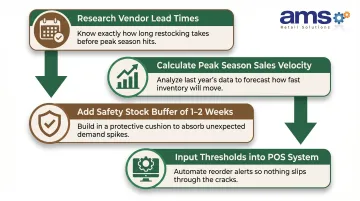
Reorder point calculation:
- Research typical lead times from your primary vendors
- Calculate average weekly sales velocity during peak season
- Add safety stock buffer (typically 1-2 weeks of peak demand)
- Input these thresholds into your POS system
Configure your POS to send automatic low-stock alerts or generate purchase orders when quantities hit those thresholds. Link vendor contact information in the system so restocking actions can be triggered immediately without hunting for supplier details.
That operational setup matters more than most owners expect: 66% of consumers will leave and shop elsewhere when an item is out of stock. During a 6-week spring rush, that lost revenue doesn't come back.
Step 4: Use POS Sales Reports to Forecast Seasonal Demand
Pull year-over-year sales reports from your POS for the same seasonal windows, identifying:
- Top-selling SKUs by season
- Average sales velocity per week at peak
- Items that went to clearance before selling through
- Week-by-week demand patterns across the full season
Use this data as the baseline for this year's purchase orders rather than gut instinct. Research shows that organizations deploying data-driven forecasting have reduced forecast errors by 20-50% and lost sales by up to 65%.
Factor in external signals — local weather forecasts, regional gardening trends, social media interest in specific plant types — to adjust the POS-derived baseline before placing orders. A late frost or an early heat wave can shift peak demand by two weeks, so treat your historical data as a starting point, not a final answer.
Step 5: Activate Seasonal Pricing, Promotions, and Loyalty Rules
Before each season opens, activate the pre-configured price levels in your POS. Raising prices on peak-demand items when supply is limited and customer urgency is high improves gross margin without requiring staff to calculate prices manually at the register.
Program promotional bundles directly into the POS:
- Soil + seedling combos in spring
- Tool + mulch kits in fall
- Fertilizer + pest control packages in summer
These bundles ring up automatically, reducing checkout errors and making it easy for staff to upsell without specialized product knowledge. Trackable promotions also generate performance data that informs next season's bundle strategy.
For garden centers with typical gross margins of 50-65% depending on product mix, even small pricing optimization gains compound significantly across a full season.
Step 6: Execute End-of-Season Clearance and Archive Seasonal SKUs
Use your POS markdown workflow to systematically discount aging seasonal stock in tiers:
- 20% off at week 8 of the season
- 40% off at week 10
- Clearance lot pricing at week 12
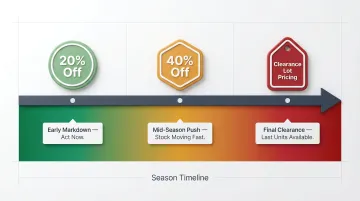
This structured approach moves perishable inventory before it becomes a total write-off and preserves data integrity for next year's forecasting. Untracked discounts, by contrast, leave gaps in your seasonal history that make next year's purchase decisions harder to defend.
Once a season closes, archive or deactivate seasonal SKUs in the POS rather than leaving them active. This prevents ghost inventory records from distorting your next cycle's counts and reports. The SKUs remain in your historical database for forecasting purposes but don't clutter active inventory screens.
When Should Garden Centers Use POS-Driven Seasonal Inventory Management?
POS-based seasonal inventory management delivers the most value when a garden center:
- Carries more than a few dozen seasonal SKUs
- Experiences demand spikes exceeding 30-40% above baseline during peak periods
- Operates across more than one location or sales channel
- Sells live plants (perishable, time-sensitive inventory)
A few scenarios push this from useful to essential:
- Live plant sellers: Up to 78% of shrinkage at garden centers stems from plant deterioration and throw-outs — far exceeding theft. Without automated rotation tracking, losses compound quickly.
- End-of-season clearance operators: Centers running time-sensitive markdowns need real-time visibility to price aggressively without leaving margin on the table.
- Multi-channel sellers: If you sell in-store, at farmers markets, or online, POS-driven inventory prevents overselling and stock discrepancies across channels.