
Introduction
Plant loss and shrinkage are among the most financially damaging — and least tracked — problems in garden center operations. Unlike traditional retail, where inventory sits stable on shelves, garden centers manage living, perishable stock that deteriorates continuously.
A plant can die overnight. If that loss isn't recorded in your POS, your inventory stays artificially inflated for weeks or months — and your margins quietly disappear with it.
Most retailers think of shrinkage as theft. Garden centers contend with something harder to track: natural plant death, weather damage, pest infestations, and seasonal throw-outs erode margins without showing up in any report — until a physical count exposes the gap. According to Garden Center magazine, up to 78% of shrinkage in garden centers is tied to plant spoilage and throw-outs — not theft or administrative error.
This guide covers how to record, track, and reduce that loss inside your POS — from initial setup through the most common mistakes operators make.
Key Takeaways
- Plant loss in garden centers is primarily caused by spoilage, die-offs, and end-of-season throw-outs — categories most general POS systems don't account for by default
- Your POS should record inventory shrinkage adjustments every time a plant dies, is damaged, or is discarded — not just at season's end
- Accurate tracking needs consistent tagging at receiving, regular condition audits, and a clear adjustment workflow
- Shrinkage reports from your POS reveal patterns by vendor, species, season, or location — helping you buy smarter
- Skipping shrinkage entries inflates on-hand counts, distorting reorder decisions and profitability reports
Why Plant Loss Is a Unique Shrinkage Problem for Garden Centers
Unlike traditional retail, where shrinkage is dominated by theft and administrative error, garden centers deal with living inventory that deteriorates on its own schedule — heat, frost, pests, and neglect don't wait for convenient timing.
The numbers bear this out. The National Retail Federation reported an average shrink rate of 1.6% of sales across all retail in 2022, but garden centers face a fundamentally different mix: up to 78% of shrinkage stems from plant spoilage and throw-outs, not theft.
Main Categories of Plant Loss
Each type of plant loss generates a distinct shrinkage event that should be captured separately in your POS:
- Natural plant death — Poor root systems, undersized root balls, or nutrient deficiencies that lead to decline
- Pest or disease damage — Infestations or infections that render plants unsellable
- Weather events — Frost damage, heat stress, wind damage, or flooding
- Improper care — Under-watering, over-watering, or incorrect light exposure
- End-of-season discards — Unsold annuals or perennials that can't be overwintered
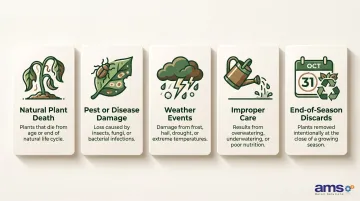
Each of these categories carries a direct financial consequence — and that consequence compounds when losses go unrecorded.
The Financial Risk of Phantom Inventory
When plant deaths aren't logged in real time, your POS shows phantom inventory — on-hand counts that reflect plants that no longer exist. This triggers:
- False reorder signals based on inflated stock levels
- Overstated gross margin in profitability reports
- Inaccurate cost of goods sold calculations
- Poor purchasing decisions throughout the season
Mid-sized garden centers typically generate $1 million to $2 million in annual sales. At that scale, a season's worth of unrecorded shrinkage can distort inventory values by thousands of dollars and mask the true cost of doing business.
How to Record and Manage Plant Loss in Your Garden Center POS
Step 1: Tag and Categorize Incoming Plants at Receiving
Accurate shrinkage tracking begins at the receiving dock. Every shipment should be checked against the purchase order and entered into the POS with correct quantities, variety, and cost. This creates a clean baseline against which any future loss is measured.
Set up SKUs to enable granular reporting:
- Distinguish between product types (annuals, perennials, trees/shrubs, bulk goods)
- Flag live goods as perishable or high-loss items in your item master
- Include size and variety details so shrinkage reports can identify patterns by species
For example, if you receive 200 units of 1-gallon perennials from a specific vendor, that exact count and cost must be entered accurately — otherwise, any shortage or DOA plants will distort your internal shrinkage metrics later.
Step 2: Conduct Regular Plant Condition Audits
A structured walkthrough process keeps inventory counts current and identifies losses before they accumulate:
- Daily audits during peak season (spring/summer)
- Weekly audits during slower periods (fall/winter)
- Designated staff responsible for each section or department
During each audit, staff should:
- Physically inspect plant sections
- Identify dying or unsellable plants
- Flag them for removal with a tag or note
- Document the findings before making any POS adjustment
Critical distinction: Plants sold at 50% off should be recorded as discounted sales, while dead or unsellable plants that will be discarded must be entered as inventory adjustments or shrinkage write-offs. Mixing the two corrupts both sales margin data and shrinkage metrics.
Step 3: Log Plant Loss as Inventory Shrinkage Adjustments in the POS
Once plants are flagged and documented, the next step is getting those losses recorded in your POS — so on-hand counts stay accurate and your shrinkage data reflects reality:
- Locate the item in inventory by SKU or description
- Enter the quantity being written off
- Select or create a reason code (e.g., "plant death," "weather damage," "pest/disease," "end-of-season throw-out")
- Save the adjustment so on-hand counts update immediately
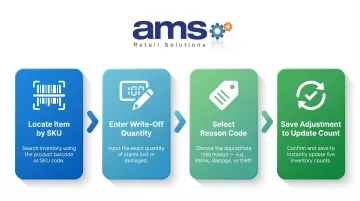
Why reason codes matter: They allow managers to run shrinkage reports filtered by cause, making it possible to identify whether a specific vendor, species, or time of year is driving disproportionate losses.
NCR Voyix Counterpoint, the platform AMS Retail Solutions implements for garden centers, supports customizable reason codes and full adjustment audit trails — so this process stays consistent and accountable across staff and seasons.
Step 4: Review Shrinkage Reports and Act on the Data
With losses recorded consistently in Step 3, your POS can turn that raw data into actionable reports. Garden center systems typically surface:
- Total shrinkage by time period — Track losses week-over-week or month-over-month
- Shrinkage by item category or vendor — Identify which suppliers or plant types drive the most loss
- Shrinkage as a percentage of received inventory — Measure loss rates to benchmark performance
- Cost-of-loss summaries — Quantify the dollar impact of shrinkage by category
Use this data to:
- Adjust purchasing quantities for high-loss species
- Switch vendors with consistently high spoilage rates
- Renegotiate return-to-vendor policies for DOA plants
- Improve in-store plant care protocols based on root-cause analysis
What Your POS Needs Before You Can Accurately Track Plant Loss
Getting your POS configured correctly before plant loss occurs is what separates useful shrinkage data from numbers that tell you nothing. If items aren't set up properly from the start, you can't tie write-offs back to meaningful reporting categories — and the data loses its value.
Three areas need to be in order before you start tracking: your system's core capabilities, how individual items are set up, and whether your staff are trained to log losses consistently.
Equipment and System Requirements
Your POS must have:
- Inventory adjustment functionality — Reduces on-hand counts outside of normal sales, so dead or damaged plants don't stay on the books
- Customizable reason codes — Flexible fields to categorize the cause of each loss
- Purchase order and receiving integration — Ensures baseline quantities are accurate from delivery
- Shrinkage reporting by item, category, and date range — Makes it easy to spot patterns and seasonal trends
Inputs and Item Setup
Each plant variety and size should have its own SKU or inventory record. This requires:
- Accurate cost of goods entered at receiving (without this, your write-off dollar values are wrong from the start)
- Item categories structured for analysis — grouping by vendor, species family, or seasonal category makes reporting far more actionable
- SKU-level detail — A 1-gallon Knockout Rose should be a different SKU than a 3-gallon Knockout Rose
Staff Readiness and Process Documentation
Even the best POS configuration fails if staff don't consistently log plant deaths. Recommend:
- Creating a simple written shrinkage recording protocol
- Training staff on how to enter inventory adjustments
- Designating a responsible employee per section or department
- Conducting periodic spot-checks to ensure compliance
Key Variables That Affect Plant Shrinkage Tracking Accuracy in Your POS
Key Variables That Affect Plant Shrinkage Tracking Accuracy in Your POS
Shrinkage tracking outcomes vary widely based on how well certain variables are controlled. Even a capable POS system will produce unreliable data if these factors are inconsistent.
Frequency of Condition Audits
Plant deaths happen continuously — not just at month-end. When audits only run at season close, losses accumulate unrecorded for weeks, distorting on-hand counts and triggering faulty reorder signals throughout the period.
Higher audit frequency keeps data current: daily checks during peak season, weekly during off-season. Smaller gaps between audits mean smaller end-of-period reconciliation surprises.
Receiving Accuracy
If incoming plant quantities are entered incorrectly at receiving, the shrinkage baseline is wrong from day one. A shortage at delivery that goes undocumented becomes phantom inventory — stock the system thinks you have but don't.
A count-against-PO process at every delivery prevents this. It should include:
- Verifying quantities against the purchase order before accepting
- Flagging dead-on-arrival plants as vendor returns, not internal shrinkage
- Documenting any delivery shortages before they enter the system as live inventory
Reason Code Consistency
If staff use different or vague reason codes — or skip them entirely — shrinkage reports can't be filtered usefully. "Unknown" write-offs tell you nothing about what's actually killing your plants.
Standardized, mandatory reason codes tied to specific causes (plant death, weather event, pest/disease, customer damage, end-of-season discard) turn raw shrinkage data into a diagnostic tool.
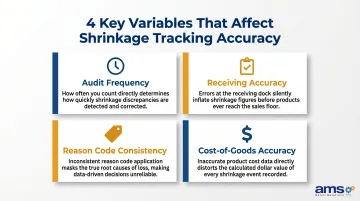
Cost-of-Goods Accuracy
Shrinkage reports that measure financial impact — not just unit counts — are far more useful. But that only works if the cost entered for each item at receiving is correct. Blank or estimated cost fields make dollar-loss figures unreliable.
Consistent entry of vendor invoice costs lets the POS calculate true shrinkage impact by category. That gives management a clear picture of which loss areas to address first, rather than treating all shrinkage as equally urgent.
Common Mistakes Garden Centers Make When Recording Plant Loss in Their POS
Most garden centers understand that plant loss happens — the problem is how they record it. These four mistakes are the most common, and each one quietly undermines the accuracy of your inventory data throughout the season.
Waiting Until End-of-Season to Record Shrinkage
Batch write-offs done once a year prevent real-time inventory accuracy and cause purchasing decisions to be made on inflated stock counts all season. Worse, you lose the ability to identify when or why losses spiked — which means you can't prevent the same thing from happening next year. Record shrinkage as it occurs, not after the fact.
Conflating Markdowns with Shrinkage
Discounting a dying-but-still-sellable plant is a discounted sale. Writing off a dead plant is shrinkage. Mixing the two in your POS corrupts both your sales margin data and your shrinkage metrics — making both reports unreliable. Keep them as separate transaction types so each tells an accurate story.
Skipping Reason Codes or Using a Single Generic Code
Without differentiated reason codes, shrinkage reports show totals but not causes. This makes it impossible to identify vendor quality issues, care protocol failures, or weather-related loss patterns that could be prevented.
Not Accounting for Dead-on-Arrival (DOA) Plants Separately
Entering DOA plants from a delivery as internal shrinkage rather than vendor short-ships or returns inflates your apparent shrinkage rate and misses an opportunity to claim credit from suppliers. Record DOA plants as vendor returns or receiving discrepancies — not as internal shrinkage events — so your numbers stay clean and your supplier accountability stays intact.
Conclusion
Handling plant loss and shrinkage in a garden center POS system is not about one-time data entry. It's about building a consistent workflow from receiving through write-off to reporting that keeps inventory counts accurate and turns loss data into better purchasing calls and smarter care decisions.
Most shrinkage tracking failures come from inconsistent audit habits, poor item setup, or skipped reason codes — not from system limitations. Small process improvements often have a meaningful difference in shrink rates and end-of-season margin.
Garden centers running NCR Voyix Counterpoint through AMS Retail Solutions get inventory adjustment tools, built-in reporting, and customizable workflows that make systematic plant loss tracking a routine part of operations — not a scramble at the end of the season.
Frequently Asked Questions
How to account for spoiled inventory?
Spoiled inventory should be recorded as an inventory adjustment (write-off) in the POS using a reason code for spoilage. This reduces the on-hand count and logs the cost-of-goods loss — separate from any discounted sales of salvageable items.
What is shrink management?
Shrink management is the practice of tracking and reducing inventory loss from all causes. For garden centers, that means monitoring plant death, spoilage, and end-of-season throw-outs — and recording each in the POS to spot patterns over time.
What is a plant tracker?
A plant tracker is any system used to monitor the status, quantity, and condition of live plant inventory — physical tags, POS records, or dedicated software. A garden center POS with proper SKU setup covers this by recording what was received, sold, and written off.
What does POS mean in inventory?
In an inventory context, POS (point of sale) refers to the system that records all sales transactions and inventory movements — including purchases, returns, and adjustments like shrinkage write-offs — so on-hand counts stay accurate.
What are the 4 types of inventory?
The standard four types are raw materials, work-in-progress, finished goods, and MRO (maintenance, repair, and operations) goods. Live plants don't fit neatly into any single category — they're perishable, condition-dependent, and need write-off tracking that most standard inventory setups don't account for.
How do garden centers reduce plant shrinkage?
Key tactics include consistent plant condition audits, prompt POS write-off recording, vendor accountability for DOA plants, smarter purchasing quantities based on historical shrinkage data, and improved in-store care protocols informed by shrinkage reports.