Introduction
Retail nurseries face a uniquely difficult inventory challenge: hundreds of plant SKUs arriving seasonally, often with inconsistent labeling or no barcodes at all. For many garden centers, it's nearly impossible to know which specific varieties are selling and which are sitting unsold until shrink reports reveal a grim reality.
Nursery retail shrink ranges from 8–33%, with a median of 19% — roughly 10 times higher than the general retail average of 1.6%. Theft isn't the culprit. Up to 78% of that shrinkage ties back to spoilage and throw-outs — plants that never sold because buyers couldn't tell which varieties customers actually wanted.
Variety-level tracking is how you close that gap — but it requires specific setup decisions that most garden centers skip entirely. This guide covers how to build and maintain a plant SKU and variety tracking system, including:
- Prerequisites to get right before you start
- Which variables to capture at the SKU level
- The most common setup mistakes that break the system
Key Takeaways
- Assign one SKU per plant variety per container size to get meaningful sales data
- Set up item records before plants arrive so receiving can be scanned accurately from day one
- Print your own barcode labels at receiving for plants arriving without them
- Checkout staff scanning variety-specific items — not generic placeholders — is what keeps your sales data accurate
- Use weekly variety-level sales reports to drive reorders, not gut feel
How to Track Plants by SKU and Variety at Your Retail Nursery
Step 1: Define Your SKU Structure Before You Build Your Item List
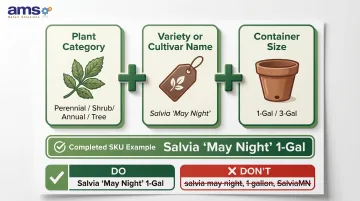
Your SKU structure determines how useful your sales data will actually be. Each SKU should encode three core attributes:
- Plant category (perennial, shrub, annual, tree)
- Variety or cultivar name (the specific plant, not just the species)
- Container size (1-gal, 3-gal, 4-inch pot, etc.)
Every unique combination should be its own SKU. According to GS1 guidance for production nurseries, barcode numbers should be unique for each Genus/Species/Cultivar/Pot size combination. This is the granularity standard that makes sales data actionable.
Establish a consistent naming convention so staff can search by variety name at checkout. Use formats like "Salvia 'May Night' 1-Gal" rather than just "Salvia" or a supplier code. Consistency matters—"Rose Knockout 1G" and "Knock Out Rose 1-Gal" will create duplicate records that fragment your sales data.
Decide your numbering scheme early: Will you use internal SKU numbers or leverage supplier barcodes where available? Document the rule and share it with everyone who handles purchasing, receiving, and system setup.
Step 2: Build Your Plant Item Records in Your POS or Inventory System
Create one item record per unique SKU before inventory arrives. Each record should include:
- Full variety name
- Plant category
- Container size
- Department or product grouping
- Base price
Your system must support multi-attribute item lookup so staff can find the correct SKU quickly, even during spring rush. Specialty retail POS platforms designed for nurseries—such as NCR Voyix Counterpoint, used by garden centers through partners like AMS Retail—handle this kind of structured plant catalog with searchable variety names and real-time quantity updates.
Group related items under a shared department so you can pull both variety-level and category-level reports. All Echinacea varieties, for example, should roll up into a "Perennials" department while still tracking individually by cultivar.
Step 3: Apply Barcodes or Labels at Receiving
At the receiving dock, scan any plants arriving with supplier barcodes. Confirm they match the correct item record in your system before accepting them into inventory. Large branded suppliers typically use standard EAN-13 or UPC-A barcodes on pre-printed tags, which scan directly into retail POS systems.
For plants arriving without barcodes—common with small growers or custom orders—**print your own labels with the internal SKU barcode** and attach them before plants go to the sales floor. Without a scannable label, the plant is invisible to your inventory system, and every untagged plant that sells creates a gap in your data.
Log received quantities by scanning at this stage. This is where your on-hand count starts. Skipping it creates gaps that compound over the season—purchases show up in accounts payable but not in inventory, causing phantom shrink in reports.
Step 4: Train Staff on Scanning and Variety Lookup at the Point of Sale
Walk every checkout employee through the correct scan process:
- Scan the pot label
- Verify the variety name on screen matches the plant in hand
- Complete the transaction
Never allow staff to key in a quantity of a generic "PLANT MISC" item as a shortcut. Every transaction through a catch-all SKU is revenue the system cannot attribute to a variety, making all downstream analysis unreliable.
For damaged or missing labels, staff should use the search/lookup function to find the correct SKU by variety name — not substitute a similar item or skip the scan.
Explain why variety accuracy matters. When "Knock Out Rose 3-Gal" and "Double Knock Out Rose 3-Gal" are rung up as the same item, the sales data becomes useless for future buying decisions.
Step 5: Review Variety-Level Sales Reports and Use the Data to Reorder
Run a weekly sell-through report sorted by variety/SKU. Identify:
- Fast movers: Varieties selling quickly are candidates for reorder
- Slow movers: Varieties stalling are candidates for markdowns or reduced future orders
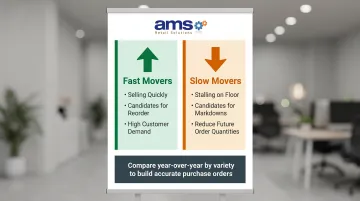
Compare this season's variety sales against the same period from the prior year to build more accurate forward purchase orders. Garden Center Magazine has profiled independent garden centers that credited variety-level sales tracking with significantly improving their forward purchase accuracy — the kind of insight that's only possible when every SKU is recorded correctly from receiving through checkout.