Introduction
Farm equipment and ag supply dealerships routinely sell high-value, serial-numbered products — from tractors and small engines to generators and irrigation equipment — making individual unit tracking a core operational requirement, not an optional feature. Equipment and material theft costs the construction and equipment industry up to $1 billion annually, with mowers, loaders, and tractors among the most frequently targeted items. Yet most general-purpose POS systems treat inventory as quantities, not individual units, leaving dealers to rely on manual logs, spreadsheets, or disconnected warranty binders to track serialized items.
Those gaps show up in predictable ways. When a customer brings in a generator for warranty service and you can't confirm the purchase date, or when an OEM requires serial number registration within 10 days of sale, tracking failures translate directly to denied warranty claims and frustrated customers.
This guide explains how farm equipment and ag supply dealers can use a POS system to manage serialized inventory correctly: setup, the point-of-sale workflow, post-sale tracking, and ongoing best practices that prevent compliance failures and service department bottlenecks.
Key Takeaways
- Serialized inventory tracking assigns a unique serial number to each unit — giving dealers accurate warranty, service, and ownership history for every item sold
- Not all POS systems support serialized inventory natively — dealers need specialty retail solutions that capture serial numbers at receiving and point of sale
- Core workflow: configure serialized items, receive and register units, link serial numbers to customer sales, then pull those records for post-sale service
- Skipping serial capture at receiving or checkout breaks the chain and creates warranty disputes and inventory gaps
- Platforms like NCR Voyix Counterpoint automate serial number capture at checkout, cutting manual workarounds and reducing staff errors
Why Serialized Inventory Tracking Matters for Farm Equipment and Ag Supply Dealers
Individual Unit Accountability vs. Bulk Counting
Serialized inventory differs from bulk or commodity inventory in one key way: instead of tracking how many units are in stock, dealers track which specific unit is where and who owns it. That distinction separates a paper trail from an audit trail.
For high-value equipment with unique warranty and service histories, this matters in practice. When a customer calls about a chainsaw repair, knowing you sold "a STIHL MS 271" isn't enough — you need to know you sold serial number 123456789 to John Smith on March 15, 2024.
OEM Warranty Registration Requirements
Many ag equipment manufacturers require dealers to register serial numbers at point of sale to activate customer warranties and qualify for warranty reimbursement. STIHL requires dealers to complete product registration electronically within 10 days of purchase, with the machine's serial number appearing on the consumer's invoice.
Failure to register correctly disqualifies customers from extended warranty programs. Standard POS quantity tracking cannot fulfill this requirement.
John Deere's warranty registration process explicitly states: "We cannot register the product without" the sales receipt, model number, and product serial number. Without a POS that captures this data automatically at checkout, dealers rely on manual double-entry that introduces errors and delays.
Theft and Loss Prevention
Because each serialized unit has a unique identifier, a POS that records serial numbers at receipt and sale makes it possible to identify exactly which unit is missing. According to the National Equipment Register, dealer and rental stores rank among the most common locations for equipment theft, with mowers, loaders, and tractors frequently targeted.
When a theft occurs, dealers with serialized POS records can:
- Provide law enforcement with exact serial numbers for recovery databases
- File insurance claims with documented proof of ownership and value
- Identify patterns (e.g., multiple units missing from the same receiving batch)
Service History Advantage
When a customer brings in equipment for repair, a serialized POS record allows staff to instantly retrieve the purchase date, original buyer, and any prior service — eliminating manual lookups and reducing diagnostic time. This speeds warranty claims, improves customer service, and helps technicians identify repeat failure patterns for specific serial number ranges.
The Dual-Inventory Challenge
Most ag dealers sell both bulk consumables (feed, seed, fertilizer by weight or volume) and serialized units (tractors, ATVs, chainsaws) from the same counter. Managing those two inventory types in separate systems creates reconciliation errors and staff confusion at the point of sale.
A POS that handles both automatically — applying quantity rules to a 50-pound bag of feed and serial tracking to a $12,000 compact tractor — keeps operations clean without requiring staff to manage two workflows.
What You Need Before Setting Up Serialized Inventory in Your POS
POS System Capable of Serialized Inventory
Confirm that the POS platform in use has a native serialized inventory module — one that prompts for serial number entry at receiving and again at point of sale. General retail POS platforms built for apparel, groceries, or e-commerce often lack this capability entirely or offer it only through third-party add-ons that create integration gaps.
Specialty retail solutions built for farm markets, feed and seed stores, and outdoor power dealers include serialized inventory support as a standard capability. NCR Voyix Counterpoint, offered by AMS Retail Solutions, is one example built specifically for this segment. Industry analysis shows that general-purpose systems lead to "siloing" where parts, service, and sales departments cannot share a combined customer view — and one dealer reported that a non-ag system "could not handle basic ag-specific bugs, credit card processing, or financial postings, leading to lost customers."
Item Master Configuration
Before going live, each serialized SKU must be configured in the system to require serial number capture. This includes:
- Identifying which product categories require serialization (small engines, irrigation controllers, GPS units)
- Identifying which do not (bulk parts, seed, consumables)
- Setting the system to block transactions for serialized items without serial number entry
Incomplete item master setup is the most common cause of serial tracking gaps at go-live. If the system allows staff to override serial number prompts, they will — particularly during the spring planting rush when speed takes priority over process.
Staff Readiness and Receiving Process
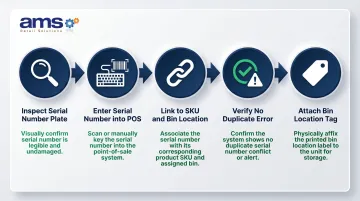
Getting item master configuration right sets the foundation. The next step is making sure receiving staff follow through consistently. Each serial number must be entered at the time of receiving — not skipped — and must match the physical tag or plate on the unit. A receiving checklist helps enforce that standard:
- Inspect each unit's serial number plate or tag
- Enter the exact serial number into the POS receiving screen
- Link the serial to the correct SKU and bin location
- Verify no duplicate serial number error appears
- Attach a bin location tag to the unit for easy physical lookup
How Farm Equipment and Ag Supply Dealers Use POS for Serialized Inventory
POS-based serialized inventory management follows four stages: configuration, receiving, sale, and post-sale tracking. Skipping any stage creates gaps that surface later as warranty disputes, missing units, or inaccurate on-hand counts.
Configuring Serialized Items in the POS
Each product category requiring serialization must be set up in the item master with a "serialized" flag that forces the system to require a unique serial number entry — it cannot be bypassed during a transaction. At setup, the system should:
- Prompt the user during receiving to enter a serial number before the receipt can be completed
- Block a sale at checkout if no serial is linked to the transaction line
- Prevent the same serial number from being entered twice (duplicate detection)
- Alert staff if a serial number format doesn't match expected patterns (e.g., wrong number of characters)
Dealers should also configure the system to store additional unit data alongside the serial number, such as model number, engine type, or OEM part number. This supports service department lookups later when customers describe their equipment by model rather than serial number.
Receiving and Registering Serialized Units
When a shipment of serialized units arrives, staff scan or manually enter each unit's serial number into the POS purchase order or receiving screen, linking it to the specific SKU and bin location. This is when the serial number first enters the system and becomes traceable.
The most common receiving mistake is entering a generic quantity receipt instead of scanning individual serial numbers. Receiving "5 units of STIHL MS 271 chainsaw" without entering five distinct serial numbers creates phantom inventory — the system shows units in stock but cannot identify which specific unit is present. When a customer wants to buy one, the cashier has no serial number to assign.
Correct receiving workflow:
- Open the purchase order or receiving document in the POS
- Scan or select the SKU being received
- For each physical unit, scan or type its unique serial number
- Assign a bin location (e.g., "Aisle 3, Shelf B")
- Confirm receipt — the system now shows that exact serial number as available inventory
Processing a Serialized Item at Point of Sale
The POS checkout sequence for a serialized item follows a controlled path:
- The cashier or sales associate scans the product barcode or selects the SKU
- The system prompts for a specific serial number (either scanned from the unit or selected from a list of available serials in stock)
- The cashier scans the unit's serial number tag or selects it from the on-screen list
- That serial number is locked to the customer's transaction record
- The sale cannot complete without serial number assignment
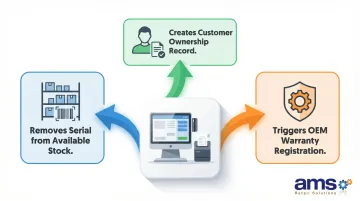
That single checkout action triggers three things at once:
- Updates inventory by removing that exact serial from available stock
- Creates a customer ownership record linking the serial number to the buyer's profile
- Triggers warranty registration with the manufacturer (in systems with OEM integration)
If the serial number doesn't match an available unit in the system, the transaction stops — preventing accidental sale of units not yet received or already sold.
Post-Sale Tracking: Warranty and Service History
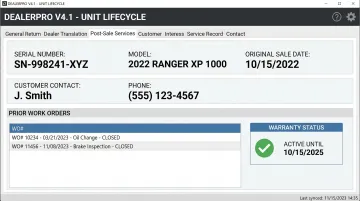
The serialized sale record becomes the foundation for post-sale service. When a customer returns for repair or warranty service, staff can search by serial number to retrieve:
- Original sale date and invoice number
- Customer contact information and purchase history
- Prior service work orders and repair notes
- Warranty coverage status and expiration date
For dealers with in-house service departments, linking serial number records to work orders creates a full unit lifecycle history — turning the sale record into an ongoing relationship with the equipment. That history supports:
- Scheduling preventive maintenance reminders based on unit age
- Identifying repeat failure patterns for specific serial number ranges
- Supporting warranty reimbursement claims with OEMs by documenting purchase date and service history
Farm Equipment magazine reports that 70% of a dealership's total gross margin comes from parts and service departments, and "the service of the parts and service department is what sells the second, third and fourth machines." Serialized tracking turns every unit sold into a service opportunity with documented ownership.
Where Serialized POS Tracking Applies Across Ag and Farm Supply Retail
Product Categories Requiring Serialization
The following product categories in farm equipment and ag supply stores typically require serialized inventory tracking:
- Outdoor power equipment: Chainsaws, mowers, generators, pressure washers
- Small tractors and UTVs: Compact tractors, utility vehicles, ATVs
- Precision ag devices: GPS units, soil sensors, yield monitors
- Irrigation controllers: Electric and battery-operated irrigation timers and controllers
- Branded hand tools with warranty registration: Professional-grade tools with OEM warranties
Not every item in the store is serialized. The system must correctly distinguish between serialized and non-serialized inventory so that bulk feed, seed bags, and consumable parts flow through checkout without serial number prompts. How those requirements scale, though, depends heavily on the size and complexity of the operation.
How Serialization Scales Across Business Contexts
A single-location feed-and-seed store selling a limited range of small engines has simpler serialization needs than a multi-location farm equipment dealer managing hundreds of high-value units across multiple locations. The core POS workflow remains the same, but the volume and OEM integration requirements scale with the dealership's size and brand mix.
Multi-location dealers need systems that:
- Track which serial numbers are at which location
- Support inter-location transfers of serialized units
- Consolidate serial number records across all stores for warranty lookup
- Allow service departments at any location to access sale records from other branches
Compliance-Driven Serialization
Certain products have legal or contractual requirements to record serial numbers at point of sale, making POS-based serialization not just a best practice but an obligation.
Firearms: Federal Firearms Licensees (FFLs) — including farm supply and sporting goods stores that sell firearms — must record the serial number of every firearm in both ATF Form 4473 (Firearms Transaction Record) and the Acquisition and Disposition Record per 27 CFR 478.124 and 478.125(e). Form 4473 must be retained for at least 20 years, and serial numbers must be obtained by physically inspecting the firearm.
OEM dealer agreements: Manufacturers like STIHL impose 10-day registration windows with serial number requirements. Dealers who fail to comply risk losing warranty reimbursement eligibility and dealer status.
Best Practices for Managing Serialized Inventory Through Your POS
Never Allow Serial Number Bypass
Configure the POS so that serialized SKUs cannot be received or sold without a serial number entry. If the system permits override, staff will use it — especially during busy season rushes — and the resulting gaps are difficult to reconstruct after the fact. Every bypassed serial creates a phantom unit that appears in inventory counts but cannot be linked to a customer or warranty claim.
Conduct Regular Serialized Inventory Audits
Schedule periodic counts where staff physically locate each unit, scan its serial number, and reconcile it against the POS on-hand records. This is more granular than a standard inventory count and catches errors — such as a unit received under the wrong serial — before they affect customer transactions or OEM claims.
Inventory management best practices recommend the ABC cycle counting method:
- A items (high-value, fast-moving): Count every other week
- B items (moderate value): Count once per quarter
- C items (low-value, slow-moving): Count once per year
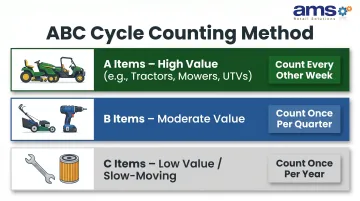
Serialized whole goods (tractors, mowers, UTVs) typically classify as A items due to high unit value, making bi-weekly cycle counts appropriate.
Use Serial Records to Drive Proactive Customer Outreach
Dealers who track which serial number a specific customer owns can send targeted service reminders — annual tune-up, filter replacement, warranty expiry notices — tied to that unit's history. This turns the POS serial record into a customer retention tool, not just an administrative requirement.
North American dealers average a 73% absorption rate, meaning parts and service revenue covers 73% of overhead expenses. Top-performing dealers reach 85-92% by converting whole-goods customers into repeat service customers — and serialized tracking is what makes that conversion systematic.
POS platforms like AMS Retail Solutions' NCR Voyix Counterpoint connect serial records directly to customer profiles, enabling automated service reminders and warranty expiry notices without manual follow-up.
Train Receiving and Sales Staff Together
Serialized inventory integrity depends on both the receiving team entering units correctly and the sales team linking them to customers at checkout. Training should cover the full process chain — not just each team's individual step — so everyone understands how their actions affect the next handoff.
Key training points:
- Receiving staff who skip serial entry force the sales team into manual lookup — or an incomplete transaction.
- Sales staff who bypass the serial prompt break warranty and service history tracking for that customer.
- For both teams: serial number errors cost warranty reimbursements and create inventory discrepancies that take hours to untangle.
Frequently Asked Questions
What does a dealer management system do?
A dealer management system (DMS) manages the full dealership operation — parts inventory, service scheduling, sales pipelines, and accounting integration. A POS system handles the retail transaction layer at the counter, including serialized inventory capture, customer checkout, and payment processing. Specialty retail POS platforms bridge both roles for smaller operations.
What is the best software for parts inventory?
The best parts inventory software for ag and farm supply dealers is built for specialty retail, supporting both bulk consumable inventory and serialized unit tracking. Generic retail or e-commerce platforms lack the dual-mode capability required for mixed-inventory environments.
Can you track a product with a serial number?
A POS system with serialized inventory capability assigns a unique serial number to each unit at receiving, links it to a customer at sale, and retains that record for service, warranty, and audit purposes. The serial number becomes the product's permanent identifier throughout its lifecycle.
What are 5 types of POS systems?
The five main POS system types are: cloud-based, mobile POS, legacy on-premise, self-service kiosk, and specialty/industry-specific platforms. Ag and farm supply dealers benefit most from specialty retail systems that support serialized inventory and offline operation.
How does serialized inventory tracking help with warranty management?
When a serial number is captured at sale and linked to a customer record, dealers can instantly retrieve purchase date and ownership for any warranty claim — satisfying OEM registration requirements and reducing disputes over coverage eligibility.
What types of products at ag supply stores need serialized inventory tracking?
Common serialized product categories include outdoor power equipment (chainsaws, mowers, generators), small tractors and UTVs, irrigation controllers, GPS and precision ag devices, and any branded equipment with OEM warranty registration requirements. Products sold in bulk (feed, seed, chemicals) do not require serialization.