Introduction
Specialty retailers—whether running a garden center, pet supply shop, or farm market—face unpredictable demand, seasonal swings, and supplier lead times that make manual stock monitoring impractical. A spring planting rush can empty your annuals section in days. Hunting season can drain your ammunition stock overnight.
Manual shelf checks miss these shifts. By the time you notice, customers are already walking out empty-handed.
Low stock alerts and automated reordering in a POS system solve this problem. According to IHL Group's 2023 analysis, out-of-stocks cost retailers $1.2 trillion globally in lost sales. For specialty retailers managing seasonal demand and time-sensitive inventory, a single stockout during peak season means a permanently lost sale: customers can't wait and won't return.
This guide covers how low stock alerts work, how to configure them correctly, and why a poorly set-up alert system can cause as many problems as having none.
Key Takeaways
- Low stock alerts trigger reordering when on-hand quantity drops below a preset threshold
- Reorder points depend on daily sales velocity, supplier lead time, and safety stock
- Thresholds can be static (fixed) or dynamic (velocity-based) depending on the product
- Accurate inventory data is essential—errors from shrink or receiving cause false alerts
- Linking alerts to purchase order workflows closes the gap between noticing and ordering
What Are Low Stock Alerts and Reordering in a Retail POS?
A low stock alert is an automated notification triggered by a retail POS system when a product's on-hand quantity drops to or below a predefined minimum threshold, signaling that it's time to reorder.
Some systems stop at the alert — sending an email or dashboard notification. More advanced POS platforms like NCR Voyix Counterpoint go further, auto-generating a suggested or full purchase order with supplier details, reorder quantities, and preferred pack sizes already populated. That removes the manual work of building orders from scratch each time.
There's an important difference between two alert types retailers often confuse:
- Low stock alert — fires while you still have inventory on hand, giving you lead time to reorder before hitting zero
- Out-of-stock alert — triggers after you've already run out, meaning lost sales have already started
One is prevention. The other is damage control.
Why Low Stock Alerts Matter for Specialty Retailers
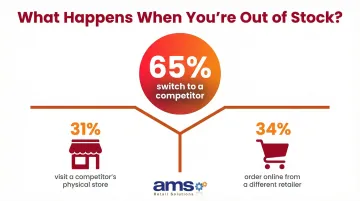
Specialty retailers carry product categories where stockouts have disproportionate consequences. A garden center out of tomato seedlings in May loses that sale permanently—customers won't wait. A pet store without a specific prescription diet loses the customer to a competitor immediately. According to AlixPartners' 2024 survey, when faced with a stockout, 65% of customers switch to a competitor—31% visit a competitor's store, 34% order from a different retailer online.
What Goes Wrong Without Automated Alerts
Without automated alerts, inventory management becomes reactive rather than deliberate. Common failure points include:
- Staff rely on visual shelf checks, which are inconsistent and error-prone
- Orders get placed after a stockout has already occurred
- Popular seasonal items—spring seedlings, hunting ammunition, holiday gifts—run dry exactly when demand peaks
- Reorder decisions depend on whoever happened to notice the empty shelf first
Cash Flow Impact
Alert-driven reordering prevents both stockouts and overstock, allowing specialty retailers to hold leaner inventory without the risk of gaps. This directly improves working capital. McKinsey research on retail inventory management demonstrates that disciplined inventory management can reduce the net working capital cycle by 23 days, unlocking significant cash for other business needs.
Shrink and Accuracy Connection
In specialty retail environments, inventory discrepancy is common—theft, damage, receiving errors, unprocessed returns. A comprehensive study published in Management Science examined nearly 370,000 inventory records and found that nearly two-thirds were inaccurate.
Accurate low stock alerts depend on clean inventory data. If your system shows 15 units but you actually have 8, your alert won't fire until it's too late. Shrink reduction isn't optional. It's a prerequisite for alert reliability.
Multi-Location and Omnichannel Complexity
For multi-location retailers or stores with both in-store and online channels, manual stock tracking becomes unmanageable fast. A customer checks your website, sees an item listed as available, drives to the store, and finds an empty shelf—because an online order shipped that morning and the count never updated.
Automated alerts tied to a centralized POS system solve this by creating consistent visibility across all sales channels, in real time.
How Low Stock Alerts Work in a Retail POS System
When inventory drops to a critical level, a stockout can cost you the sale — and sometimes the customer. To prevent that, a retail POS system continuously (or at set intervals) compares the current on-hand quantity for each SKU against a pre-configured reorder point. When on-hand equals or drops below that threshold, the system triggers a notification and/or purchase order action.
Core Components the System Tracks
The system uses these data points to make alerts accurate:
- On-hand quantity – Current physical inventory count
- Reorder point – The threshold that triggers the alert
- Reorder quantity – How many units to order when the threshold is hit
- Safety stock – Buffer inventory to cover demand spikes or supplier delays
- Supplier lead time – How many days between placing an order and receiving it
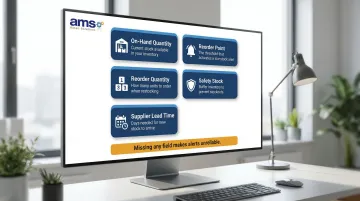
Missing or incorrect data in any of these fields makes alerts unreliable.
How Alerts Are Delivered
Modern retail POS systems deliver alerts through multiple channels:
- In-dashboard notifications with visual flags in the POS interface
- Email alerts sent directly to the buyer, store manager, or owner
- Auto-generated draft purchase orders ready for review and approval
NCR Voyix Counterpoint, the platform AMS Retail Solutions implements for specialty retailers, supports this full alert-to-PO workflow — so the gap between identifying a low-stock item and placing the replenishment order shrinks from days to minutes.
From knowing how alerts are delivered, the next step is configuring them correctly for your inventory.
Setting Up an Alert: Step by Step
Step 1 – Assign a reorder point to each SKU
Access the product or inventory settings in the POS, select the item, and enter the minimum on-hand quantity that should trigger an alert. This should not be a uniform number across all SKUs—it must reflect each product's individual sales pace and lead time.
Step 2 – Define reorder quantity and link to a supplier
Specify how many units to reorder when the threshold is hit. Connect the SKU to its supplier record so the system can populate a purchase order automatically with cost, pack size, and contact details.
Step 3 – Configure notification delivery
Choose who receives the alert (store manager, buyer, owner), through what channel (email, app, in-system dashboard), and at what frequency. Set priority levels so high-velocity or high-margin items trigger immediate notifications while slow movers can appear in a daily or weekly summary.
Setting the Right Reorder Thresholds for Your Store
The reorder point formula provides the math behind the threshold:
Reorder Point = (Average Daily Sales × Supplier Lead Time in Days) + Safety Stock
Practical Example
A bag of wild bird seed sells 4 units per day. Your supplier takes 5 days to deliver. You want a 10-unit safety stock buffer.
Reorder Point = (4 units/day × 5 days) + 10 units = 30 units
When your on-hand inventory drops to 30 units, the alert fires and you place an order. By the time the order arrives 5 days later, you'll have sold 20 units, leaving you with 10 units (your safety stock) plus the new shipment.
That example assumes stable, predictable demand. In practice, most specialty retailers need to choose between two threshold approaches.
Static vs. Dynamic Thresholds
| Threshold Type | How It Works | Best For | Trade-off |
|---|---|---|---|
| Static | Fixed number set manually per SKU | Slow-moving, non-seasonal items (e.g., specialty fertilizer at 2 bags/week year-round) | Requires manual review when sales patterns shift |
| Dynamic | Auto-calculated from live sales velocity and updated lead time data | Fast-moving items, seasonal SKUs (spring annuals, fall hunting accessories), high-demand fluctuation | Requires accurate historical data to function reliably |
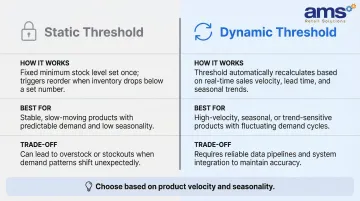
Whichever approach you use, neither works without one critical calculation underneath it.
Safety Stock Is Not Optional
Safety stock is a buffer above the baseline reorder calculation that protects against demand spikes and supplier delays. A simple formula:
Safety Stock = (Max Daily Sales − Average Daily Sales) × Max Lead Time
Use a higher safety stock percentage for seasonal or volatile SKUs (20-30% of average demand) and lower for stable, year-round sellers (10-15%). According to research from the Association for Supply Chain Management, ignoring safety stock can increase operational costs by up to 95% in high-variability scenarios.
Threshold Maintenance
Thresholds you set once and never revisit become inaccurate within months. Schedule quarterly reviews to adjust for:
- Supplier lead time changes
- Seasonal transitions (spring to summer, fall to winter)
- SKU velocity shifts (a product that was slow-moving last year may be trending this year)
Annual SKU cleanup—removing discontinued items—also prevents ghost alerts from triggering unnecessary reorders.
Common Mistakes That Undermine Low Stock Alert Systems
Mistake 1 – Using One Threshold for All SKUs
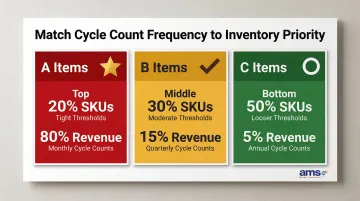
Applying a blanket minimum (e.g., "reorder everything at 5 units") ignores reality. A fast-selling bird feeder and a slow-moving specialty fertilizer have completely different demand profiles. ABC segmentation helps:
- A items (top 20% of SKUs, 80% of revenue) – Tight thresholds, frequent review, higher safety stock
- B items (middle 30% of SKUs, 15% of revenue) – Moderate thresholds, quarterly review
- C items (bottom 50% of SKUs, 5% of revenue) – Looser thresholds, annual review, minimal safety stock
Mistake 2 – Treating Alerts as a Substitute for Inventory Accuracy
Alerts are only as reliable as the on-hand count in the system. If shrinkage, receiving discrepancies, or unprocessed returns have inflated or deflated recorded inventory, alerts will fire too early, too late, or not at all. The National Retail Federation's 2023 survey found that shrink averaged 1.6% of sales, costing U.S. retailers $112.1 billion annually.
Regular cycle counts and proper receiving procedures need to be in place before alert thresholds mean anything — ideally monthly for A items, quarterly for B and C.
Mistake 3 – Ignoring Supplier Lead Time Variability
Many retailers enter an ideal lead time (e.g., 3 days) but don't account for real-world variability (e.g., 5-10 days during peak seasons or supply disruptions). When that variability isn't factored in, reorders arrive after the stockout — not before it. According to IHL Group analysis, supplier and vendor issues contributed $414 billion to global inventory distortion in 2023.
To close this gap:
- Track actual vs. expected lead time per supplier over time
- Use the worst-case lead time in your reorder point formula (e.g., if your supplier ranges from 3-7 days, calculate with 7)
- Revisit lead time assumptions each season, especially for suppliers affected by weather or shipping delays
Conclusion
Low stock alerts and automated reordering are not a "set and forget" feature. They are a system that requires accurate data inputs (on-hand quantities, lead times, supplier records) and regular threshold maintenance to deliver reliable outcomes. The setup work is front-loaded, but the operational payoff is consistent:
- Fewer stockouts and missed sales
- Leaner inventory and reduced carrying costs
- Improved cash flow
- Customers who find what they need when they visit
For specialty retailers managing seasonal demand, multi-category assortments, and complex supplier relationships, the reordering process only works when alerts connect directly to purchase order workflows. AMS Retail Solutions implements NCR Voyix Counterpoint for specialty retailers—garden centers, feed stores, pet supply shops, and similar businesses—specifically because its customizable alert rules and integrated PO workflows turn reactive guesswork into a repeatable, systematic process.
Frequently Asked Questions
What is a low-stock alert?
A low-stock alert is an automated notification from a POS or inventory management system triggered when a product's on-hand quantity reaches or drops below a preset minimum threshold. It signals the retailer to reorder while stock is still available, preventing a stockout.
What does low-stock alert configuration mean?
Configuration refers to the process of setting the specific parameters that govern when and how an alert fires. This includes the reorder point threshold, reorder quantity, supplier linkage, and notification delivery method for each SKU in the system.
How do I calculate a reorder point for my retail store?
Use the formula: Reorder Point = (Average Daily Sales × Supplier Lead Time in Days) + Safety Stock. Each variable should reflect actual historical data for that specific SKU rather than a store-wide estimate. For example, if a product sells 3 units/day, has a 7-day lead time, and requires 10 units of safety stock, the reorder point is 31 units.
What is the difference between a reorder point and safety stock?
The reorder point is the quantity at which you place a new order. Safety stock is a buffer inventory built into that calculation to protect against unexpected demand spikes or supplier delays. Safety stock is a component of the reorder point, not a separate trigger.
Can a retail POS system automatically create purchase orders when stock runs low?
Yes, advanced retail POS systems can auto-generate draft or complete purchase orders when a reorder point is hit, pre-populated with supplier details, preferred quantities, and pack sizes. Most systems recommend a human review step before sending orders to suppliers, allowing adjustments for budget or timing.
How often should I update my low stock alert thresholds?
Review thresholds quarterly at minimum, plus before major seasonal transitions — such as spring planting season for garden centers, back-to-school, or holiday — and whenever a key supplier's lead time shifts. High-velocity or seasonal SKUs may need monthly adjustments.