Introduction
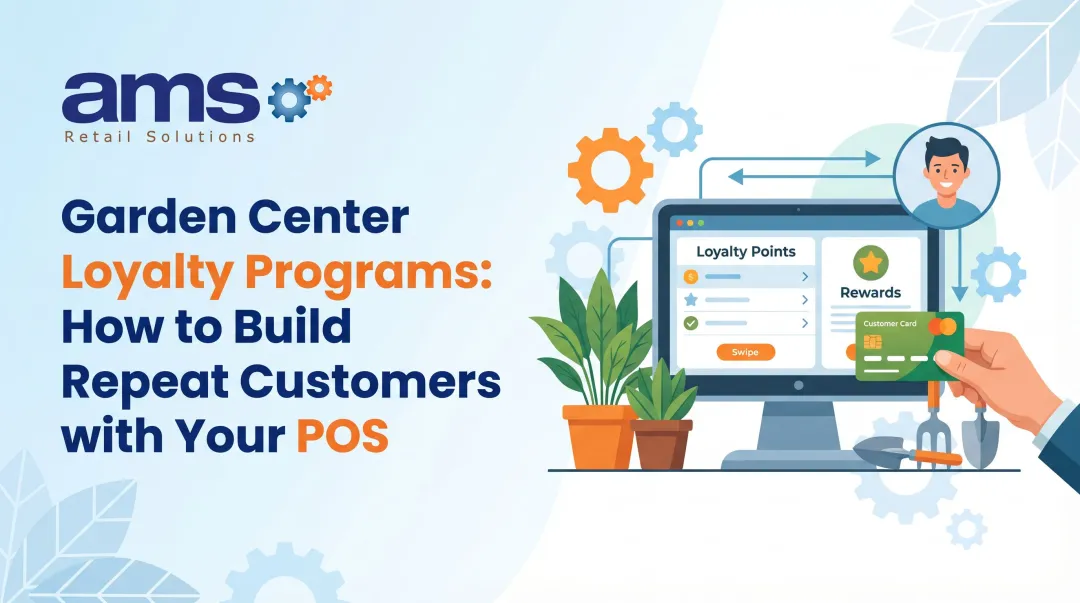
Specialty retail customers — whether shopping at a garden center, pet store, or farm market — return more often when they feel recognized and rewarded. Yet many retailers still manage loyalty manually or skip it entirely, missing out on repeat visits they've already earned. Industry data shows loyalty members spend 116% more per transaction than non-members, with enrolled customers accounting for up to 80% of total sales in programs that run well.
Setting up a loyalty program in your POS system sounds simple enough — and it can be. But results vary significantly based on program type, configuration, and how well it's executed. Poorly built programs go unused; the right setup drives real increases in visit frequency and average transaction value.
This guide covers what you need to know to get it right:
- Which loyalty program types work best for specialty retail
- What to have in place before you configure anything
- The step-by-step setup process inside your POS
- Key variables that affect outcomes
- Common mistakes that undermine even well-designed programs
Key Takeaways
- Setup covers four steps: choose a structure (points, tiers, or visits), configure earning/redemption rules, enroll customers at checkout, and train staff
- Most modern POS systems offer native loyalty modules or third-party integrations; program complexity determines which fits best
- Key success variables include earning rate, redemption threshold, reward type, and enrollment friction
- Common failures stem from misconfigured earning rates, skipping pre-launch testing, and insufficient staff training
- A properly configured POS loyalty program automates tracking so repeat customers are rewarded without manual effort
Types of Loyalty Programs to Consider for Your Retail Business
Before touching any settings in your POS, decide what kind of loyalty program you're running — the structure drives all subsequent configuration decisions. The best fit depends on your customer visit frequency, average transaction size, and business type.
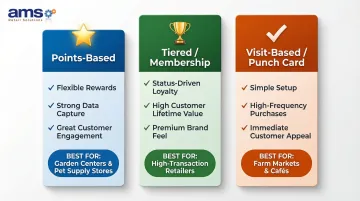
Points-Based Programs
Points-based programs award customers a set number of points per dollar spent, which they later redeem for discounts or free items. Most POS platforms support this structure natively, and it works well for specialty retailers with moderate-to-high transaction values — garden centers and pet supply stores are a natural fit.
Points programs hold up because they balance simplicity with data value:
- Easy for customers to understand at a glance
- Flexible reward options (discounts, free items, store credit)
- Built into most POS platforms without custom configuration
- Generate purchase history data you can use for targeted promotions
If your customers respond well to points, tiered programs take that engagement further — though they require more setup to get right.
Tiered/Membership Programs
Tiered programs let customers unlock better rewards as they spend more (Silver, Gold, Platinum). They're more complex to configure, but effective for driving higher average transaction values. They work best for retailers — outdoor sporting goods stores, for instance — with a loyal core base willing to invest more for better perks.
Tiered programs suit:
- Stores with diverse product ranges where customers return for different categories
- Retailers looking to differentiate from competitors on experience, not just price
- Businesses with a customer base that responds to status and recognition
The setup complexity is real — but so is the payoff when customers actively work toward the next tier.
Visit-Based or Punch Card Programs
Visit-based programs (buy 10 bags of feed, get 1 free) are the simplest to set up in a POS and ideal for high-frequency, lower-transaction businesses like farm markets. The trade-off is less customer data captured compared to points-based programs.
Modern POS systems automate what were once physical punch cards, tracking visits digitally and applying rewards automatically at checkout.
What You Need Before Getting Started
Preparation directly determines how smoothly the setup goes and how effective the program is from day one. Skipping this phase is the most common reason loyalty programs underperform.
POS Compatibility and Loyalty Module Access
First, confirm whether your POS system has a built-in loyalty module or requires a third-party integration. For example, NCR Voyix Counterpoint — the retail POS used by AMS Retail Solutions for specialty retail environments — includes built-in loyalty program functionality, so merchants often don't need a separate platform at all.
Check:
- What subscription tier or add-on unlocks loyalty features
- Whether your current plan includes loyalty capabilities
- If third-party integration is required, which platforms are supported
Customer Data Infrastructure
Your POS needs a customer profile system in place before loyalty can work. At minimum, it must identify customers at checkout using one of the following:
- Phone number
- Email address
- Loyalty card or QR code
Each method links the transaction to a customer profile. Without that link, the system has no way to track points or redemptions.
Staff Readiness and Defined Program Rules
Before any configuration begins, decide on your core program rules in writing:
- Point earning rate
- Minimum redemption threshold
- What rewards are offered
- Whether points expire
- Which products (if any) are excluded
Configuring settings without these decisions finalized means constant adjustments — and nothing erodes trust faster with staff and customers than rules that keep changing.
How to Set Up a Loyalty Program in Your POS System
While the exact interface varies by system, the core setup tasks are consistent across most modern POS platforms. For specialty retailers — whether you run a garden center, pet supply store, or farm market — following these steps in order minimizes errors and reduces the need for reconfiguration after launch.
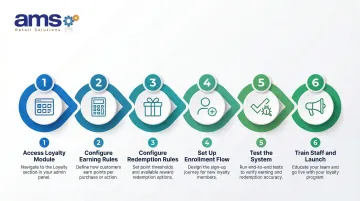
Step 1: Access the Loyalty Module in Your POS Dashboard
Navigate to your POS back-end admin dashboard or portal — not the front-end register. In most systems, loyalty is either a native module to activate or an app/add-on to install.
Before proceeding:
- Ensure you are in the correct location
- Confirm the module is enabled for all relevant store locations
- Verify you have admin permissions to modify loyalty settings
Step 2: Configure Earning Rules
Input the core earning rule settings:
- Accrual rate: e.g., 1 point per $1 spent
- Eligible items: Points on all items or only specific categories
- Sign-up bonus: Offered to new enrollees or not
- Item-level exclusions: Check if your system allows excluding sale items, tobacco, or specific categories from accruing points
Industry benchmarks suggest customers earn 1 point per dollar spent, but adjust based on your margins and transaction values.
Step 3: Configure Redemption Rules and Rewards
Configure three core redemption settings:
- Redemption threshold: Minimum points balance required before a customer can redeem
- Conversion rate: e.g., 100 points = $5 discount
- Reward type: Percent discount, dollar-off, free item, or a combination
Critical calibration: The reward must be compelling enough to motivate repeat visits but set carefully so the program doesn't erode margins. A typical setup offers a 10% reward value — for example, 100 points redeemable for a $10 discount.
With earning and redemption rules locked in, the next step is making enrollment fast and frictionless.
Step 4: Set Up the Customer Enrollment Flow
Configure the enrollment experience at the point of sale:
- How staff or customers initiate sign-up (typically via phone number or email at the register or customer-facing display)
- How the customer profile is created in the system
- Whether a sign-up bonus is applied automatically
The enrollment process should take under 30 seconds at checkout — slow sign-ups are a leading reason loyalty programs underperform. Research shows that 32% of loyalty enrollments now happen via mobile app, but 17% still occur at the checkout counter, making in-store enrollment critical.
Step 5: Test the System Before Going Live
Run simulated test transactions in a sandbox or using a test customer account before the first real customer uses the program.
Verify:
- Points accrue correctly after a purchase
- Redemptions apply the right discount
- Excluded items don't earn points
- Customer balances update immediately
- Multi-location syncing works (if applicable)
Document any discrepancies and resolve them with the POS vendor before launch.
Step 6: Train Staff and Launch
Cover the essential staff training elements:
- How to enroll a new customer at checkout
- How to look up a customer's points balance
- How to apply a redemption to a transaction
- How to handle common errors (customer not found, points not updating)
In-POS prompt cards or quick-reference guides posted at the register reduce checkout confusion during the initial rollout period.
Key Variables That Affect Your Loyalty Program's Results
Two retailers can use the exact same POS loyalty setup and get dramatically different results. The difference usually comes down to four variables — and getting even one wrong can quietly undermine an otherwise solid program.
Earning Rate vs. Redemption Threshold Balance
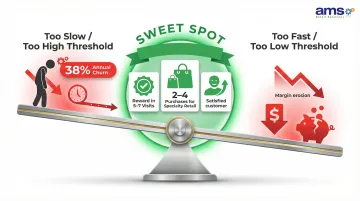
If points accumulate too slowly or the redemption threshold sits too high, customers disengage before they ever earn a reward. Set it too low and the program may cost more than it returns. Customers should be able to earn a meaningful reward within 5-7 visits. For semi-discretionary retail like garden centers and pet supply stores, aim for rewards attainable within 2-4 purchases.
The primary reason customers abandon loyalty programs is the perception that it takes too long to earn a reward — one 2024 study found 38% annual churn driven by slow accumulation.
Reward Type and Perceived Value
A dollar-off discount and a free item may carry the same cost to you, but customers experience them very differently. Free items tend to feel more rewarding and build a stronger emotional connection than equivalent discounts.
Consumer research shows 70% prefer discounts and 64% prefer cash-back style rewards. That said, surprise rewards or exclusive access can set your program apart from competitors.
Specialty retailers should align rewards with their product mix — a free bag of seed at a farm market lands differently than a percentage discount at a pet supply store.
Enrollment Rate and Customer Identification Method
A loyalty program is only as effective as its enrollment rate. If fewer than half of transactions are linked to a customer profile, the program generates limited data and limited loyalty impact.
The customer identification method directly affects enrollment friction:
- Phone number: Fastest, lowest friction, no physical card to carry
- Loyalty card: Requires customers to remember/carry card
- Mobile app: Higher engagement potential but slower enrollment at checkout
Simpler works better in specialty retail environments. Phone number entry takes seconds and requires nothing extra from the customer.
Points Expiration and Urgency Settings
Programs with no expiration on points often see low redemption rates — without urgency, customers never feel pressed to return. A well-set expiration window (points expiring after 12 months of inactivity, for example) can drive re-engagement without feeling punitive.
Research shows 56% of shoppers changed or abandoned a purchase after discovering their points had expired — showing how much expiration stings. Most POS systems allow automated SMS or email notifications when points are near expiration. Enabling those alerts is one of the simplest ways to drive incremental visits.
Common Mistakes When Setting Up POS Loyalty Programs
Getting the setup right is only half the battle. These are the mistakes that most often surface after launch — and cost retailers the most to fix.
Setting Earning and Redemption Rates Without Margin Analysis
Many retailers copy industry benchmarks or guess at rates without calculating the actual cost to their business. Model out the worst-case redemption scenario: what if 80% of enrolled customers redeem at the maximum rate? Confirm the program remains profitable before finalizing rates.
As a general benchmark, industry data suggests roughly half of all loyalty rewards are eventually redeemed. In active programs, expect 20–30% of enrolled customers to redeem within any given period — plan your margins accordingly.
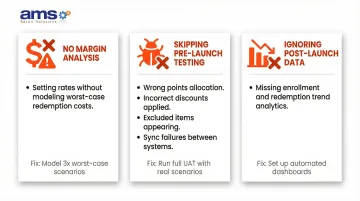
Skipping Real-World Testing Before Launch
Testing in a live environment after launch means real customers experience errors first. Common issues caught in testing include:
- Points not linking to the correct customer
- Redemptions applying the wrong discount value
- Excluded items still accruing points
- Multi-location sync failures
Run at least 10–15 test transactions covering different scenarios before going live.
Failing to Review Program Performance Data Post-Launch
Many retailers launch a loyalty program and never revisit the numbers. That's a problem, because most POS loyalty modules generate detailed reports — and ignoring them means you won't catch underperformance until it's already costing you.
Review monthly:
- Enrollment rate (percentage of transactions linked to a loyalty profile)
- Redemption rate
- Change in visit frequency among enrolled customers vs. non-enrolled
- Average transaction value for loyalty members vs. non-members
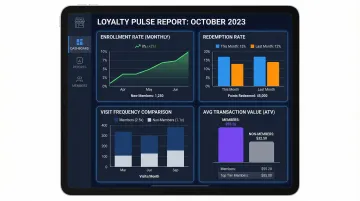
These metrics tell you whether the program is actually changing customer behavior — or just adding administrative overhead with no measurable return.
Conclusion
Setting up a loyalty program in a POS system works best when the program structure is decided before configuration begins, earning and redemption variables are calibrated thoughtfully, and staff are trained ahead of launch. Get those three right, and most of the common failure points disappear before they become problems.
Specialty retailers looking to implement or upgrade their loyalty setup can work with AMS Retail Solutions, a POS partner that specializes in NCR Voyix Counterpoint for specialty retail. The platform includes built-in loyalty tools configured for how specialty stores actually operate, backed by 24/7 support. Call AMS Retail at 757.495.4995 to discuss your loyalty program requirements.
Frequently Asked Questions
What are the 4 C's of customer loyalty?
The 4 C's are Captive, Convenience-Seeker, Contented, and Committed. These types inform your POS program structure: Committed customers respond well to tiered programs, while Convenience-Seekers do better with simple points-based setups.
What are the 3 R's of customer loyalty?
The 3 R's are Rewards, Relevance, and Recognition. In a POS context, Rewards are configured through earning rules, Relevance comes from personalized offers built on purchase data, and Recognition happens when the system identifies customers at checkout.
What type of loyalty program works best for specialty retail stores?
Points-based programs are the most versatile and widely supported by POS systems, making them the most practical starting point for specialty retailers. Tiered programs suit businesses with high average transaction values, while visit-based programs work better for high-frequency, lower-ticket purchases like farm markets.
How long does it take to set up a loyalty program in a POS system?
Basic loyalty program configuration in a POS typically takes a few hours to a full day, depending on the complexity of the rules and whether the system has a native module or requires a third-party integration. Testing and staff training add additional time before a program is ready to launch.
Can a POS loyalty program work across multiple store locations?
Most modern POS systems support multi-location loyalty programs, letting customers earn and redeem points at any participating location. All locations must share the same loyalty database, with item eligibility and other settings configured consistently across sites.
How do I know if my POS loyalty program is actually working?
Check your POS loyalty dashboard monthly for enrollment rate, redemption rate, visit frequency among enrolled vs. non-enrolled customers, and average transaction value for members vs. non-members. Consistent movement in these numbers indicates whether your program is gaining traction.