Introduction
Your POS system is the operational backbone of your specialty retail business—whether you're a garden center processing spring rush crowds, a pet supply store managing complex inventory, or a farm market handling seasonal product changes. But even the best system delivers poor results if staff aren't trained to use it confidently.
POS training isn't as simple as handing someone a manual. Results vary dramatically depending on preparation, skills taught, training methods, and how consistently that training is reinforced.
Poor training creates measurable problems: longer checkout times, transaction errors, incorrect discounts, and inventory mismatches. Each of those issues hits revenue and customer satisfaction directly.
Getting training right fixes all of that. This guide covers what to do before training starts, a step-by-step training process, the core skills every retail employee needs, and the most common mistakes that slow teams down.
Key Takeaways
- Set up user accounts, permissions, and a training plan before staff ever touch the system
- Every employee needs core transaction skills: sales processing, inventory lookups, discounts, returns, and end-of-shift procedures
- Hands-on practice with real retail scenarios builds competency faster than any manual
- Role-based training matters—cashiers need different access and skills than managers
- Schedule refreshers before peak seasons—POS skills erode without regular reinforcement
Why Proper POS Training Matters for Specialty Retailers
Untrained or undertrained staff create measurable business problems. According to the National Retail Federation's 2023 Security Survey, process and control failures—many originating at the POS—accounted for $30.27 billion in retail losses in 2022. These errors include pricing mistakes, incorrect discounts, payment processing failures, and return handling errors.
Checkout speed compounds the problem. Long queues cause 1-4% of total revenue loss from abandoned purchases — and one UC Berkeley study found that one-third of shoppers walk out if wait time exceeds seven minutes.
Specialty retail environments face unique complexity:
- Seasonal product catalogs that change frequently
- Age-restricted items requiring verification
- Fluctuating inventory during peak periods
- High-volume rush seasons (spring planting, hunting season, holidays)
High staff turnover—a common challenge in specialty retail—makes consistent training especially critical. The retail sector's annualized separation rate is 37%, about 24% higher than the total private sector. Without a structured program, each new hire develops different habits — and those inconsistencies compound into real error rates across your team.
What to Set Up Before Training Begins
Preparation directly determines training effectiveness. Teams that show up without accounts configured, permissions assigned, or a plan in place waste time and create confusion.
System and Account Configuration
Before training starts, each employee should have:
- Individual login created — never share credentials
- Role-appropriate permission levels assigned — cashiers need different access than managers
- Correct register or station configured — assign staff to specific terminals
NCR Voyix Counterpoint supports customizable user roles, so assigning the right permissions per employee takes minutes rather than guesswork. Individual logins also create accountability — managers can see exactly who processed which transactions, which matters when discrepancies come up.
With accounts ready, the next step is building the environment where employees can actually learn.
Training Materials and Environment
Managers should prepare:
- Simple training outline covering the session's objectives
- Quick-reference sheet of the most common functions
- Demo or sandbox mode (where available) so employees can practice without affecting live data
- Assigned trainer or mentor to guide each new hire through the first sessions
When these pieces are in place before day one, the first session can cover actual workflows instead of troubleshooting who has access to what.
How to Train Staff on Your POS System: A Step-by-Step Process
Step 1: Familiarize Staff with the Interface Before Touching a Live Transaction
Walk staff through the POS dashboard, main menus, and navigation pathways before asking them to process anything. The goal is comfort with the layout, not speed.
Have each employee practice:
- Logging in and out using their unique credentials
- Locating key functions (checkout, inventory lookup, reports)
- Understanding what their specific access level allows them to do
- Identifying where to find help or support information
Getting comfortable with the layout first means staff arrive at their first real transaction with a clear mental map—not a blank stare at the screen.
Step 2: Demonstrate Core Transactions Using Real Store Scenarios
Conduct live demonstrations of the most frequent transactions your store handles—scanning products, processing a card payment, applying a discount, and printing a receipt.
Use products and scenarios that mirror what staff will actually encounter:
- Scanning a bag of feed or potting soil
- Applying a seasonal promotion on plants or pet supplies
- Processing a split payment (part cash, part card)
- Handling an age-restricted item like pesticides or ammunition
Have the trainer talk through each step aloud, explaining what the system is doing and why—so staff grasp the logic of each action, not just the button sequence.
Step 3: Give Staff Hands-On Practice in a Controlled Environment
Move from demonstration to supervised practice as soon as possible. Use role-play exercises—one employee acts as the customer, one processes the transaction—to simulate real checkout pressure without risk to live data.
Cover progressively complex scenarios in sequence:
- Simple sale first (scan, total, payment, receipt)
- Returns and voids (item removal, transaction cancellation)
- Discount application (manual codes, loyalty rewards)
- Loyalty redemptions and gift card processing
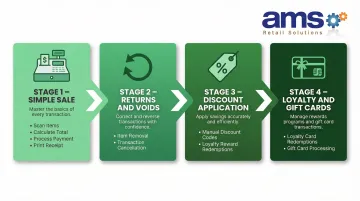
Only introduce the next level once the previous one is completed confidently. If the POS system offers a training or practice mode, use it here to keep errors out of inventory counts and financial records.
Step 4: Run Supervised Live Transactions Before Independent Clearance
Have each employee complete a set number of real transactions under direct supervision before being cleared to operate the register independently. Direct oversight at this stage lets trainers catch bad habits before they become routine.
Use a simple sign-off checklist to confirm the employee has demonstrated:
- Processing a standard sale correctly
- Handling a return without errors
- Applying a discount accurately
- Completing end-of-shift procedures
Document completion—this creates an accountability record and provides a baseline if performance issues arise later.
Core POS Skills Every Retail Staff Member Should Know
When staff aren't confident at the register, small mistakes compound fast — declined cards hold up lines, missed discounts erode margins, and incorrect returns skew inventory counts. These five skill areas form the foundation every customer-facing employee needs before their first solo shift.
Processing Sales and Payments
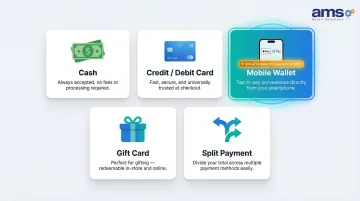
Staff must confidently process:
- Cash transactions with correct change calculation
- Credit/debit card payments
- Mobile wallet payments (Apple Pay, Google Pay)
- Gift card payments
- Split payment transactions (multiple payment methods)
Include how to confirm a payment has gone through and how to troubleshoot a declined card without holding up the line. With digital wallets projected to reach 31% of in-store transactions by 2027, staff must be comfortable with all payment types.
Inventory Lookups and SKU Scanning
Critical for specialty stores with large, seasonal product catalogs. Staff should be able to:
- Locate a product by SKU or product name
- Check available stock at the current location
- Identify whether an item is available at another location
- Understand product attributes (size, color, variety)
This is especially important for stores like garden centers or feed-and-seed retailers where product availability changes frequently and customers ask specific questions about stock.
Applying Discounts, Promotions, and Loyalty Rewards
Staff must know how to:
- Manually apply promotional codes
- Honor loyalty points and rewards
- Process gift card redemptions
- Verify that a promotion applied correctly
- Troubleshoot when a promotion does not apply automatically
Incorrectly applied or unapplied discounts are among the most common sources of both revenue loss and customer friction — and in specialty retail environments with complex seasonal pricing, that risk is higher than most operators expect.
Returns, Voids, and Refunds
Staff need to distinguish between three distinct scenarios — each handled differently in the system:
- Voiding an item mid-transaction — removing a scanned item before payment
- Processing a return after payment — handling a customer return with receipt
- Issuing a refund to the original payment method — ensuring refunds go to the correct card or account
Accuracy here protects inventory data integrity and prevents accounting errors. Note that return fraud accounts for 8-11% of all returns, making proper verification procedures essential.
End-of-Shift Procedures
Every staff member should know how to close out their session correctly:
- Reconciling the cash drawer against system records
- Generating a shift summary report
- Securely logging out of the system
- Reporting any discrepancies to management
Consistent close-outs protect against cash variances and give managers the data they need to spot shrinkage and staffing patterns early.
Common POS Training Mistakes to Avoid
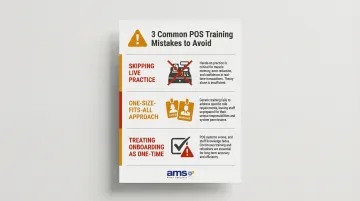
Three patterns consistently derail POS training — and all three are avoidable:
- Skipping practice on live transactions: Putting new staff straight onto real transactions leads to errors that are harder to catch in the moment. Even a short role-play or sandbox session cuts first-week mistakes and builds confidence before the pressure is real.
- Using a one-size-fits-all approach: Cashiers, floor staff, and managers need different access levels and different skills. Training a cashier on manager-level override functions wastes time and creates security gaps — role-based training keeps permissions clean and audit trails clear.
- Treating onboarding as a one-time event: Many stores train staff once at hire and never return to it. As system updates roll out, new promotions launch, or seasonal features activate, that gap compounds. POS training works best as an ongoing process, not a checkbox.
Keeping Your Team Sharp: Ongoing POS Training Tips
Ongoing training doesn't require lengthy sessions — it requires well-timed ones. Specialty retail businesses face predictable high-pressure periods: spring season for garden centers, back-to-school for pet and feed stores, hunting season for sporting goods retailers. Brief refresher sessions before these peaks reduce checkout errors and keep throughput high when it matters most.
Build a small library of quick-reference materials kept near the register:
- One-page cheat sheet of the most common functions
- The returns policy and approval requirements
- Contact list for IT or POS vendor support
AMS Retail Solutions provides 24/7 support, so staff can get real-time help during a Saturday rush without waiting until Monday morning. That kind of immediate availability keeps a single stuck transaction from turning into a line out the door.
When system updates or new features roll out, run a short team briefing before the change goes live — not after. Letting staff discover updates mid-shift leads to workarounds and outdated habits that are hard to unlearn. Most POS platforms push updates regularly (some bi-weekly, others quarterly), so building a standing pre-launch check-in into your process keeps everyone on the same page.
Frequently Asked Questions
How long does POS training take for new retail employees?
Initial training typically takes one to two shifts (four to eight hours), covering core transactions and basic navigation, with additional time for supervised practice before independent clearance. Both the system's complexity and the employee's prior experience influence that range.
Should all retail staff have the same level of POS access?
No—access should be role-based. Cashiers need transaction-level access, while managers need override, reporting, and refund capabilities. Granting broad access to untrained employees increases the risk of errors and unauthorized transactions.
What are the most important POS skills to teach first?
Processing basic sales and payments should always come first, followed by returns and voids, then discounts and loyalty functions.
How often should retail staff receive POS refresher training?
Refreshers are recommended at a minimum before peak selling seasons, after any significant system updates, and whenever a pattern of errors is identified. Quarterly check-ins keep skills sharp between seasonal rushes.
What should I do if staff are resistant to learning a new POS system?
Resistance usually stems from fear of making errors or feeling overwhelmed. Hands-on practice in a low-pressure environment, paired with positive reinforcement during supervised transactions, helps staff build confidence quickly.
How do I handle POS training when turnover is high?
Use a standardized onboarding checklist and quick-reference materials that any trainer can use consistently. This keeps training consistent and helps new hires reach competency faster, no matter who's running the onboarding.