Portable POS devices aren't just a checkout upgrade—they're a staff empowerment tool that fundamentally changes what employees can do, where they can do it, and how confidently they can serve customers. By untethering staff from fixed terminals, portable POS transforms associates from order-takers into knowledgeable, mobile sales resources capable of delivering service anywhere on the floor.
Key Takeaways
- Portable POS eliminates checkout lines by letting staff process payments anywhere on the floor
- Staff pull up real-time inventory data on the spot — no leaving the customer to check the back room
- Familiar mobile interfaces get seasonal and part-time staff up to speed faster
- Handheld devices surface purchase history and loyalty data, so every customer interaction feels personal
- Transaction tracking and audit trails improve accountability and reduce inventory shrink
What Is a Portable POS Device?
A portable POS (also called mobile POS or mPOS) is a compact, wireless device that replicates every function of a fixed checkout terminal. Staff can process payments, look up inventory, access customer accounts, and complete full transactions from anywhere in the store. Instead of directing customers to a register, employees bring the register to the customer.
Modern portable POS systems integrate directly with a retailer's core POS software, so sales, inventory, and customer records stay consistent across every device in real time. For specialty retailers managing large SKU counts and seasonal inventory swings, that consistency matters. AMS Retail Solutions offers NCR Voyix Counterpoint with portable POS capabilities built for exactly these environments — where staff need accurate product information on hand to guide customers to the right purchase.
5 Ways Portable POS Devices Empower Your Staff
Checkout From Anywhere on the Floor
Portable POS allows staff to complete the entire checkout process—payment processing, receipt generation, loyalty point capture—without directing customers to a fixed terminal. This effectively eliminates checkout lines during peak periods.
The real-world impact for specialty retailers is substantial. During a spring rush at a garden center or a busy weekend at a farm market, the ability to check out customers anywhere on the floor directly reduces wait times, prevents cart abandonment, and allows staff to handle higher transaction volumes with the same headcount. Home Depot's garden centers saw a 6.1% boost in same-store sales after implementing mobile POS for line-busting.
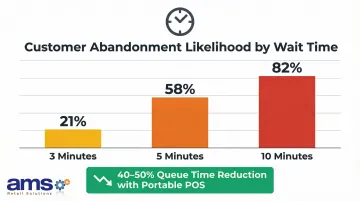
Customer tolerance for waiting is remarkably low. Research shows that while a 3-minute wait has a 21% abandonment likelihood, this jumps to 58% at 5 minutes and 82% at 10 minutes. Some retailers using portable POS report queue time reductions of up to 40-50% during peak periods.
Key benefits:
- Process full transactions at the customer's location
- Eliminate wait times during seasonal rushes
- Prevent cart abandonment from long lines
- Increase transaction capacity without adding staff
Real-Time Inventory Access Without Leaving the Customer
When a customer asks whether a specific item is in stock, in what size, or available at another location, a staff member with portable POS can answer instantly—without leaving the customer or disappearing into a stockroom.
The staff role changes fundamentally. Instead of shuttling between the customer and a back-office terminal, the employee becomes a knowledgeable sales resource on the floor — especially valuable in high-SKU environments like pet supplies, seed and feed, or outdoor sporting goods where customers need expert guidance.
The cost of not having this capability is significant. According to IHL Group, retailers lose $15.7 billion annually worldwide because customers "couldn't find anyone to help." Inventory distortion—the combination of out-of-stocks and overstocks—costs the retail industry $1.77 trillion annually, with out-of-stocks representing approximately $1.2 trillion in lost sales.
What staff can do with portable POS:
- Check stock levels instantly during customer conversations
- Verify product availability at other locations
- Access detailed product information and specifications
- Offer alternatives when items are out of stock
Faster Onboarding for Seasonal and Part-Time Staff
Portable POS devices built on familiar mobile interfaces significantly reduce the learning curve for new staff—a critical advantage for retailers who depend on seasonal hires or high-turnover part-time workforces.
An intuitive, app-like interface means staff can become operationally functional in far less time than with legacy systems that require memorizing complex key sequences or navigating unintuitive terminal menus. Research on modern software with in-app guidance consistently shows onboarding time reductions of 40-50% — and mobile POS systems, built on the same familiar touchscreen conventions, deliver comparable results.
For specialty retailers facing spring rushes at garden centers or harvest season peaks at farm markets, getting seasonal staff productive quickly directly impacts service quality and revenue during the most critical selling periods.
Training advantages:
- Familiar touchscreen interface reduces learning curve
- Staff become functional faster than with legacy terminals
- Lower training costs per seasonal employee
- New hires contribute to sales sooner
More Personalized Customer Interactions
Portable POS devices give staff access to customer purchase history, loyalty balances, and account notes at the point of conversation—not just at the checkout counter. This enables more meaningful, contextual service that builds repeat business.
The associate's role moves from order-taker to trusted advisor — particularly valuable in specialty retail where customers have specific questions and appreciate informed recommendations. The revenue impact is real: companies using personalization generate 40% more revenue than average performers, and customers engaged through personalized service spend 63% more per month with 194% higher average order values.
NCR Voyix Counterpoint includes built-in customer loyalty program capabilities, allowing staff to look up loyalty status, apply rewards, and access customer preferences during floor interactions.
Personalization capabilities:
- Access customer purchase history during conversations
- Look up loyalty points and rewards balances
- View customer preferences and account notes
- Make informed product recommendations based on past purchases
Better Accountability and Reduced Inventory Shrink
Portable POS devices create a real-time audit trail of every transaction, lookup, and inventory adjustment made by a staff member. Managers gain visibility into store operations without requiring physical supervision.
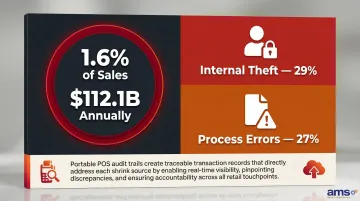
Portable POS systems tied to a centralized inventory database help flag discrepancies faster—whether from administrative errors or employee theft—which directly supports shrink reduction goals. According to the National Retail Federation, inventory shrink averages 1.6% of sales, costing the industry $112.1 billion annually. Internal theft accounts for 29% of shrink, while process errors represent 27%.
Every transaction, void, discount, and inventory adjustment is tracked by individual staff login — creating an audit trail that surfaces suspicious patterns like frequent voids, cash discrepancies, or unauthorized discounts before they compound into significant losses.
Accountability features:
- Individual login tracking for all transactions
- Real-time visibility into staff activity
- Automated flagging of unusual patterns
- Faster identification of inventory discrepancies
What Happens When Staff Don't Have Portable POS Tools
The operational costs of stationary-only POS compound quickly. Staff must leave customers unattended to check inventory. Checkout lines build during peak periods. Seasonal hires take longer to train. Managers have less real-time visibility into floor activity. All of this increases labor costs while degrading the customer experience.
These friction points wear on staff over time. When employees can't answer customer questions on the spot or process a transaction without walking away, frustration builds — and disengagement follows.
That frustration has a measurable cost. Replacing a single hourly employee runs around $5,000, or roughly 33% of their base salary, once recruiting and retraining are factored in.
Consequences of stationary-only POS:
- Staff abandon customers to check inventory or process transactions
- Long checkout lines during seasonal peaks push customers to walk out
- New hires require longer training periods
- Managers lack real-time visibility into floor operations
- Employee frustration increases turnover
How to Get the Most from Your Portable POS Investment
Portable POS delivers the most value when it's fully integrated with the store's core inventory, sales, and customer management systems—not operated as a standalone device. Fragmented data between mobile and fixed terminals undermines the real-time accuracy staff depend on.
That integration only pays off when staff actually use the system well. Portable POS works best when employees are trained on capabilities beyond basic checkout—inventory lookup, customer account access, loyalty management—and when managers review usage data regularly to identify where additional support is needed.
Implementation best practices:
- Ensure full integration with core POS and inventory systems
- Train staff on all capabilities, not just payment processing
- Review usage data to identify training gaps
- Start with high-traffic periods to demonstrate value
- Provide ongoing support as staff become proficient
Specialty retailers looking for mobile-ready POS built around their specific operations can explore AMS Retail Solutions, which provides NCR Voyix Counterpoint with mobile capabilities tailored to garden centers, farm markets, feed stores, pet supply shops, and outdoor sporting goods retailers.
Conclusion
Portable POS devices are a direct investment in staff capability. They expand what employees can do, reduce the friction they face daily, and give them the information and tools needed to serve customers well from anywhere in the store.
The gains build on each other: faster checkouts improve customer satisfaction, knowledgeable staff drive higher conversion, and real-time accountability supports cleaner inventory management. Each improvement feeds the next. For specialty retailers operating in high-SKU environments with seasonal peaks and lean teams, portable POS is one of the more practical ways to get more out of the staff you already have—without adding headcount.
Frequently Asked Questions
What is a portable POS?
A portable POS (or mobile POS) is a wireless device that replicates the functions of a fixed checkout terminal—including payment processing, inventory lookup, and customer account access—allowing staff to operate from anywhere on the floor rather than from a stationary station.
Is using a POS system a skill?
Yes, but it's one most staff pick up quickly. Modern mobile interfaces are designed for fast onboarding, though full proficiency across features like inventory management, reporting, and loyalty programs does take practice and proper training.
Can POS systems find examples of employee theft?
Modern POS systems log every transaction, void, discount, and inventory adjustment under individual staff logins. That audit trail makes it straightforward to spot suspicious patterns: frequent voids, cash discrepancies, or unauthorized discounts that may signal theft.
How is a portable POS different from a traditional POS?
A traditional POS is a fixed terminal tied to a specific location in the store, while a portable POS is a wireless, handheld device that connects to the same system—giving staff full checkout and lookup functionality from anywhere on the floor.
How does a portable POS help during seasonal peaks?
During high-traffic periods—like spring at a garden center or harvest season at a farm market—portable POS lets staff serve customers across the floor simultaneously. That means fewer bottlenecks at checkout and fewer lost sales to long wait times.