Introduction
For specialty retailers—garden centers, farm markets, feed stores, pet supply shops—internet connectivity isn't guaranteed. Nearly 22% of the rural population still lacks reliable broadband access, and many of these businesses operate squarely in that gap.
Seasonal surges compound the problem. A single spring Saturday at a nursery or a peak harvest weekend at a farm market can stress even stable connections—pushing systems to their limits precisely when downtime is most costly.
U.S. businesses experience an average of five major payment disruptions annually, with 63% occurring during peak trading periods.
For a garden center that generates 50-80% of annual revenue in a single month, even a brief outage translates directly into lost sales and frustrated customers who won't return.
This article explains why POS offline mode is a non-negotiable operational safeguard for specialty retailers, focusing on its real, day-to-day business impact.
Key Takeaways
- POS offline mode lets your system process transactions, track inventory, and record data locally when internet connectivity drops
- For specialty retailers in rural areas or with seasonal traffic spikes, offline mode prevents lost sales during outages
- Offline capability keeps revenue flowing, inventory accurate, and checkout smooth — even during peak periods
- Businesses without offline capability risk permanent revenue loss and data errors precisely when they can least afford it
What Is POS Offline Mode?
POS offline mode is a built-in capability that allows your point-of-sale system to continue functioning—processing sales, applying discounts, tracking inventory, recording transaction data—locally on the device when internet connection drops. Once connectivity returns, the system automatically synchronizes everything with your central database.
This capability matters most for specialty retail environments—garden centers in rural areas, farm markets operating from temporary field locations, feed stores serving agricultural communities, and outdoor sporting goods retailers—where connectivity gaps are a routine operational reality, not an occasional inconvenience.
Where offline mode matters most:
- Rural locations with DSL or spotty broadband (23-34ms latency vs. 7-14ms for fiber)
- Seasonal operations where peak weeks concentrate the majority of annual revenue
- Outdoor or mobile selling scenarios (farmers markets, outdoor events)
- Areas prone to weather-related service interruptions
Purpose-built retail POS platforms like NCR Voyix Counterpoint, available through AMS Retail Solutions, include offline capability as a core feature designed specifically for these scenarios. Sales keep processing, inventory keeps updating, and transaction records stay intact—whether or not your connection does.
Key Advantages of POS Offline Mode
The advantages below map directly to operational outcomes specialty retailers track daily: revenue protection, data accuracy, and customer experience.
Uninterrupted Sales and Revenue Protection
POS offline mode eliminates the direct financial cost of connectivity outages by allowing transactions to continue processing locally, queuing them securely for sync once connection returns.
How this works in real specialty retail contexts:
- A garden center on a busy spring Saturday when 50-80% of annual revenue is at stake
- A farm market operating from a rural field location with unreliable cellular connectivity
- An outdoor sporting goods store during hunting season opening weekend
Internet reliability in these environments is never guaranteed, yet customer volume peaks during these exact periods.
The financial reality:
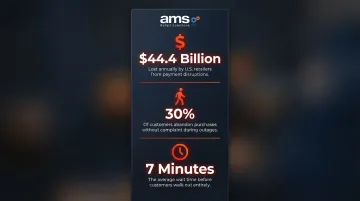
Every transaction lost during a POS outage is permanent lost revenue. Research shows that 30% of customers will abandon a purchase without complaint when they can't pay, and few return specifically to complete that transaction. Payment disruptions cost U.S. retailers an estimated $44.4 billion annually.
For seasonal businesses, the impact compounds: when a few peak weeks represent the majority of annual revenue, even a brief outage has outsized financial consequences. The average outage lasts two hours, but customers will abandon after waiting just seven minutes.
Offline mode also prevents reputational damage—a business that can't complete a sale appears unreliable, especially to first-time customers who have no loyalty buffer.
KPIs impacted:
- Revenue per trading day
- Transaction completion rate
- Peak-period sales volume
- Customer conversion rate at checkout
When this advantage matters most:
- Spring planting season, holiday weekends, harvest events
- Rural store locations with documented broadband gaps
- Regional weather events or ISP outages affecting multiple businesses
Inventory and Data Accuracy Are Preserved
Full-featured POS offline mode keeps more than the payment terminal running: it maintains the entire transaction record locally. Inventory levels, sales data, and customer purchase history continue updating accurately and sync automatically when connectivity returns.
This differs sharply from payment-only workarounds (manual card imprinters, cash-only fallbacks) that break the data chain entirely, creating reconciliation headaches, inventory discrepancies, and reporting gaps.
The data problem:
If your POS isn't tracking what's sold offline, stock counts become unreliable — leading to over-ordering, stockouts, and missed reorder triggers. Inventory inaccuracy costs retailers globally $1.73 trillion annually through out-of-stocks and overstocks.
Manual workarounds introduce human error at every step. For a business processing 200 transactions during an outage, even a modest error rate means a dozen entries requiring manual correction — if they're caught at all.
Data continuity also means end-of-day reports and financial records stay clean—no guessing what sold during the outage window, no reconciliation delays.
KPIs impacted:
- Inventory shrink rate
- Stock accuracy percentage
- End-of-day reconciliation time
- Data entry error rate
- Reorder accuracy
When this advantage matters most:
- High-SKU environments (nurseries, feed stores, pet supply) where inventory tracking is complex
- Multi-day events or outdoor markets with inconsistent connectivity throughout operations
Customer Experience Stays Seamless at Peak Moments
For specialty retailers, checkout experience during busy periods directly reflects your brand. Long lines, confused staff, or a failed payment terminal during peak rush creates negative impressions that erode customer loyalty.
POS offline mode removes "connectivity anxiety" from checkout. Staff continue processing customers at normal speed, with the same pricing, discounts, and loyalty rules applying — without explaining system issues or asking customers to wait.
What this looks like in practice:
- A nursery cashier rings up a $300 Saturday order without pausing to troubleshoot the internet router
- A farm market booth processes card payments in the field, with no cellular dead-zone workaround needed
- A sporting goods store completes a layaway transaction mid-outage, loyalty points and all
What customers actually experience:
Checkout experience directly influences repeat visits and loyalty. According to PwC, 32% of customers will stop doing business with a brand after just one bad experience. The National Retail Federation identifies long checkout lines as a "conversion killer," causing immediate purchase abandonment and reluctance to return.
For specialty retailers whose competitive advantage is personalized service — a key differentiator versus big-box stores — being unable to complete a transaction undermines that positioning immediately. Research shows that 80% of consumers avoid stores with long lines, and 58% will abandon a queue after waiting just five minutes.
KPIs impacted:
- Customer satisfaction scores
- Repeat visit rate
- Checkout wait time
- Loyalty program participation rate
When this advantage matters most:
- High-footfall events (plant sales, market days, seasonal promotions)
- Multiple customers in line simultaneously, where any delay compounds quickly
What Happens When POS Offline Mode Is Missing or Ignored
Operating without offline capability creates immediate and compounding consequences:
Immediate impacts:
- Lost transactions — Customers leave without purchasing, and that revenue is permanently forfeited
- Inventory records fall out of sync — Manual counts and estimates introduce errors into stock management and reordering
- Staff resort to reactive workarounds — Cash-only operations, handwritten logs, and manual card imprints slow checkout, frustrate customers, and create end-of-day reconciliation headaches
Compounding long-term impacts:
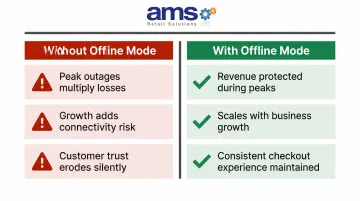
- Peak timing amplifies damage — For seasonal businesses, outages during high-traffic windows (when systems are most stressed) multiply every consequence listed above
- Growth introduces more risk — Adding locations, expanding transaction volume, or moving into outdoor and mobile selling increases connectivity exposure that an offline-incapable system can't handle
- Customer trust erodes quietly — Repeated checkout failures during busy periods stick in customers' minds and push them toward competitors who don't have the same problem
These aren't edge cases. According to Retail Dive, 30% of retailers reported checkout errors, slowdowns, or crashes during Black Friday operations — and high-profile names like J. Crew and Lowe's have faced system failures at exactly the moments they could least afford them.
How to Get the Most Value from POS Offline Mode
Offline mode delivers maximum value when it's properly configured and maintained as part of normal operations—not treated as an emergency-only toggle.
Choose a Full-System Offline Solution
Select a POS platform with true full-system offline capability—not just payment acceptance—so inventory, receipts, discounts, and customer data all continue functioning locally. For specialty retailers, NCR Voyix Counterpoint (available through AMS Retail Solutions) is built for the operational complexity of businesses like garden centers, farm markets, and pet supply stores.
Train Staff on Offline Mode Recognition
Train all staff to recognize when the system has switched to offline mode and understand that transactions are being captured locally. This removes uncertainty and prevents staff from abandoning the POS during an outage.
Establish Sync-and-Review Protocols
Once connectivity is restored:
- Confirm all offline transactions have synced correctly
- Review the reconciliation report for discrepancies
- Flag any issues before end of day
- Verify inventory adjustments have updated in the central system
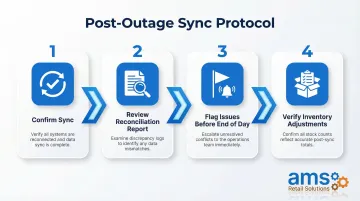
Regular review ensures data integrity and catches sync errors before they compound.
Conclusion
For specialty retailers where internet reliability varies and seasonal peaks concentrate revenue into narrow windows, POS offline mode is a foundational business continuity requirement — not an optional add-on.
Beyond protecting individual transactions, offline mode preserves inventory accuracy, maintains customer experience quality, and ensures data integrity across your entire operation — all of which support sustainable growth and consistent margins.
Evaluate your current POS system's offline capabilities now, before the next outage hits on your busiest day of the year. Contact AMS Retail Solutions at 757.495.4995 to discuss how NCR Voyix Counterpoint's offline mode can protect your business.
Frequently Asked Questions
Can a POS system work without internet?
Yes, POS systems with offline mode capability can process transactions, track inventory, and record data locally without an internet connection, then sync automatically when connectivity returns. However, not all POS systems include this capability—verify before purchase.
What is an offline POS transaction?
An offline POS transaction is a sale recorded and stored locally on the POS device when no internet connection is available. It syncs to the central system automatically once connectivity is restored.
How does an offline transaction work?
The POS detects loss of connectivity and switches to local data storage mode. It captures and encrypts transaction details on-device, then initiates an automatic batch sync when internet access returns, preserving all sales, inventory, and customer data.
What is the difference between online POS and offline POS?
Online POS requires continuous internet connection to process transactions in real time, while offline POS stores data locally and syncs later. Offline-capable systems are more resilient for businesses in areas with unreliable connectivity.
What are the different types of POS systems?
The three main categories are:
- Cloud-based POS — requires a constant internet connection
- On-premise/legacy POS — runs entirely on local hardware
- Hybrid POS — cloud-based with offline mode capability
Hybrid systems offer the most flexibility for specialty retailers who need both real-time reporting and offline resilience.