Introduction
According to the National Gardening Association's 2025 survey, 84% of U.S. households (122.3 million) participated in lawn and garden activities in 2024, spending a combined $52.3 billion on lawn and garden products. Before stepping into a store, most of those buyers researched plants, compared prices, and read care instructions online first.
The numbers back it up: the Garden Centre Association reported that online sales in the horticulture sector surged by 30% in 2023. For garden centers still operating without an online channel, that's not a trend to watch — it's revenue leaving through the door.
Yet connecting a garden center POS to an eCommerce platform isn't a guarantee of success. The results vary wildly depending on inventory structure, platform choice, and sync configuration. Poorly executed integrations create overselling, pricing mismatches, and frustrated customers who never return.
This guide covers the exact steps to get your POS and online store working together, what you need in place first, the variables that most affect success, and the critical mistakes to avoid.
Key Takeaways
- Selling plants online requires a POS built for eCommerce integration, not a generic retail tool
- Clean inventory data is the foundation; your online store inherits every problem your in-store data has
- Choose an eCommerce platform offering real-time, two-way sync with your POS to prevent costly oversells
- Plant-specific listings (photos, care details, variants) and flexible fulfillment (pickup, delivery, shipping) drive online conversions
- Integration success depends on configuration, testing, and ongoing monitoring — not just software selection
How to Sell Plants Online: Connecting Your Garden Center POS to eCommerce
Step 1: Audit Your POS System for eCommerce Readiness
"eCommerce-ready" means your garden center POS must support API connections or native integrations with platforms like Shopify or WooCommerce, handle product variants (size, container type, species), and export inventory in real time. Not all POS systems have this capability out of the box. Garden Center magazine's 2020 State of the Industry Report found that only 20% of independent garden centers had eCommerce before the pandemic. By fall 2020, adoption jumped to 45%, where it has remained flat.
Run these specific checks:
- Built-in connector or middleware? — Confirm whether your POS connects natively to your eCommerce platform or requires third-party middleware. For example, NCR Voyix Counterpoint — the software powering AMS Retail Solutions — integrates with Shopify via the POS Highway SyncApp middleware, syncing bi-directionally every 3 to 5 minutes. Lightspeed Retail offers a native Shopify integration requiring no coding.
- Check item record fields — Confirm your POS item records include fields needed for online listings: product name, description, price, category, stock count, and image support.
- Confirm sync direction — Verify whether your POS supports two-way sync (in-store sales reduce online inventory and vice versa) or only one-directional data pushes. One-way sync is a recipe for overselling.
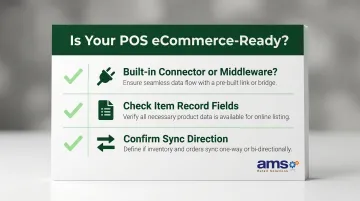
Garden centers using specialty retail POS systems designed for complex inventory structures — like the ones deployed by AMS Retail Solutions — benefit from built-in eCommerce integration support tailored to nurseries and garden centers.
Step 2: Clean and Organize Your Inventory Data
Duplicate SKUs, vague item names like "plant 4in," inconsistent pricing, and missing categories will publish directly to your online store and confuse customers or cause order errors. According to research cited by Envive, poor data quality can drain 15% to 25% of revenue. Salsify's 2025 Consumer Research found that 71% of consumers have returned a product because the actual item did not match the online description.
What to fix:
- Use full, specific product names — Include common and botanical names where applicable. "Rosemary (Rosmarinus officinalis) 1-gallon" tells customers exactly what they're buying; "Plant 1gal" does not.
- Assign clear categories — Organize products into annuals, perennials, shrubs, hard goods, and accessories. Categories enable customers to filter and find products quickly.
- Verify pricing and tax rules — Ensure every item has accurate pricing and correct tax classifications before syncing.
- Remove discontinued items — Delete or hide seasonal or sold-out items that won't be available online.
Garden Center magazine reports that a major industry hurdle is the lack of good barcode data across inventory, especially generic barcodes used by vendors for perennials. Mahoney's Garden Centers invested in specialized labeling equipment to barcode all annuals by variety, ensuring reliable inventory for online sales.
For garden centers with thousands of SKUs, clean up in phases — start with top-selling or year-round items and expand from there.
Step 3: Choose a Compatible eCommerce Platform
Your platform choice comes down to four factors: compatibility with your existing POS, how well it handles plant-specific product pages, mobile responsiveness, and support for fulfillment options like curbside pickup and local delivery.
Common options for garden centers:
| Platform | Strengths | Considerations |
|---|---|---|
| Shopify | Broad integration ecosystem, ease of use, 30% U.S. market share | Requires third-party connectors for most specialty POS systems |
| WooCommerce | Flexibility, ideal if you already have WordPress, free core platform | More technical setup; customization requires developer knowledge |
| Ship My Plants | Garden-industry-specific multi-vendor marketplace, lower commission fees than Amazon | Less control over branding; marketplace model vs. owned website |
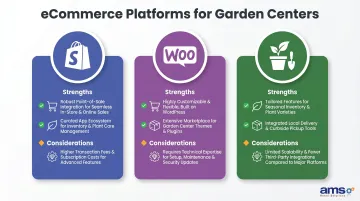
Garden Center magazine identifies POS integration as the "top consideration" for independent garden centers choosing an eCommerce platform. That prioritization makes sense given the numbers: for some Top 100 garden centers, eCommerce represents less than 0.5% of total sales overall — yet specific categories sold online can reach 10% to 15% of that category's total volume.
Step 4: Configure the Real-Time Inventory Sync
A two-way sync works like this: when a plant sells in-store, the online stock count drops automatically. When an online order comes in, the POS records it and reduces available inventory on both channels, preventing oversells before they happen.
Configure these elements during setup:
- Map POS fields to eCommerce fields — Product name, SKU, price, stock count, and category must correspond correctly across both systems.
- Set inventory buffers — Hold back a small stock quantity (e.g., 2-3 units) to avoid online oversells during busy in-store periods.
- Define variant mapping — A 1-gallon vs. 3-gallon rosemary should be separate listings with separate stock counts, not bundled under one item.
- Enable automatic price updates — Sync price changes instantly to avoid selling online at outdated prices.
A study by Nventory tracking 50,000 multichannel orders found that 34% of all cancellations were caused by inventory discrepancy (overselling), the #1 cancellation reason, at an average cost of $67 per incident. The same study found that sellers using real-time sync had 72% fewer cancellations than those relying on batch synchronization.
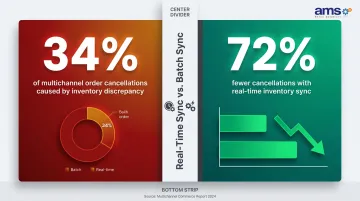
Test thoroughly before going live: Simulate an in-store purchase and an online order and verify that inventory adjusts correctly on both sides. Catching a sync misconfiguration in testing costs nothing; catching it after your first weekend of online orders costs customers.
Step 5: Build Out Product Listings and Fulfillment Options
Customers cannot touch or inspect the plant online, so they rely on clear photos (multiple angles, size reference), care instructions, hardiness zone information, and honest descriptions of what the plant looks like at the time of shipping or pickup.
What makes a plant listing effective:
- Multiple photos with a size reference — Salsify's 2024 Consumer Research found that 76% of shoppers say high-quality product images are important in their purchase decision. Shoot from multiple angles and include something for scale.
- Care instructions — Provide sunlight, water, and hardiness zone details.
- Size and container type — Specify pot size (1-gallon, 3-gallon, etc.) and mature plant dimensions.
- Honest descriptions — Describe what the plant looks like now, not just at maturity.
Fulfillment options to configure:
- In-store or curbside pickup — Route the order through the POS for staff to pull and stage. Forrester reported that one-third of U.S. online adults used BOPIS (buy online, pick up in-store); just over one in five used curbside pickup.
- Local delivery — Set delivery radius, fees, and scheduling through the POS or fulfillment module.
- Shipping for non-perishables — Seeds, tools, and garden accessories ship easily. Live plants require careful handling and often limit shipping viability. UPS classifies packages containing live plants as perishable commodities accepted at the shipper's risk, with no liability for damage.
With POS and eCommerce connected, staff fulfill online orders from the same interface they use at the register — no separate systems to reconcile, no duplicate data entry.
What You Need Before Connecting Your Garden Center POS to eCommerce
Preparation directly determines how smooth or chaotic the integration will be. Most failed or frustrating integrations trace back to skipping these prerequisites.
POS System Requirements
Your POS must support eCommerce connectivity through native integrations or certified middleware. Confirm this capability before selecting a platform — not after.
Garden centers running specialty retail POS software like NCR Voyix Counterpoint benefit from built-in eCommerce integration support designed for the complex inventory structures nurseries deal with daily. If you're unsure whether your current system qualifies, AMS Retail Solutions (757.495.4995) can walk you through your options.
Inventory and Data Readiness
You need a reasonably clean item database with consistent naming, pricing, and categorization. The minimum viable standard: a customer seeing your item name online should know exactly what they're buying. If your database has vague names, duplicate SKUs, or missing categories, fix those before syncing — not during.
With your data in order, the next question is whether your team can actually fulfill what customers order.
Fulfillment Capacity
Before accepting online orders, confirm you have the staff workflow and physical space to stage curbside pickups or handle local deliveries. An eCommerce channel that creates fulfillment chaos in-store will damage the customer experience faster than having no online presence at all. Multiple garden center operators report that managing an eCommerce website is a "full-time job" — one that needs a dedicated leadership role, not an add-on to someone's existing workload.
Key Factors That Affect Your POS-eCommerce Integration Success
Two garden centers can use the same POS and the same eCommerce platform but get very different results. The difference almost always comes down to four variables: inventory sync, product data, platform compatibility, and fulfillment configuration.
Inventory Sync Frequency and Reliability
During peak spring season, popular plants can turn over within hours. If your sync runs every few hours instead of in real time, your online store will show items as available that are already sold out — leading to cancelled orders and disappointed customers.
During peak spring season, popular plants can turn over within hours. If your sync runs every few hours instead of in real time, your online store will show items as available that are already sold out — leading to cancelled orders and disappointed customers.
Real-time sync prevents overselling, reduces your customer service burden, and builds trust in your online channel. Without it, your online store becomes a liability rather than an asset.
Product Data Quality
Customers shopping for plants online decide entirely based on what your listing tells them. Poor photos, generic descriptions, and missing details like pot size or mature height drive abandoned carts and complaints. Salsify's 2024 research found that 45% of shoppers have returned items because the product content was misleading or low quality.
Strong listings do more than prevent returns. Product pages that include:
- Clear photos showing actual size and condition
- Care guides specific to your climate or region
- Related item suggestions (pots, soil, fertilizer)

...consistently increase both conversion rates and average order value.
Platform Compatibility and Middleware
Not all POS-to-eCommerce connections are equal. A native integration built and maintained by your POS vendor is more reliable and easier to maintain than a third-party connector with its own update cycle. For example, Lightspeed Retail offers a native Shopify integration requiring no coding, while NCR Voyix Counterpoint connects to Shopify via the POS Highway SyncApp middleware.
Middleware that falls out of sync after a POS update can cause pricing errors, duplicate listings, or broken order imports. Before committing to any connector, verify the maintenance schedule and confirm who handles support when something breaks.
Fulfillment Configuration
If your online store promises same-day curbside pickup but your POS doesn't automatically notify staff of new online orders, orders get missed. That single failure point often determines whether a first-time customer comes back.
When POS and eCommerce share order management, the improvement is immediate:
- Staff see in-store and online orders in one queue
- Fulfillment errors drop because nothing falls through the cracks
- Customers get a consistent pickup experience regardless of how they ordered
Common Mistakes Garden Centers Make When Selling Plants Online
Launching before cleaning up inventory data — Going live with a messy item database means your online store inherits every inconsistency. Customers see duplicate listings, confusing names, and wrong prices — problems that erode trust before a single sale is made.
Using a POS and eCommerce platform without verifying integration compatibility first — Some garden centers choose a popular platform like Shopify and only later discover their POS requires expensive custom middleware or doesn't support two-way sync. Always confirm integration compatibility before committing to a platform.
Shipping live plants without addressing logistics — Live plants require specific packaging, climate considerations, and fast transit. USDA APHIS regulates the interstate movement of plants, with quarantine zones for specific pests restricting certain shipments across state lines. Skipping this step leads to damaged-plant complaints and chargebacks. Limit shipping to non-perishables or partner with a specialty live-goods provider before offering nationwide delivery.
Treating the online store as "set it and forget it" — Seasonal changes, new arrivals, and sold-out items require active management. A product page showing a plant that's been out of stock for two months signals neglect and hurts search visibility.
The numbers back this up: for some Top 100 independent garden centers, eCommerce accounts for less than 0.5% of total sales. Tom Mahoney of Mahoney's Garden Centers describes the standalone ROI as "terrible" — success requires ongoing effort, not passive income.
Conclusion
Connecting a garden center POS to eCommerce extends your reach, captures demand from online shoppers, and lets in-store and online inventory run as one unified system rather than two siloed channels.
Success depends on doing the groundwork: a POS built for integration, clean inventory data, a compatible platform, and a tested sync configuration are non-negotiable. Skip these steps and you're looking at overselling, inventory mismatches, and manual reconciliation eating up time you don't have.
Once the integration is running, the data it generates becomes genuinely useful: which plants sell fastest online, when demand spikes, which listings convert best. That intelligence feeds smarter buying, merchandising, and marketing decisions year-round.
If you're ready to take that step, contact AMS Retail Solutions at 757.495.4995 to explore eCommerce integration for your garden center POS.
Frequently Asked Questions
Can a POS sale be online?
Yes, modern POS systems support online sales by connecting to eCommerce platforms and processing online orders through the same system used in-store, keeping inventory and reporting unified across both channels.
What POS systems integrate with Shopify?
Common options include NCR Voyix Counterpoint (via POS Highway SyncApp middleware), Lightspeed Retail (native integration), and Heartland Retail (via Mortar connector). Integration depth — real-time sync, two-way inventory updates — varies by system, so verify specifics before committing.
What's the best POS system for small e-commerce stores?
The best POS for a small garden center or nursery selling online is one built specifically for specialty retail with native eCommerce connectivity, not a general-purpose retail tool. The right fit depends on your inventory complexity, platform preference, and support needs.
Where is the best place to sell plants online?
Your own website (Shopify or WooCommerce) gives you full control and better margins. Marketplaces like Etsy offer reach but higher fees. Local delivery-focused listings on Google or Facebook are often the highest-converting channel for neighborhood garden centers.
How does real-time inventory sync work between a garden center POS and an online store?
When a sale occurs in either channel, the sync automatically adjusts available stock across both — in-store purchases reduce online inventory and online orders reflect in the POS, preventing overselling and eliminating the need for manual stock updates.
What are the biggest challenges of selling live plants online?
The main challenges are perishability (live plants need special packaging and fast transit), communicating plant quality through photos alone, and seasonal inventory swings that require active listing management. Without real-time sync, it's easy to sell plants that are already sold out or no longer available.