Introduction
Picture a garden center mid-spring rush: dozens of transactions happening simultaneously, staff pulling inventory from multiple greenhouse locations, and the owner checking sales figures from a phone offsite. Whether any of that works smoothly depends heavily on one foundational choice — the POS architecture running underneath it all.
For garden centers managing seasonal plant inventory, farm markets processing transactions outdoors, and pet supply stores tracking perishable goods with lot numbers, the right POS system determines how well daily operations hold together.
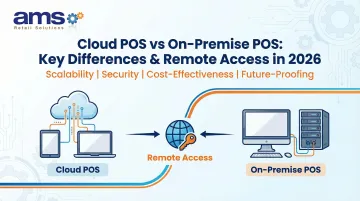
The core choice is between two distinct architectures: cloud POS systems that store data remotely and require internet connectivity, versus on-premise POS systems that host software and data locally on servers within your store. That difference ripples through upfront costs, IT overhead, and remote access to business data.
For specialty retailers in rural areas, outdoor environments, or locations with spotty connectivity, what happens when the internet goes down isn't a hypothetical — it's a real operational risk that should drive this decision.
Key Takeaways
- Cloud POS stores data on remote servers; on-premise POS runs on local servers with no internet dependency
- Cloud systems offer lower startup costs, automatic updates, and remote access from any device
- On-premise delivers greater data control and offline reliability, but requires higher upfront investment
- Cloud POS lets you monitor sales and inventory from any location; on-premise access is typically tied to a single site
- Specialty retailers with multiple locations or unreliable internet should weigh connectivity, budget model, and control needs before choosing
Cloud POS vs On-Premise POS: Quick Comparison
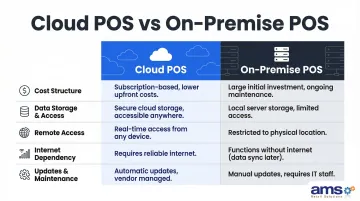
| Factor | Cloud POS | On-Premise POS |
|---|---|---|
| Cost Structure | Monthly/annual subscription; low upfront hardware cost | High upfront spend on servers, licenses, and hardware; ongoing maintenance fees |
| Data Storage & Access | Remote servers; accessible from any internet-connected device | Local servers; on-site terminals only (VPN required for remote access) |
| Remote Access | Real-time reporting from any smartphone, tablet, or laptop | Restricted to in-store terminals by default; IT setup needed for remote access |
| Internet Dependency | Requires reliable internet; some offer limited offline modes | Operates independently of internet connectivity |
| Updates & Maintenance | Automatic updates; no merchant action required | Manual updates; typically requires IT support |
What is a Cloud POS System?
A cloud POS is a Software-as-a-Service (SaaS) point-of-sale system where the application runs in the cloud and data is stored on remote servers managed by the vendor. Retailers access the system via web browser or dedicated app on tablets, desktops, or mobile devices. Unlike traditional systems, cloud POS doesn't require dedicated proprietary hardware or on-site servers—just an internet connection and compatible terminals.
For specialty retailers, cloud POS delivers three core operational benefits:
- Updates automatically in the background, with no IT intervention or downtime required
- Syncs inventory in real time across all locations—useful for managing seasonal stock at garden centers or coordinating transfers between pet supply stores
- Gives owners remote access to sales reports and daily performance metrics, whether they're running a seasonal pop-up or overseeing multiple sites
The key limitation is consistent internet connectivity. Cloud POS systems require a stable connection to function fully. In areas with unreliable internet—such as rural farm markets, outdoor garden centers, or locations in broadband gaps—this dependency creates genuine operational risk. According to USDA data, 22.3% of Americans in rural areas lack access to fixed terrestrial broadband at 25/3 Mbps speeds, making cloud-only systems a risky choice for these locations.
Best Fit Use Cases for Cloud POS
Cloud POS excels in specific scenarios:
- Small-to-mid-size specialty retailers opening their first store with limited capital for IT infrastructure
- Multi-location operators who need centralized reporting and real-time visibility across all stores from a single dashboard
- Retailers in urban areas with reliable high-speed internet where connectivity outages are rare
- Businesses requiring rapid expansion, since adding a new location typically requires only downloading the app and adding a license
What is an On-Premise POS System?
An on-premise POS—also called legacy or traditional POS—is a system where software is installed on local servers or computers within your business premises. All transaction data, inventory records, and customer information are stored on-site, and the system operates on a closed internal network. This architecture makes on-premise POS completely independent of internet connectivity.
For specialty retail operations, on-premise POS delivers three core operational advantages:
- Faster transaction processing — no data roundtrip to external servers means every lookup, sale, and inventory check resolves locally
- Deep customization control — modify workflows, pricing matrices, and inventory tracking to match your exact business needs
- Full independence from internet outages — critical for high-traffic checkout during peak seasonal rushes
Those advantages come with real trade-offs, though. On-premise systems require significant upfront investment in server hardware, perpetual software licenses, and professional installation. Ongoing maintenance—security patches, updates, and troubleshooting—falls on in-house IT staff or a third-party contractor.
Remote management is also limited by default. Without additional VPN or remote desktop configuration, owners and managers can't access the system from off-site, which matters more as multi-location and mobile operations become the norm.
Best Fit Use Cases for On-Premise POS
On-premise POS is preferred in these scenarios:
- High-volume specialty retailers — feed and seed stores, garden centers, and farm markets with heavy checkout traffic during peak seasons
- Stores in low-connectivity areas where consistent internet access can't be guaranteed
- Retailers requiring deep customization for complex workflows like lot/expiry tracking, custom blend creation, or specialized pricing matrices
- Retailers prioritizing data ownership who want full control over sensitive customer and transaction records on-site
Key Differences That Matter Most for Specialty Retailers
Remote Access and Business Visibility
Cloud POS is the clear winner for remote access. Owners can log in from a phone or laptop to check real-time sales, monitor inventory levels across locations, track employee performance, and pull detailed reports from anywhere with internet access.
This capability changes how specialty retailers operate day-to-day. A garden center owner can monitor both a physical store and a seasonal pop-up location from a single dashboard; a pet supply retailer with two stores can instantly see which location needs inventory transfers.
On-premise POS, by contrast, typically restricts access to on-site terminals. Remote access is possible but requires additional setup like VPN configurations or remote desktop tools, adding complexity and cost. This limitation means owners must be physically present at the store or coordinate with on-site staff to access critical business information.
For specialty retailers specifically, this difference is decisive. Managing seasonal peaks, coordinating multi-location inventory, and responding quickly to sales trends all benefit enormously from real-time remote visibility that cloud POS provides by default.
Cost Structure: Upfront vs. Ongoing
Cloud POS operates on an operational expense (OpEx) model with low upfront costs and predictable monthly fees. Subscription pricing typically ranges from $89 to $289 per month per location for mid-tier plans, according to Lightspeed's published pricing. Initial investment is limited mainly to POS terminal hardware like tablets, card readers, and receipt printers. Over a 3-5 year period, total cost equals the sum of monthly subscriptions plus initial hardware—predictable and easier to budget.
On-premise POS requires substantial upfront capital expenditure (CapEx). Typical initial costs include:
- Perpetual software licenses
- Server hardware, networking equipment, and backup systems
- Professional installation services
Ongoing costs add annual maintenance contracts (typically 15-22% of the initial license cost), IT personnel for system management, and a hardware refresh cycle every 3-5 years that represents another major capital outlay.
Market research from Mordor Intelligence indicates that cloud POS captured approximately 56% of market revenue share in 2025, driven largely by the lower financial barriers to entry for small and mid-size retailers. However, over a 5-year period, accumulated subscription costs can match or exceed the total cost of ownership for an on-premise system—making the financial comparison more nuanced than it initially appears.
Offline Reliability: A Critical Factor in Specialty Retail
Offline operation is a differentiator that rarely gets enough attention during the buying process. Traditional on-premise POS works without internet by design—all data and processing happens locally. Most cloud POS systems will fail or operate with severely limited functionality during connectivity outages.
For outdoor farm markets, garden centers in rural areas, or feed stores in locations with unreliable broadband, this is a genuine operational risk. An internet outage doesn't just mean you can't process credit cards—it can mean you can't look up inventory, access customer records, or even complete transactions at all.
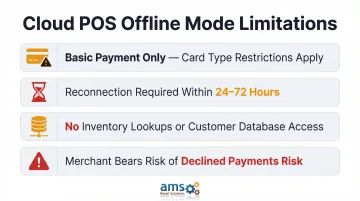
Some modern POS solutions bridge this gap with offline mode capabilities, where the system continues to process transactions locally and syncs data once connectivity is restored. However, these offline modes have significant limitations. Research into major cloud POS platforms reveals that offline modes typically:
- Support only basic payment acceptance, often with restrictions on card types
- Require reconnection within 24-72 hours to avoid declined transactions
- Don't support inventory lookups or customer database searches
- Place the risk of declined payments entirely on the merchant
For specialty retailers, a hybrid approach like NCR Voyix Counterpoint—offered through AMS Retail—provides offline POS capability that keeps transactions running even when disconnected from the network, while still delivering modern reporting and management features. This addresses the single biggest risk of cloud-only systems for specialty retail environments.
Security and Data Control
The security trade-off centers on responsibility. On-premise POS keeps sensitive data entirely within your business's physical infrastructure, giving you full control, but also full responsibility for security, backups, and breach prevention.
That means implementing and maintaining all PCI DSS controls yourself: network security, server hardening, patching, and physical access controls.
Cloud POS offloads security responsibility to the provider through a shared responsibility model defined by the PCI Security Standards Council. The vendor secures the infrastructure and maintains compliance certifications, typically investing in encryption, monitoring, and security standards that individual businesses cannot match. However, data lives on third-party servers, and merchants remain responsible for local components like terminals, user access management, and network security.
Most major cloud POS providers maintain PCI DSS Level 1 compliance, SOC 2 Type 2 certification, and ISO 27001 standards—higher and more current security certifications than most individual specialty retailers can manage on their own. The practical security advantage often favors cloud systems for smaller retailers lacking dedicated IT security expertise.
Scalability for Growing Retail Businesses
Cloud POS makes scaling straightforward. Adding a new store location or terminal typically requires only adding a license and downloading the app—deployment can happen in days or weeks. A Shopify case study shows retailer EVEREVE brought 103 stores live within six weeks using cloud POS.
On-premise scaling requires purchasing and configuring additional hardware and potentially upgrading server capacity at each new location—more expensive and time-intensive. For a nursery expanding from one location to three, or a pet supply retailer adding an e-commerce channel, cloud POS offers faster and more predictable expansion timelines.
Which POS System Should Specialty Retailers Choose?
The right POS system depends on four key factors: internet reliability at your location, your budget model (upfront vs. subscription), the level of remote visibility you need, and how much customization your operations require.
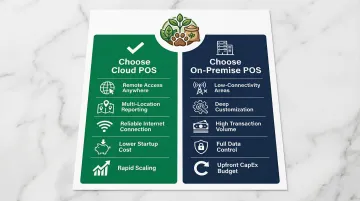
Choose cloud POS if you:
- Need remote access to monitor sales, inventory, and performance from anywhere
- Operate multiple locations requiring centralized reporting
- Have reliable high-speed internet at all store locations
- Prefer lower startup costs with predictable monthly fees
- Plan to scale rapidly and add locations quickly
Choose on-premise POS if you:
- Operate in areas with unreliable or limited internet connectivity
- Need deep customization for complex inventory tracking or specialized workflows
- Handle high transaction volumes requiring fast local processing
- Want full control over your data and system configuration
- Have the capital budget for upfront investment and ongoing IT maintenance
A hybrid approach is worth considering if you fall somewhere in between. Solutions like NCR Voyix Counterpoint maintain offline POS capability so transactions keep processing during connectivity outages—while still delivering the centralized reporting and management tools most specialty retailers require. For operations in rural or seasonally unpredictable environments, this is often the most practical choice.
Before committing, consult with a retail POS specialist to evaluate which setup matches your operational realities—particularly if your business deals with seasonal peaks, multiple locations, or complex inventory needs. AMS Retail configures NCR Voyix Counterpoint specifically for specialty retail environments including garden centers, farm markets, feed and seed stores, pet supply shops, and outdoor sporting goods operations. Contact AMS Retail at 757.495.4995 to discuss your specific requirements.
Conclusion
Neither system is inherently better. Cloud POS wins on accessibility, scalability, and lower barriers to entry. On-premise POS wins on control, customization, and offline reliability. The deciding factor for most specialty retailers will be whether remote access and flexibility outweigh the need for internet-independent operations.
Bring that choice back to concrete retail outcomes:
- Checkout speed during peak season rushes
- Inventory visibility across multiple locations
- Accurate reporting that supports cash flow management
- The ability to monitor and manage operations remotely
For specialty retailers managing complex inventory, seasonal demand, and potentially unreliable connectivity, no industry trend makes that decision for you. Evaluate your specific operational context — then choose the system built to support it.
Frequently Asked Questions
Is on-premise cheaper than cloud?
On-premise typically has higher upfront costs for hardware and perpetual licenses but lower recurring fees. Cloud POS has minimal startup costs but ongoing subscription fees that accumulate over time. Factor in hardware refresh cycles every 3-5 years when comparing total cost of ownership.
When to use cloud vs on-premise?
Use cloud POS when you need remote access, plan to scale across locations, have reliable internet, and prefer a subscription model. Use on-premise when operating in low-connectivity areas, requiring deep customization, prioritizing data control, or needing guaranteed offline reliability for business continuity.
What is the difference between cloud POS and traditional POS?
Cloud POS stores data on remote servers accessible from any internet-connected device and updates automatically. Traditional on-premise POS stores data locally on in-store servers, runs on a closed network, and requires manual maintenance and updates.
Can a cloud POS system work without internet?
Most cloud POS systems require internet to function fully. Some offer a limited offline mode that stores transactions locally and syncs when connectivity returns, but restrictions on inventory lookups and payment types are common. Retailers in low-connectivity areas should confirm offline capabilities before committing to a cloud system.
Which POS system is better for multi-location specialty retail?
Cloud POS is generally better for multi-location operations because it centralizes data management, enabling owners to view sales, inventory, and performance across all locations in real time from a single dashboard. This eliminates the complexity of managing separate systems at each location.
What are the hidden costs of on-premise POS systems?
Beyond upfront hardware and licensing fees, on-premise systems carry several ongoing costs:
- Annual support and maintenance contracts
- IT personnel for system management and troubleshooting
- Hardware refresh cycles every 3-5 years
- Power and cooling for in-store servers
- Maintenance of custom integrations during upgrades