Introduction
Specialty retailers—garden centers, pet supply shops, farm markets—store critical business data in their POS systems every hour they're open. Transaction records, inventory levels, customer loyalty profiles, vendor pricing, and purchase order history all accumulate continuously. A single system failure, ransomware attack, or accidental deletion can wipe all of it.
The stakes are measurably high: small-to-mid-sized businesses face downtime costs between $2,000 and $10,000 per hour, according to Datto's 2023 survey. For a busy garden center during spring planting season or a pet supply store on a Saturday afternoon, that's not just revenue lost—it's customer trust damaged, inventory counts corrupted, and compliance records gone.
This guide breaks down the backup and recovery options built for specialty retail operations: what backup types actually protect POS data, what recovery time targets to set, and which evaluation criteria matter most when choosing a solution.
Key Takeaways
- POS data—transactions, inventory, customer records—is irreplaceable, making automated backup non-negotiable
- The 3-2-1 backup rule (3 copies, 2 media types, 1 off-site) is the industry baseline for data protection
- Cloud-based solutions deliver reliable automated protection for small-to-mid specialty retailers
- Evaluate Acronis Cyber Protect, Backblaze Business Backup, iDrive Business, MSP360, and Carbonite Safe as top contenders
- Prioritize automated scheduling, encryption, fast recovery time, and POS software compatibility
Why POS Data Backup Is Critical for Specialty Retailers
Your POS system holds far more than sales receipts. Transaction logs, end-of-day reports, customer loyalty data, inventory records, purchase order history, and vendor pricing all live inside it. When that data disappears, so does your ability to operate — revenue stops, inventory goes out of sync, and customer trust takes a hit.
The risk landscape for retail environments is specific and severe:
- Hardware failure from aging terminals or hard drive crashes
- Ransomware targeting small businesses, with cyberattacks now the #1 cause of business outages according to Veeam's 2024 Data Protection Trends Report
- Power surges that corrupt databases, especially relevant for outdoor and seasonal retailers like nurseries
- Natural disasters such as floods, fires, or storms that destroy on-site equipment
- Human error including accidental data deletion or misconfigured software updates
Industry data from Datto estimates the average cost of downtime for small-to-mid-sized businesses at $2,000 to $10,000 per hour. For a specialty retailer processing 50–100 transactions per hour during peak season, that's catastrophic.
Types of POS Data Backup Methods
Backup Types
Four primary backup types apply to POS environments:
- Full Backup: Complete snapshot of all data. Provides the fastest recovery but consumes the most storage and takes the longest to create.
- Incremental Backup: Captures only changes since the last backup — the fastest and most storage-efficient option for daily transaction volumes. Recovery requires restoring the last full backup plus every subsequent incremental file.
- Differential Backup: Captures changes since the last full backup, balancing speed and completeness. Recovery needs only the last full backup and the most recent differential file.
- Continuous Data Protection (CDP): Real-time data replication with near-zero data loss (measured in seconds). Ideal for high-transaction retail environments where even a few minutes of lost data is costly.
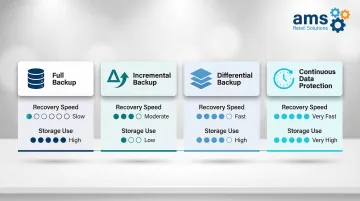
For specialty retail's daily transaction volumes, incremental backups combined with periodic full backups are most common. CDP is increasingly used for mission-critical systems where downtime cost is high.
Deployment Models
Once you know what to back up, the next decision is where to store it. Retailers choose from three approaches:
Local/On-Site Backup — stored on an external hard drive or NAS device at the location:
- Fastest recovery time for everyday issues
- Vulnerable to the same physical events that damage the store (fire, flood, theft)
- Best used as one layer in a multi-layered strategy
Cloud Backup — off-site, automated, accessible from anywhere:
- Ideal for retailers without dedicated IT staff
- Protected from local disasters
- Recovery speed depends on available internet bandwidth
Hybrid Backup — combines local and cloud storage:
- Fast local recovery for common problems, cloud recovery for catastrophic events
- The most complete approach and the foundation of the 3-2-1 rule (keep 3 copies of data, on 2 different media, with 1 stored off-site)
- Recommended for any retailer where downtime directly impacts revenue
Offline Capability Note: Some modern POS platforms include offline operation as an availability layer. NCR Voyix Counterpoint, for example, allows transactions to continue processing even when internet or server connection is lost, reducing the window in which data can go unrecorded.
Best POS Data Backup & Recovery Solutions
These solutions were evaluated based on ease of setup for non-IT retail environments, automated backup scheduling, encryption standards, recovery speed, pricing transparency, and compatibility with retail POS platforms.
Acronis Cyber Protect
Acronis Cyber Protect is a comprehensive data protection platform combining backup, cybersecurity, and endpoint management in a single solution. It's one of the more complete options for retailers who want backup and ransomware protection in one place.
Key advantages for POS environments:
- Anti-ransomware AI monitors for suspicious activity in real time
- Full system image backups restore the entire POS machine, not just individual files
- Forensic backup capability supports compliance; HIPAA and GDPR certified
| Category | Details |
|---|---|
| Key Features | Full system image backup, active ransomware protection, bare-metal recovery, cross-platform support, centralized management dashboard, Continuous Data Protection (CDP) for near-zero RPO |
| Pricing Model | Starting at $85/year per device; pricing varies by region and workload type; includes pooled cloud storage (3 TB per server, 2 TB per VM, 300 GB per workstation); 30-day free trial with 1 TB cloud storage |
| Best For | Multi-location specialty retailers or any store handling high transaction volumes where ransomware risk and recovery speed are top priorities |
Backblaze Business Backup
Backblaze Business Backup is a straightforward, affordable cloud backup service with unlimited data backup per endpoint and a simple interface. It's a strong fit for small specialty retailers who need solid protection without complexity.
What sets it apart:
- Unlimited backup per device at a flat rate keeps budgeting predictable
- Group management makes it easy to oversee multiple checkout terminals at once
- Three restore options (cloud download, USB drive, or physical hard drive shipment) add flexibility
- GDPR and HIPAA compliant with two-factor authentication included
| Category | Details |
|---|---|
| Key Features | Unlimited endpoint backup, group management, multiple restore methods (cloud/USB/physical drive), two-factor authentication, private encryption keys, continuous backup by default |
| Pricing Model | $99/year per computer; optional Enterprise Control feature adds $24/year per computer; 15-day free trial available |
| Best For | Small single-location retailers (pet stores, farm markets, feed & seed) looking for budget-friendly, unlimited backup with simple management |
iDrive Business
iDrive Business supports multiple device types — Windows/Mac endpoints, mobile devices, and NAS drives — all managed from a single web console. That makes it a practical choice for retailers running mixed hardware environments or expanding to new locations.
Key advantages:
- Express physical data transfer option speeds up large initial uploads when bandwidth is limited
- 24/7 customer support via live chat, email, and phone
- GDPR and HIPAA certified with a strong storage-to-cost ratio across tiers
| Category | Details |
|---|---|
| Key Features | Multi-device backup (endpoints, mobile, NAS), centralized web console, Express physical data transfer, cloud-to-cloud backup, real-time file sync, Continuous Data Protection (CDP) configurable by interval |
| Pricing Model | Team and Business plans structured by user/device count and storage capacity; significant first-year promotional discounts available; three free Express Backup requests per year included; overage charges at $0.50/GB/month |
| Best For | Growing specialty retailers with multiple device types or those expanding to additional store locations needing centralized backup management |
MSP360 Managed Backup
MSP360 (formerly CloudBerry Lab) is a highly configurable backup platform that lets businesses choose their own cloud storage target — AWS, Backblaze B2, Azure, and others. Retailers and their IT partners get direct control over where data lives and how it's managed.
Standout features:
- Bring-your-own-storage model keeps data in your preferred cloud environment
- Customizable AES-256 encryption and per-project backup schedules (hourly to near real-time)
- Free tier available for limited use; full GDPR and HIPAA compliance
| Category | Details |
|---|---|
| Key Features | Bring-your-own-storage (BYOS) model, customizable encryption (AES-256), per-project backup scheduling (hourly to daily or near real-time), free tier available, hybrid backup support |
| Pricing Model | Standalone licenses start at $29.99/year for Windows Desktop; Managed Backup service starts from $2.50/month per endpoint (calculated via online tool); storage costs separate and paid directly to chosen cloud provider; 15-day free trial |
| Best For | Specialty retailers working with a managed IT or POS service provider who need flexible, configurable backup infrastructure |
Carbonite Safe
Carbonite Safe (formerly Carbonite Professional) is a well-established business cloud backup service built around ease of setup. The valet installation option makes it one of the most accessible choices for retail owners without dedicated IT staff.
Key advantages:
- Continuous backup captures changes throughout the day — critical for active POS systems
- Scheduling flexibility supports off-hours backup windows to minimize performance impact
- HIPAA, FERPA, and GLBA encryption compliance
- Note: Storage caps at 500 GB; additional storage runs $99 per 100 GB, so factor that in for larger datasets
| Category | Details |
|---|---|
| Key Features | Continuous and scheduled backup, valet installation service, server and desktop support, HIPAA/FERPA/GLBA encryption compliance, immutable backup storage, web-based management dashboard |
| Pricing Model | Core: $287.99/year (250 GB); Power: $799.99/year (500 GB); Ultimate: $1,299.99/year (500 GB); additional storage at $99 per 100 GB; promotional pricing often available |
| Best For | Small specialty retailers who want a "set it and forget it" solution with minimal setup effort and no internal IT staff |
How to Choose the Right POS Backup Solution
The 3-2-1 Backup Rule
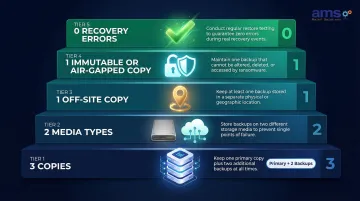
The classic 3-2-1 rule is the baseline standard for POS data protection:
- 3 copies of your data (1 primary + 2 backups)
- 2 different media types (e.g., local drive + cloud)
- 1 copy stored off-site (outside your business facility)
For a garden center running peak spring season, recovering from data loss within hours rather than days separates a manageable incident from a catastrophic one.
Modern variant: The 3-2-1-1-0 rule adds two critical layers for ransomware protection:
- +1 immutable or air-gapped copy (unchangeable backup that ransomware can't delete)
- +0 recovery errors (emphasizing regular testing to ensure backups actually restore)
Define Your Recovery Objectives
Before selecting a solution, answer two questions:
Recovery Point Objective (RPO): How much data can you afford to lose? For a busy retail store, this might be only 15 minutes of transactions. Your RPO determines backup frequency.
Recovery Time Objective (RTO): How long can you afford to be down? Can you survive 4 hours without processing sales, or do you need recovery within 30 minutes? Your RTO determines which backup technology and deployment model you need.
Common Mistakes to Avoid
The most common mistake retailers make is choosing a backup solution based solely on price without validating that it can restore POS-specific data—transaction history, inventory databases, customer files—quickly and completely.
Testing restores matters as much as running backups. Only 58% of servers met their recovery SLA during large-scale recovery tests, according to Veeam's 2024 report. A backup you've never tested is a backup you can't trust.
Key Selection Criteria
Prioritize these factors when evaluating solutions:
- Automated scheduling: Backups happen without staff remembering to run them
- Strong encryption: Protects cardholder and customer data in compliance with PCI DSS (which requires encryption both in transit and at rest for all backup locations)
- Cross-platform compatibility: Works with your retail POS software
- Vendor support quality: 24/7 availability for businesses that operate extended or weekend hours
- Immutability features: Prevents ransomware from deleting your backups
Platform Resilience as a First Line of Defense
These criteria assume you already have a platform worth protecting. AMS Retail Solutions' NCR Voyix Counterpoint software includes offline POS capability, allowing transactions to continue processing even when the network goes down, and is backed by 24/7 support so recovery concerns get addressed at any hour. Specialty retailers who start with a system designed for retail operations reduce their data exposure before a backup solution ever needs to activate.
Conclusion
Data loss is not a hypothetical risk for specialty retailers—it is a matter of when, not if. Whether the threat is hardware failure, a ransomware attack, or a staff error, having a tested, automated backup and recovery plan in place is the most cost-effective insurance a retail business can carry.
Start by evaluating your current backup status against the 3-2-1 rule and confirming your RTO/RPO tolerances. Then select a solution that matches the scale and operational reality of your store — not just the lowest sticker price. The right fit depends on your daily transaction volume, staff size, and how quickly you genuinely need to be back up and running after an incident.
Ready to shore up your backup strategy? Contact AMS Retail Solutions at 757.495.4995 to learn how NCR Voyix Counterpoint can help your specialty retail store protect its data — and keep operations running when things go wrong.
Frequently Asked Questions
What backup solutions are recommended for POS data?
The right choice depends on store size, IT resources, and how quickly you need to recover. Widely used options include Acronis Cyber Protect, Backblaze Business Backup, iDrive Business, MSP360, and Carbonite Safe. For most retail environments, automated cloud backup paired with local redundancy (the 3-2-1 approach) offers the strongest protection.
What is the 3-2-1 rule for backing up data?
Keep 3 total copies of your data, stored on 2 different media types (such as a local drive and the cloud), with 1 copy held off-site. For POS systems, that means your live database, a local backup on an external drive or NAS, and a cloud backup covering you against both hardware failures and on-site disasters.
What are the 4 types of data backup?
The four types are Full (complete copy), Incremental (changes since the last backup), Differential (changes since the last full backup), and Continuous Data Protection (real-time replication). Most POS environments rely on incremental backups combined with periodic full backups, balancing speed, storage efficiency, and recovery reliability.
How often should POS data be backed up?
At minimum, schedule daily automated backups for transaction data. Continuous or real-time backup is preferred for high-volume retail environments. Backup frequency should match the Recovery Point Objective (RPO) your business can tolerate—if you can't afford to lose more than one hour of transactions, back up at least hourly.
What happens if a POS system loses its data?
Losing POS data disrupts sales processing, wipes inventory counts, erases customer loyalty records, and can create regulatory exposure if payment data is unrecoverable. Without a tested recovery plan, downtime can cost $2,000–$10,000 per hour and, in severe cases, lead to permanent business closure.
Can a POS system keep running during an internet outage?
Some POS platforms like NCR Voyix Counterpoint include offline capability that allows continued transaction processing during internet outages. Local backup copies also serve as an availability layer, ensuring data isn't lost between cloud sync intervals. This offline functionality is critical for maintaining operations during network disruptions.